
GUI Followers Mod para Minecraft 26.3
🐺 [Cliente] Muestra en la GUI/HUD una lista de todos los seguidores domesticados que no estén sentados y que haya cerca.
 Fabric
 Forge
Forge NeoForge
 Quilt
QuiltAcerca del mod GUI Followers
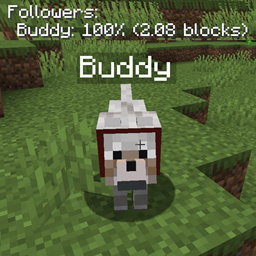
GUI Followers is a client-side mod which shows a list of all tamed non-sitting following mobs around the player. By default it also shows the health of the follower as a percentage, and how many blocks it is away from the player. Fully configurable! You'll never accidentally leave your wolf buddy behind.
Pets you don't want in the list can be hidden with a command, and will show up again once they sit down. Specific entities can also be ignored entirely via the config. The durability of a wolf's armour is shown as well, so you'll know when it needs to be repaired. The list can be moved, scaled and optionally coloured based on the follower's health.
All available config options:
showFollowerList default true If disabled, the follower list is not shown at all.
followerListHeaderFormat default "Followers:" The header text above the follower list.
showFollowerHealth default true If enabled, shows the follower's health in the GUI list.
followerHealthFormat default ": <health>%" The format of the health string in the GUI. <health> will be replaced by the percentage of total health.
showWolfArmour default true If enabled, shows the durability of a follower's armour (like wolf armour) in the GUI list.
wolfArmourFormat default " [Armour <armour>%]" The format of the armour string in the GUI. <armour> will be replaced by the percentage of durability left.
showFollowerDistance default true If enabled, shows the follower's distance in blocks to the player in the GUI list.
followerDistanceFormat default " (<distance> blocks)" The format of the distance string in the GUI. <distance> will be replaced by distance in blocks.
distanceToCheckForFollowersAround default 50, min -1, max 300 The distance in blocks around the player where the mod checks for tamed, non-sitting followers to add to the list. A value of -1 disables this feature.
timeBetweenChecksInSeconds default 2, min 0, max 3600 The time in seconds in between checking for tamed, non-sitting followers around the player.
entityTypesToIgnore default "workers:*" A comma-separated list of entity ids that are never shown in the follower list. Use '<modid>:*' to ignore every entity of a mod. By default contains the workers from the Villager Workers mod, which always follow.
followerListPositionIsLeft default true Places the follower list on the left.
followerListPositionIsCenter default false Places the follower list in the middle.
followerListPositionIsRight default false Places the follower list on the right.
followerListHeightOffset default 20, min 0, max 3000 The vertical offset (y coord) for the follower list. This determines how far down the list should be on the screen. Can be changed to prevent GUIs from overlapping.
followerListWidthOffset default 0, min -3000, max 3000 The horizontal offset (x coord) for the follower list. A positive value moves the list to the right, a negative value to the left.
followerListTextScale default 1.0, min 0.5, max 3.0 The size of the follower list text. 1.0 is the normal size.
drawTextShadow default true If the text displayed should have a shadow drawn below it.
colourFollowerByHealth default false If enabled, a follower's line changes colour based on its health, using followerHealthColours.
followerHealthColours default "75:255,255,85;50:255,170,0;25:255,85,85" A list of <health percentage>:<R>,<G>,<B> entries separated by a semicolon, with RGB values from 0 to 255. A follower at or below that health percentage is shown in that colour. Used when colourFollowerByHealth is enabled.
RGB_R default 255, min 0, max 255 The red RGB value for the text.
RGB_G default 255, min 0, max 255 The green RGB value for the text.
RGB_B default 255, min 0, max 255 The blue RGB value for the text.
/guifollowers hide - Hides the pet you're looking at from the follower list, until it sits down again. /guifollowers hide <name> - Hides all followers in the list with that name. /guifollowers unhide - Shows all hidden followers in the list again.
The wolf named buddy shown in the GUI:
The wolf buddy is currently at 85% health. I did feel a little bad about testing this.
Sitting entities will not be added to the follower list.
Long distances are supported.
And last but not least, a GIF showing the feature:
You may freely use this mod in any modpack, as long as the download remains hosted within the CurseForge or Modrinth ecosystem.
Serilum.com contains an overview and more information on all mods available.
Comments are disabled as I'm unable to keep track of them across so many separate mod pages. For issues, ideas, suggestions or anything else there is the Github repo. Thanks!
Cómo instalar GUI Followers
With Millida Launcher
Install Millida Launcher
The launcher is free: download it at millida.net/launcher and sign in with any nickname.
Click “Install” on this page
The launcher opens and installs the mod for Minecraft 1.19.3–26.3 on Fabric, Forge, NeoForge or Quilt automatically.
Launch the game
A profile with it appears in the launcher: click “Play”.
Manually
Install Fabric, Forge, NeoForge or Quilt
The loader must match the game version of the mod file, for example Minecraft 26.3. After installing it, a separate profile appears in your launcher.
Download the file for your version
In the version list above, pick the file guifollowers-26.3.0-4.4.jar (63 KB) for your game version and loader.
Put it in the mods folder
The folder is inside .minecraft (Windows: %appdata%\.minecraft\mods). If it does not exist, create it.
Launch the loader profile
Open “Mods” in the main menu: GUI Followers should be in the list.
Versiones
Con dependencias
| Minecraft | Cargador | Archivo | Fecha | Acciones |
|---|---|---|---|---|
| 26.3 | Fabric, Forge, NeoForge, Quilt | [Fabric/Forge/Neo] 26.3.0-4.4 | GUI Followers62.9 KB | ||
| 1.19.3 | Forge | guifollowers_1.19.3-2.1.jar13.9 KB |
FAQ
Which Minecraft versions does GUI Followers work on?
There are files for 26.3, 1.19.3. The newest is 26.3.
Is GUI Followers for Forge or Fabric?
There are files for Fabric: 26.3, for Forge: 1.19.3–26.3, for NeoForge: 26.3 and for Quilt: 26.3.
Does GUI Followers need other mods?
The author lists no required dependencies: the Fabric, Forge, NeoForge or Quilt loader is enough.
Where can I download GUI Followers safely?
On this page: the file guifollowers-26.3.0-4.4.jar (63 KB) is stored on Millida’s server, with no link shorteners. SHA-1 checksum: 800964956863cf773a980872f66c23b96163e28f.
Reseñas
Sé el primero en valorar GUI Followers


