

EMI Mod para Minecraft 1.20.1, 1.21.1
Un visor de objetos y recetas con muchas funciones y accesible
 NeoForge
 Forge
Forge Fabric
 Quilt
QuiltEMI
EMI es un visor de objetos y recetas completo y accesible. Aporta muchas funciones nuevas y optimiza la experiencia del usuario. Fuera de la API estándar de Fabric/Quilt, EMI no requiere dependencias y se puede lanzar con el juego de forma sencilla y fácil.
Compatibilidad con JEI en tiempo de ejecución
Para la compatibilidad con JEI en tiempo de ejecución, solo tienes que instalar JEI junto con EMI y funcionarán juntos para compartir recetas. JEI quedará oculto.

¿Qué aporta EMI?
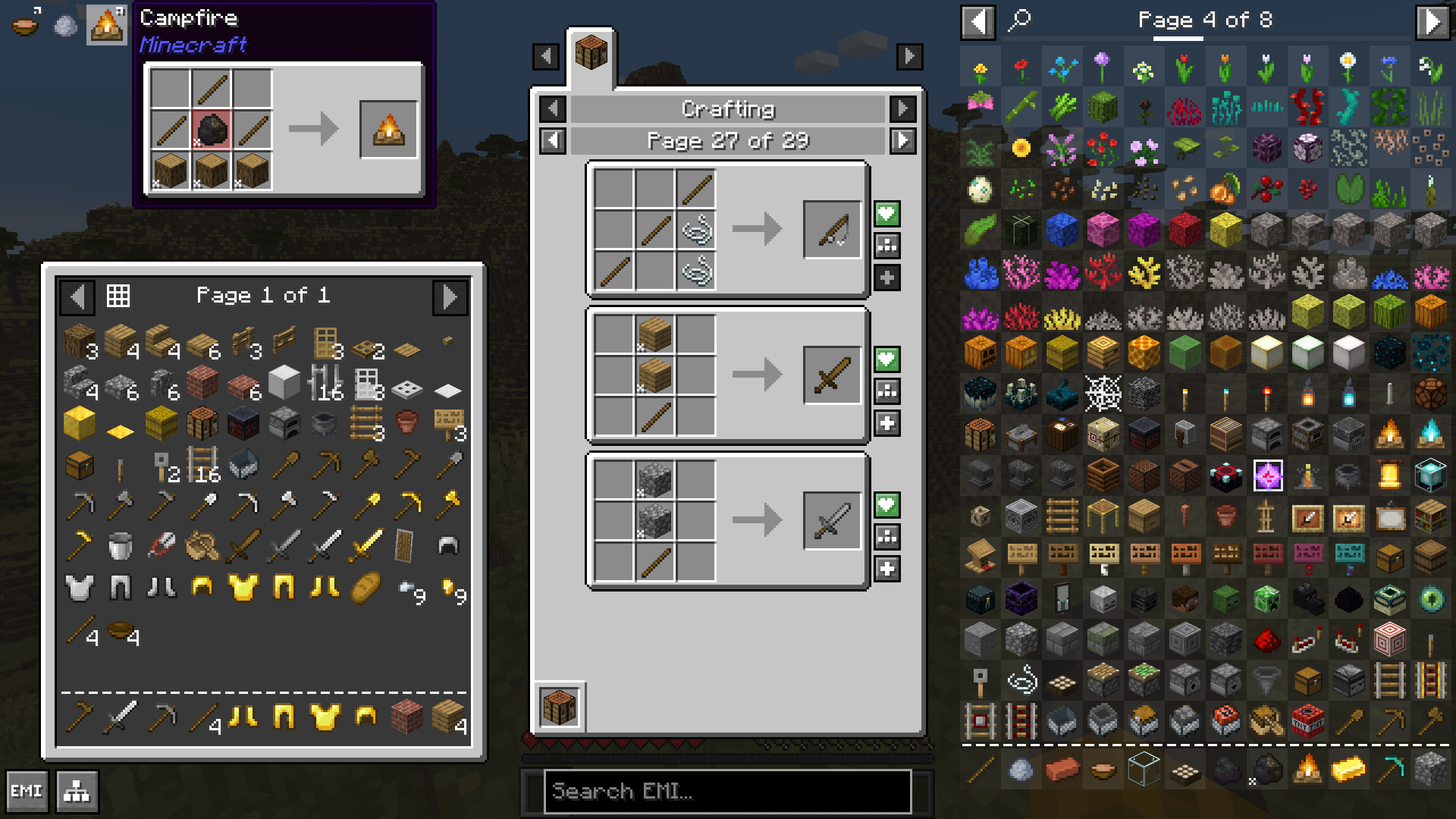
Por supuesto, EMI incluye todas las funciones que cabría esperar desde el principio: ver recetas, marcar objetos como favoritos, buscar y similares. Pero ¿qué novedades ofrece EMI?
- Un modo de fabricación para crear rápidamente cualquier receta que puedas hacer, usable mediante un interruptor o como configuración para búsquedas vacías
- Las recetas se pueden marcar como favoritas junto con los objetos y también se pueden usar para fabricar rápidamente con solo pulsar un botón
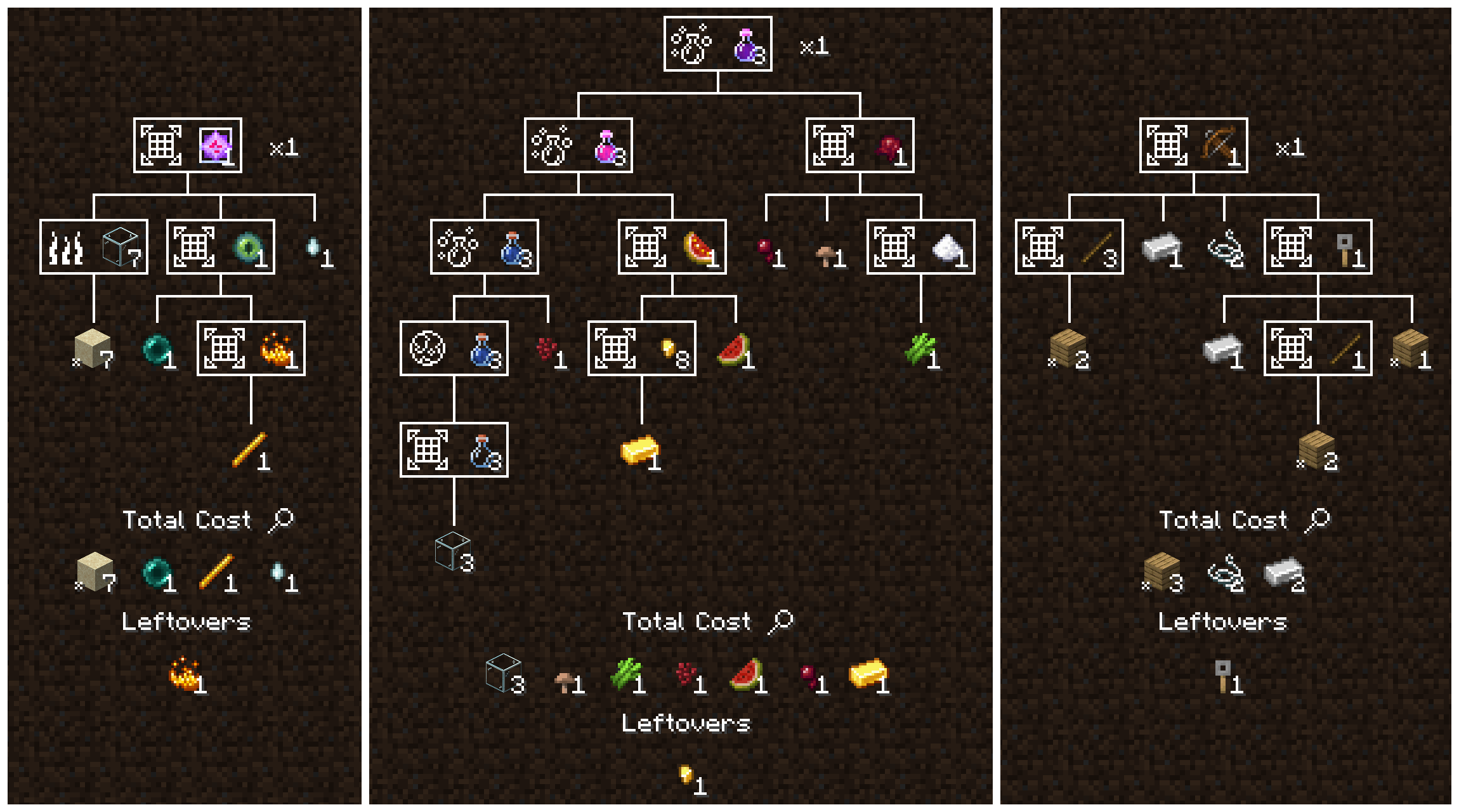
- Un árbol de recetas para desglosar el coste de una fabricación compleja, mostrándote cada paso, cuántos ingredientes base necesitas y qué te sobrará
- Un modo de fabricación de árbol de recetas que cuenta los materiales y pasos que necesitas completar para terminar una tarea, incluyendo favoritos sintéticos en tu barra lateral que puedes usar para fabricar cada paso por exactamente la cantidad que necesitas
- Visualización inteligente de etiquetas, con traducciones, modelos e información emergente, que te muestra los ingredientes de un vistazo, como "Planks" en lugar de ir rotando lentamente por cada tablón del juego.
- Desgloses inteligentes de costes base, que permiten a los árboles de recetas desglosarse automáticamente hasta los ingredientes base y te dejan definir tus propios valores predeterminados mientras juegas
- Información emergente para recetas, etiquetas e ingredientes que te muestra qué se fabricará y qué compone un ingrediente
- Atajos para fabricar rápidamente directamente en tu inventario o cursor, uno o muchos a la vez, junto con los favoritos de recetas o el modo de fabricación
- Una API limpia y moderna, construida desde cero para ser simple, potente y adaptarse a todas las funciones de EMI
- Cero dependencias de terceros. EMI solo requiere las API estándar de Fabric/Quilt de primera parte
¿Qué significa EMI?
Nada, no es un acrónimo. ¿O quizá es un acrónimo sin significado? Si te hace sentir más cómodo, puedes elegir uno de la lista de abajo o inventarte el tuyo.
- Emi Memy Imi
- Exhaustively Many Items
- Explicitly Mandated Items
- Endless Material Information
- Expounded Minutia Introspection
- Earnestly Made Imitation
- Even More Items
- Eminence, My Inception
- Emi's Magic Inventory
- Efficiently Managed Inventory
- Exploring Modified: Iridescent
- Expropriated Matter Insights
Cómo instalar EMI
With Millida Launcher
Install Millida Launcher
The launcher is free: download it at millida.net/launcher and sign in with any nickname.
Click “Install” on this page
The launcher opens and installs the mod for Minecraft 1.18.2–1.21.1 on Fabric, Forge, NeoForge or Quilt automatically.
Launch the game
A profile with it appears in the launcher: click “Play”.
Manually
Install Fabric, Forge, NeoForge or Quilt
The loader must match the game version of the mod file, for example Minecraft 1.21.1. After installing it, a separate profile appears in your launcher.
Download the file for your version
In the version list above, pick the file emi-1.1.12+1.21+neoforge.jar (985 KB) for your game version and loader.
Put it in the mods folder
The folder is inside .minecraft (Windows: %appdata%\.minecraft\mods). If it does not exist, create it.
Launch the loader profile
Open “Mods” in the main menu: EMI should be in the list.
On a server
A server on Fabric, Forge, NeoForge or Quilt
The mod only works on a server with the same loader and game version, for example 1.21.1.
File goes into the server’s mods folder
Stop the server, put the mod file into the mods folder and start the server again.
Or use the “To hosting” button
On Millida Hosting, the button at the top of the page uploads the file to your server and restarts it for you.
Minecraft 1.21.1 runs on Java 21: with a different Java version the game may close right after launch.
Versiones
Con dependencias
| Minecraft | Cargador | Archivo | Fecha | Acciones |
|---|---|---|---|---|
| 1.21 | NeoForge | 1.21985 KB 101 | — | |
| 1.20.1 | Forge | 1.20.11.1 MB 94 | — | |
| 1.19.2 | Forge | 1.19.21 MB 2 | — | |
| 1.18.2 | Fabric, Quilt | 1.18.2736 KB 1 | — |
Contenido que lo necesita
FAQ
Which Minecraft versions does EMI work on?
There are files for 1.21.1, 1.21, 1.20.1, 1.19.2, 1.18.2. The newest is 1.21.1.
Is EMI for Forge or Fabric?
There are files for Fabric: 1.18.2, for Forge: 1.19.2–1.20.1, for NeoForge: 1.21–1.21.1 and for Quilt: 1.18.2.
Does EMI need other mods?
The author lists no required dependencies: the Fabric, Forge, NeoForge or Quilt loader is enough.
Does EMI work on a server?
Yes. EMI works both in singleplayer and on a server.
Which Java does EMI need?
Minecraft 1.21.1 runs on Java 21. If the game closes right after launch, the usual cause is the wrong Java version in the profile settings.
Where can I download EMI safely?
On this page: the file emi-1.1.12+1.21+neoforge.jar (985 KB) is stored on Millida’s server, with no link shorteners. SHA-1 checksum: a496c1be4a561b4a3154b9661a126b65b14ee7cf.
Reseñas
Sé el primero en valorar EMI


