

Dark Paintings Mod para Minecraft 1.20.1, 1.19.2
Añade nuevas pinturas a Minecraft
 NeoForge
 Fabric
 Forge
 Quilt
Acerca del mod Dark Paintings
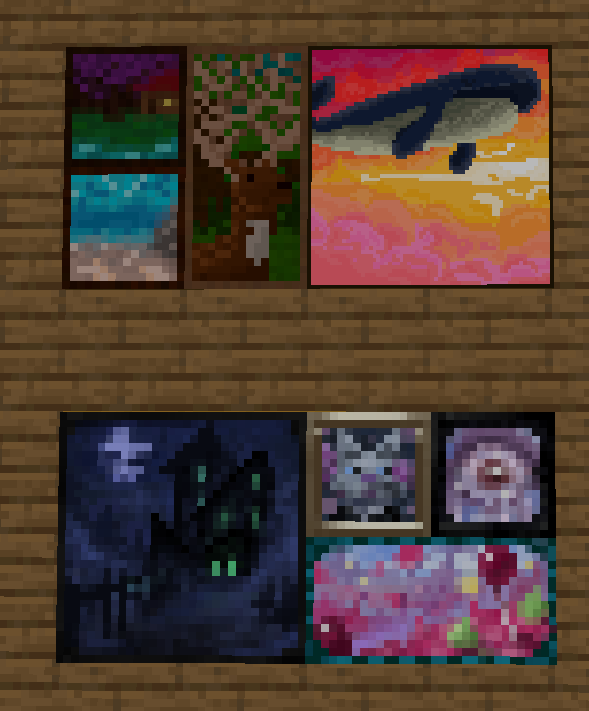
¡Este mod añade muchas pinturas nuevas al juego! Estas pinturas vienen en una variedad de tamaños y estilos artísticos. ¡Cada pintura fue diseñada e ilustrada por un miembro de nuestra comunidad! Estas pinturas están integradas a la perfección con las pinturas originales y se pueden colocar en el mundo usando el objeto de pintura normal. ¡También hay objetos en la pestaña de creativo que se pueden usar para colocar un diseño específico exactamente donde quieras!
Gracias a los muchos artistas talentosos que han colaborado conmigo en este mod, incluidos mmg28rtt, FuryDev, Axeonlotl, Wouter, Absolem Jackdaw, Punpudle, Superkat32 y yo, Darkhax lol.
¡Este proyecto está patrocinado por Nodecraft! ¡Usa el código DARKHAX para obtener un 30% de descuento en tu primer mes de servicio!
Cómo instalar Dark Paintings
With Millida Launcher
Install Millida Launcher
The launcher is free: download it at millida.net/launcher and sign in with any nickname.
Click “Install” on this page
The launcher opens and installs the mod for Minecraft 1.15.2–26.3 on Fabric, Forge, NeoForge or Quilt automatically.
Launch the game
A profile with it appears in the launcher: click “Play”.
Manually
Install Fabric, Forge, NeoForge or Quilt
The loader must match the game version of the mod file, for example Minecraft 26.3. After installing it, a separate profile appears in your launcher.
Download the file for your version
In the version list above, pick the file DarkPaintings-neoforge-MC26.3-26.3.0.1.jar (55 KB) for your game version and loader.
Put it in the mods folder
The folder is inside .minecraft (Windows: %appdata%\.minecraft\mods). If it does not exist, create it.
Launch the loader profile
Open “Mods” in the main menu: Dark Paintings should be in the list.
Versiones
Con dependencias
| Minecraft | Cargador | Archivo | Fecha | Acciones |
|---|---|---|---|---|
| 26.3 | NeoForge | DarkPaintings-neoforge-MC26.3-26.3.0.1.jar55.3 KB 2 | ||
| 26.3 | Fabric | DarkPaintings-fabric-MC26.3-26.3.0.1.jar57.8 KB 28 | ||
| 1.20.1 | Forge, NeoForge | DarkPaintings-Forge-1.20.1-17.0.6.jar51.4 KB 6 | ||
| 1.19.2 | Forge | DarkPaintings-Forge-1.19.2-13.1.4.jar38.6 KB | ||
| 1.19.2 | Fabric, Quilt | DarkPaintings-Fabric-1.19.2-13.1.4.jar33.8 KB | ||
| 1.17 | Fabric | DarkPaintings-fabric-1.17-rc2-3.0.5.jar12.7 KB | ||
| 1.15.2 | — | DarkPaintings-1.15.2-1.0.2.jar7.1 KB | ||
| 1.15.2 | — | DarkPaintings-1.15.2-1.0.1.jar28.8 KB |
FAQ
Which Minecraft versions does Dark Paintings work on?
There are files for 26.3, 1.20.1, 1.19.2, 1.17, 1.15.2. The newest is 26.3.
Is Dark Paintings for Forge or Fabric?
There are files for Fabric: 1.17–26.3, for Forge: 1.19.2–1.20.1, for NeoForge: 1.20.1–26.3 and for Quilt: 1.19.2.
Does Dark Paintings need other mods?
The author lists no required dependencies: the Fabric, Forge, NeoForge or Quilt loader is enough.
Where can I download Dark Paintings safely?
On this page: the file DarkPaintings-neoforge-MC26.3-26.3.0.1.jar (55 KB) is stored on Millida’s server, with no link shorteners. SHA-1 checksum: 15c9f13e2fa48507f646c9f0b133940516f6350c.
Reseñas
Sé el primero en valorar Dark Paintings


