
Create: Ultimate Factory Mod para Minecraft 1.20.1, 1.21.1
Un complemento para el mod Create desarrollado para aumentar las posibilidades de automatización, añadiendo 30 recetas (razonablemente) equilibradas al juego.
 Fabric
 NeoForge
 Forge
Forge Quilt
QuiltAcerca del mod Create: Ultimate Factory
For 1.18.2 and older, refer to the datapack version
About
Create: Ultimate Factory is a simple Create addon that introduces new automation possibilities. Through 30 new (reasonably) balanced recipes, this mod essentially makes dozens of Minecraft resources renewable.
For example, Tuff is now renewable, giving players a reliable source of Ores. Lapis Lazuli, Amethyst, Redstone... Almost all resources are can now be automated. This also includes rare items and loot, at a much lower rate.
Ever dreamt of automating Diamond or Netherite? It's now possible!
Media
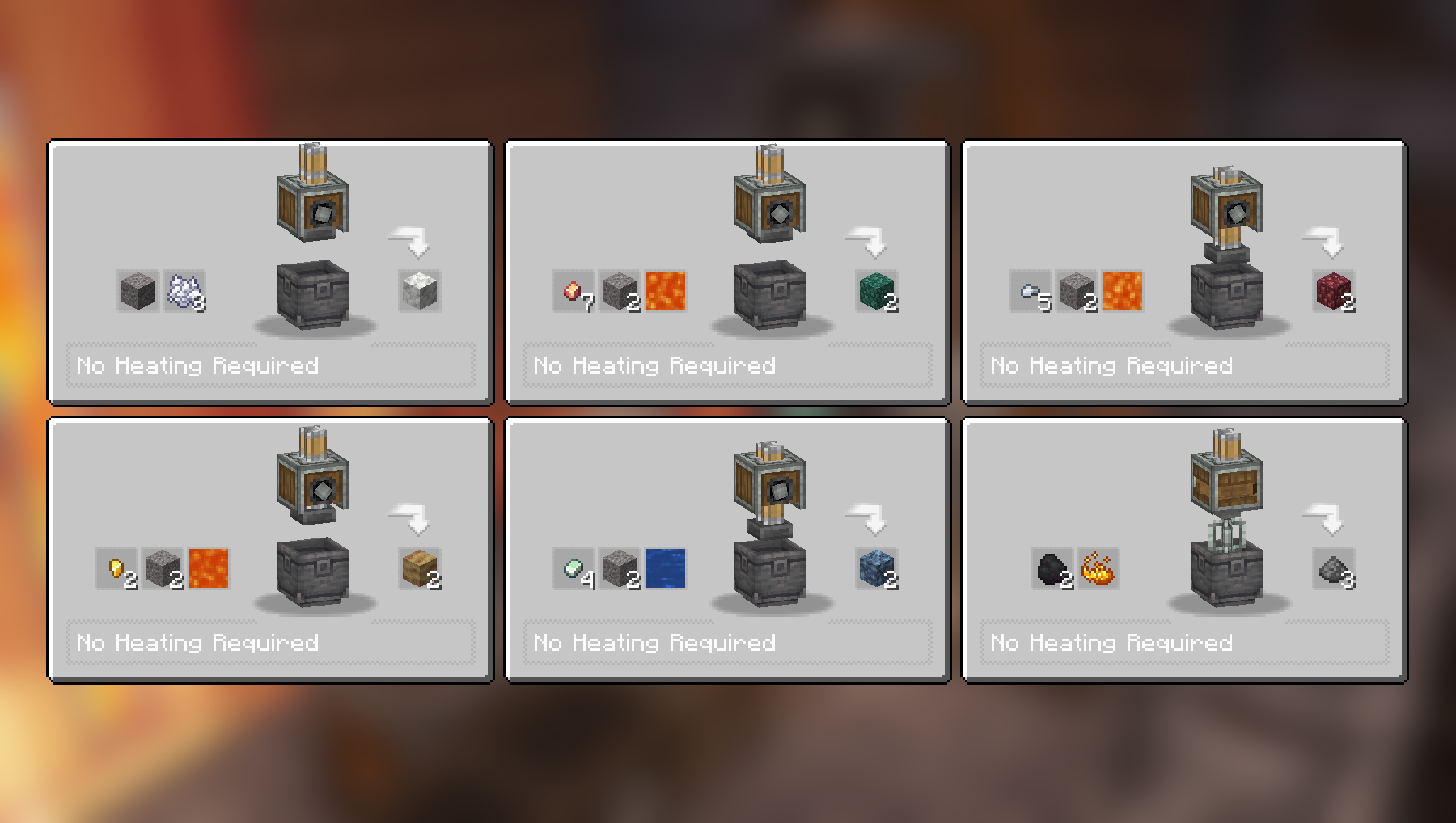
Compacting and Mixing recipes:
More Compacting and Mixing recipes:
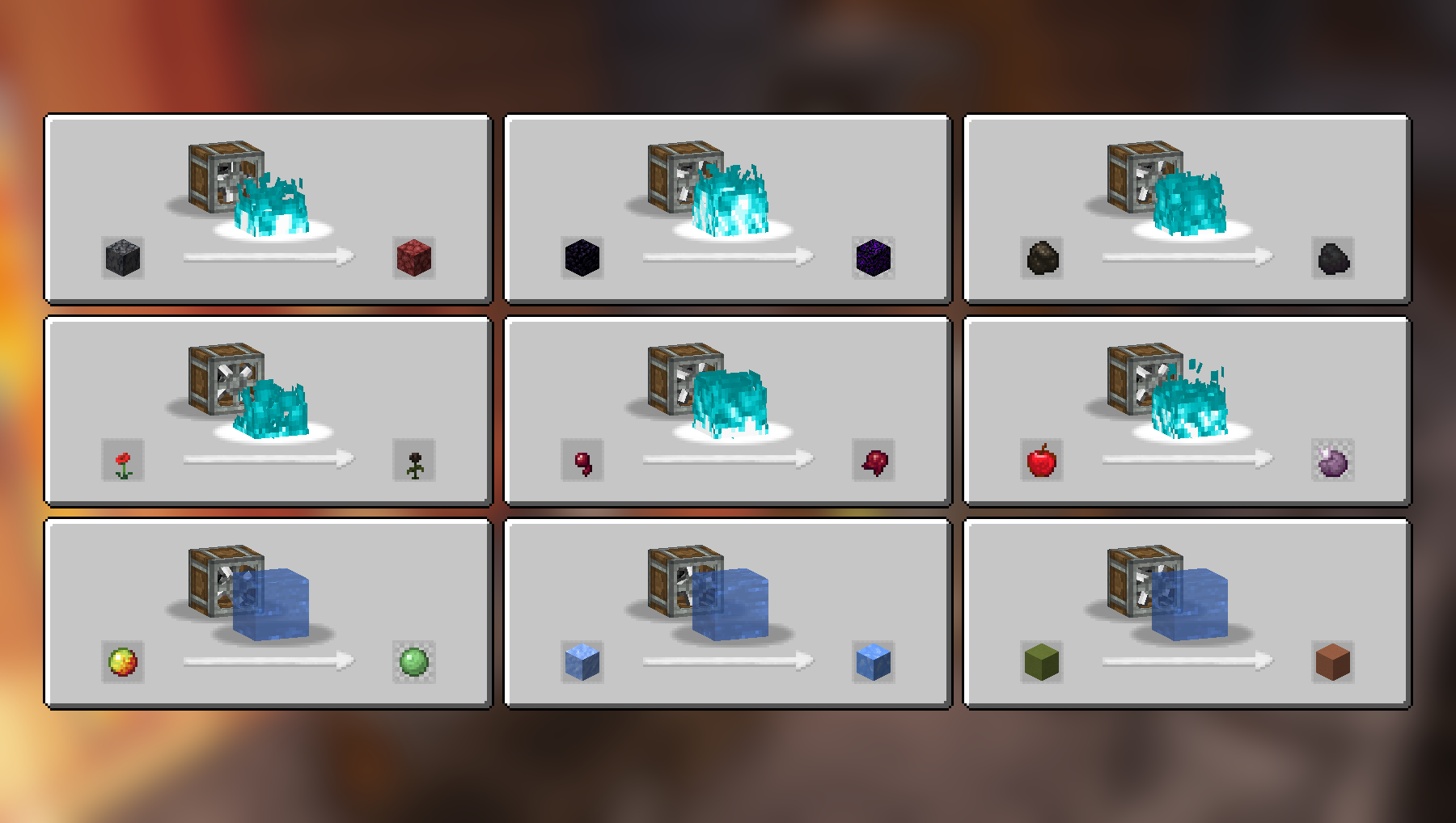
Haunting and Splashing recipes:
Crushing recipes:
More Crushing recipes:
Full recipe list (2.2.4)
Compacting
- Cobblestone and Lava to Tuff
- Stone and Lava to Deepslate
- Coal Blocks and Lava to Diamond (must be heated by an active Blaze Burner)
- Gravel and Bone Meal to Calcite
- Zinc Nuggets, Gravel and Water to Asurine
- Iron Nuggets, Gravel and Lava to Crimsite
- Gold Nuggets, Gravel and Lava to Ochrum
- Copper Nuggets, Gravel and Lava to Veridium
- Blaze Powder to Blaze Rod
Mixing
- Netherrack, Flint and Lava to Redstone
- Calcite and Water to Dripstone
- Coal and Blaze Powder to Gunpowder
Haunting
- Basalt to Netherrack
- Obsidian to Crying Obsidian
- Charcoal to Coal
- Poppy to Wither Rose
- Spider Eye to Fermented Spider Eye
- Apple to Chorus Fruit
Splashing
- Packed Ice to Blue Ice
- Magma Cream to Slime Ball
- Colored Terracotta to Terracotta
Crushing
- Blackstone to Wither Skull (rare), occasionaly gives back Blackstone
- Scoria to Blaze Powder
- Nether Bricks to Nether Brick and Netherite Scraps (extremely rare)
- Soul Sand to Glowstone Dust
- Limestone to Quartz and Lapis Lazuli
- Red Sandstone to Red Sand and Nautilus Shell (extremely rare)
- Crying Obsidian to Powdered Obsidian and Amethyst Shard
- Corals to Heart of the Sea (extremely rare)
- Dead Corals to Bone Meal
- Red Mushroom Blocks to Red Mushrooms
- Brown Mushroom Blocks to Brown Mushrooms
- Endstone to Ender Pearl (rare), occasionaly gives back Endstone
Videos
Dependencies
Only the base Create mod is required for the above recipes to work.
JEI is recommended but not required.
Installation
Add the .jar mod file into your mods folder.
Alternatively, you can browse the CurseForge launcher for the mod (if it doesn't show up, try typing the autor's name). Once found, click "Install" to add it to your modpack.
Permissions
You are free to include this mod in any modpack, public or private.
Support my work
Download my projects on CurseForge
Download my projects on Modrinth
Donate on Paypal
Cómo instalar Create: Ultimate Factory
With Millida Launcher
Install Millida Launcher
The launcher is free: download it at millida.net/launcher and sign in with any nickname.
Click “Install” on this page
The launcher opens and installs the mod for Minecraft 1.20–26.2 on Fabric, Forge, NeoForge or Quilt automatically.
Launch the game
A profile with it appears in the launcher: click “Play”.
Manually
Install Fabric, Forge, NeoForge or Quilt
The loader must match the game version of the mod file, for example Minecraft 26.2. After installing it, a separate profile appears in your launcher.
Download the file for your version
In the version list above, pick the file create_ultimate_factory-2.2.4-fabric-26.2.jar (259 KB) for your game version and loader.
Put it in the mods folder
The folder is inside .minecraft (Windows: %appdata%\.minecraft\mods). If it does not exist, create it.
Launch the loader profile
Open “Mods” in the main menu: Create: Ultimate Factory should be in the list.
Versiones
Con dependencias
| Minecraft | Cargador | Archivo | Fecha | Acciones |
|---|---|---|---|---|
| 26.2 | Fabric | create_ultimate_factory-2.2.4-fabric-26.2.jar259 KB 44 | ||
| 1.21 | NeoForge | create_ultimate_factory-2.2.4-neoforge-1.21.1.jar230 KB 273 | ||
| 1.20.1 | Forge, NeoForge | create_ultimate_factory-2.2.4-forge-1.20.1.jar229 KB 100 | ||
| 1.21 | NeoForge | create_ultimate_factory-2.2.3-neoforge-1.21.1.jar229 KB | ||
| 1.20.1 | Forge, NeoForge | create_ultimate_factory-2.2.3-forge-1.20.1.jar228 KB | ||
| 1.20.1 | Fabric, Quilt | create_ultimate_factory-2.0.0-fabric-1.20.1.jar222 KB 35 |
FAQ
Which Minecraft versions does Create: Ultimate Factory work on?
There are files for 26.2, 1.21.1, 1.21, 1.20.1, 1.20. The newest is 26.2.
Is Create: Ultimate Factory for Forge or Fabric?
There are files for Fabric: 1.20–26.2, for Forge: 1.20–1.20.1, for NeoForge: 1.20–1.21.1 and for Quilt: 1.20–1.20.1.
Does Create: Ultimate Factory need other mods?
The author lists no required dependencies: the Fabric, Forge, NeoForge or Quilt loader is enough.
Where can I download Create: Ultimate Factory safely?
On this page: the file create_ultimate_factory-2.2.4-fabric-26.2.jar (259 KB) is stored on Millida’s server, with no link shorteners. SHA-1 checksum: dad0d63849a485082727b80af6fe758db530792c.
Reseñas
Sé el primero en valorar Create: Ultimate Factory


