
Construction Sticks Mod para Minecraft 1.20.1, 1.21.1
Palos que facilitan la construcción
 NeoForge
 Forge
ForgeAcerca del mod Construction Sticks
Construction Sticks te permiten colocar varios bloques a la vez, hasta 1024 a la vez, extendiendo tu construcción en la dirección en la que estás mirando. Puedes mejorar tu stick para potenciar sus habilidades, haciendo la construcción más rápida y eficiente.
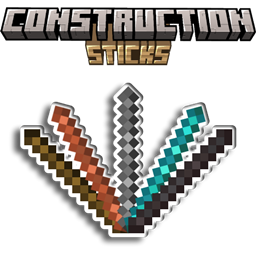
Sticks
Hay cinco niveles diferentes de Construction Sticks: Wood, Copper, Iron, Diamond y Netherite. Cada nivel ofrece mayor durabilidad y habilidades de colocación de bloques, y se puede mejorar aún más con plantillas.
Stick Durability Max. Blocks Upgradeable Angel Distance Max. Blocks (Destroy)
Wood 59 3 Yes 1 1
Copper 131 9 Yes 2 3
Iron 250 27 Yes 4 9
Diamond 1561 128 Yes 8 25
Netherite 2031 1024 Yes 16 81
Upgrade Templates
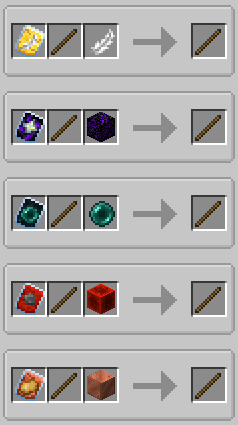
Las plantillas añaden mejoras especiales a tus Construction Sticks. Para aplicar una plantilla, combina el stick, la plantilla y un objeto adicional en una Smithing Table.
Available Templates:
- Angel: Coloca bloques detrás de los que estás mirando o en el aire.
- Destruction: Elimina bloques de forma rápida y eficiente.
- Unbreakable: Elimina el consumo de durabilidad, permitiendo la colocación infinita de bloques.
- Battery: Permite que el stick use RF en lugar de durabilidad.
Additional Features
- Shulker Boxes, Bundles, and Other Containers: Úsalos como fuentes para bloques de construcción.
- Offhand Placement: Coloca bloques desde tu mano secundaria en lugar de la que estás mirando.
Disclaimer
Este es un fork del mod original ConstructionWand, que tiene licencia MIT. Ha sido modificado para añadir nuevas características y mejoras, incluyendo nuevos niveles, plantillas y funcionalidad. El mod original fue creado por Theta-Dev.
¿Necesitas un servidor? Obtén un 20% de descuento en tu primer mes usando el código promocional "mrbysco"
Para preguntas, siéntete libre de unirte a mi Discord.
Want to support us?
-Mrbysco
-ShyNieke
Cómo instalar Construction Sticks
With Millida Launcher
Install Millida Launcher
The launcher is free: download it at millida.net/launcher and sign in with any nickname.
Click “Install” on this page
The launcher opens and installs the mod for Minecraft 1.20.1–26.1.2 on Forge or NeoForge automatically.
Launch the game
A profile with it appears in the launcher: click “Play”.
Manually
Install Forge or NeoForge
The loader must match the game version of the mod file, for example Minecraft 26.1.2. After installing it, a separate profile appears in your launcher.
Download the file for your version
In the version list above, pick the file ConstructionSticks-26.1.2-3.2.1.jar (264 KB) for your game version and loader.
Put it in the mods folder
The folder is inside .minecraft (Windows: %appdata%\.minecraft\mods). If it does not exist, create it.
Launch the loader profile
Open “Mods” in the main menu: Construction Sticks should be in the list.
Versiones
Con dependencias
| Minecraft | Cargador | Archivo | Fecha | Acciones |
|---|---|---|---|---|
| 26.1.2 | NeoForge | ConstructionSticks-26.1.2-3.2.1.jar264 KB | ||
| 1.21.1 | NeoForge | ConstructionSticks-1.21.1-1.5.0.jar259 KB 4 | ||
| 1.20.1 | Forge, NeoForge | ConstructionSticks-1.20.1-1.2.7.jar253 KB 5 | ||
| 1.20.1 | Forge, NeoForge | ConstructionSticks-1.20.1-1.2.6.jar253 KB | ||
| 1.21.1 | NeoForge | ConstructionSticks-1.21.1-1.0.0.jar189 KB |
Reseñas
Sé el primero en valorar Construction Sticks


