
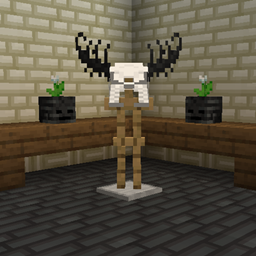
Bone Zone Mod para Minecraft 1.20.1, 1.19.2
Dale vida a tu mundo con decoraciones macabras basadas en huesos.
 Fabric
 Quilt
 NeoForge
 Forge
Acerca del mod Bone Zone
Welcome to the bone zone! This mod provides new spooky and macabre decorations based on bones and skeletons. It also adds some fun cosmetics that you can wear. This mod is available for Forge, Fabric, and Quilt.
Bonecarving
Bonecarving is a new crafting mechanic accessed through the Bonecarver block. This block is crafted using the standard Crafting Table. Once placed in the world you can access the crafting system by right clicking the block.
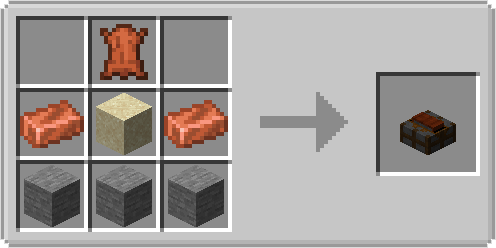
Right clicking the Bonecarver block will bring up the Bonecarver crafting screen. To start bonecarving simply put a valid material such as the Bone Block in the input slot on the left. This will populate the area in the center with all of the different blocks and items you can craft. Once you have an item selected you can take the result out of the output slot on the right. The main materials used for bonecarving is bones, bone blocks, and coal blocks.

In addition to crafting new bone items, the Bonecarver will hurt any mob that stands on top of it long enough. Some mobs such as skeletons have special interactions with this mechanic and will drop items like bone meal as they are sanded down. The Bonecarver will do 2 damage per second to most mobs, however mobs with a special interaction will receive 3 damage per second. These special interactions often allow mobs to drop more resources than normal.
- Skeletons and Stray have a 35% chance to drop bone meal when sanded.
- Wither Skeletons have a 5% chance to drop coal when sanded.
- Blaze have a 5% chance to drop blaze powder when sanded.
- Chickens have a 75% chance to drop a feather when sanded.
- Iron Golems have a 5% chance to drop an iron nugget when sanded.
- Zombies have a 15% chance to drop rotten flesh when sanded.
Skull Pots
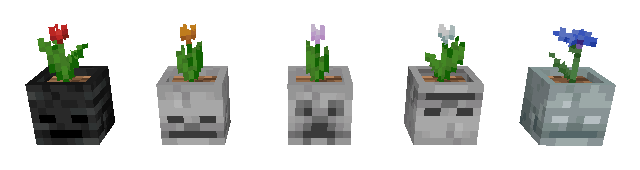
Skull pots are flower pots crafted from the bones of your enemies, how lovely! The skull pots come in several variants and are crafted using the Bonecarver. Any flower or plant supported by the vanilla flower pot can also be planted in a skull pot. Unlike vanilla flower pots these pots can also be rotated to face a certain direction or waterlogged by placing them in water.
Skull Masks
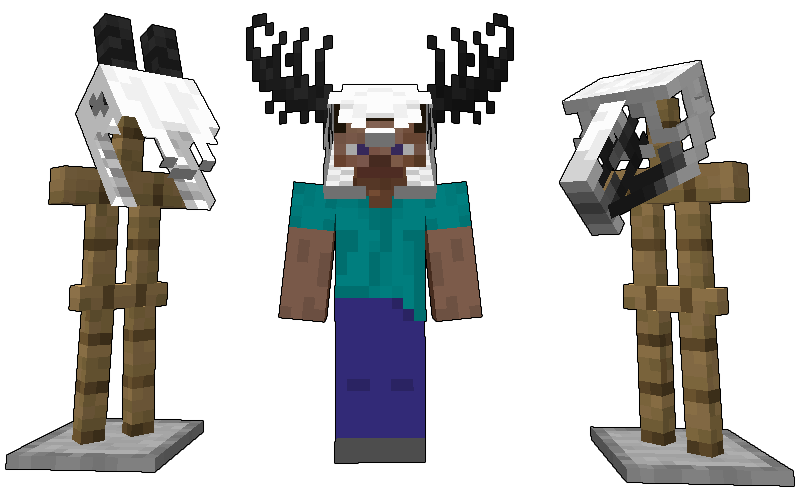
Skull masks are decorative masks crafted using the Bonecarver. These masks take on the form of various animals like goats, deer, and birds. These masks can be worn by players, armor stands, and any other mob that can wear helmets on their heads. They can also be placed on the ground as a block similar to the normal skeleton skull.
Bone Building Blocks
There are several new building blocks based on the different species of skeletons in the game. Classic skeleton bone blocks provide a creamy off-white building block, while wither skeleton bone blocks provide a neutral black. We also have blocks based on the Stray which have a cool steel tone that is perfect for the cold hearted.
Contact
Questions ? In need of support ? Issue to report ?
Cómo instalar Bone Zone
With Millida Launcher
Install Millida Launcher
The launcher is free: download it at millida.net/launcher and sign in with any nickname.
Click “Install” on this page
The launcher opens and installs the mod for Minecraft 1.19.2–1.20.4 on Fabric, Forge, NeoForge or Quilt automatically.
Launch the game
A profile with it appears in the launcher: click “Play”.
Manually
Install Fabric, Forge, NeoForge or Quilt
The loader must match the game version of the mod file, for example Minecraft 1.20.4. After installing it, a separate profile appears in your launcher.
Download the file for your version
In the version list above, pick the file BoneZone-Fabric-1.20.4-6.0.4.jar (520 KB) for your game version and loader.
Put it in the mods folder
The folder is inside .minecraft (Windows: %appdata%\.minecraft\mods). If it does not exist, create it.
Launch the loader profile
Open “Mods” in the main menu: Bone Zone should be in the list.
Minecraft 1.20.4 runs on Java 17: with a different Java version the game may close right after launch.
Versiones
Con dependencias
| Minecraft | Cargador | Archivo | Fecha | Acciones |
|---|---|---|---|---|
| 1.20.1 | Fabric, Quilt | BoneZone-Fabric-1.20.1-3.0.6.jar577 KB | ||
| 1.20.1 | Forge | BoneZone-Forge-1.20.1-3.0.6.jar547 KB | ||
| 1.20.4 | Fabric, Quilt | BoneZone-Fabric-1.20.4-6.0.4.jar520 KB | ||
| 1.20.4 | NeoForge | BoneZone-NeoForge-1.20.4-6.0.4.jar501 KB | ||
| 1.20.4 | Forge | BoneZone-Forge-1.20.4-6.0.4.jar522 KB | ||
| 1.19.2 | Fabric, Quilt | BoneZone-Fabric-1.19.2-1.0.0.jar503 KB | ||
| 1.19.2 | Forge | BoneZone-Forge-1.19.2-1.0.0.jar435 KB |
FAQ
Which Minecraft versions does Bone Zone work on?
There are files for 1.20.4, 1.20.1, 1.19.2. The newest is 1.20.4.
Is Bone Zone for Forge or Fabric?
There are files for Fabric: 1.19.2–1.20.4, for Forge: 1.19.2–1.20.4, for NeoForge: 1.20.4 and for Quilt: 1.19.2–1.20.4.
Does Bone Zone need other mods?
The author lists no required dependencies: the Fabric, Forge, NeoForge or Quilt loader is enough.
Which Java does Bone Zone need?
Minecraft 1.20.4 runs on Java 17. If the game closes right after launch, the usual cause is the wrong Java version in the profile settings.
How do I download Bone Zone?
With Millida Launcher: it installs Bone Zone into a modpack by itself, for the right game version and loader. The launcher is free.
Reseñas
Sé el primero en valorar Bone Zone


