
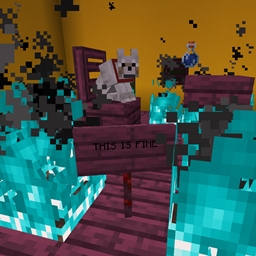
Blue Flame Burning Mod para Minecraft 1.20.1, 1.21.1
Hace que el fuego de almas queme a las entidades con una llama azul en lugar de llamas normales
 NeoForge
 Forge
ForgeAcerca del mod Blue Flame Burning
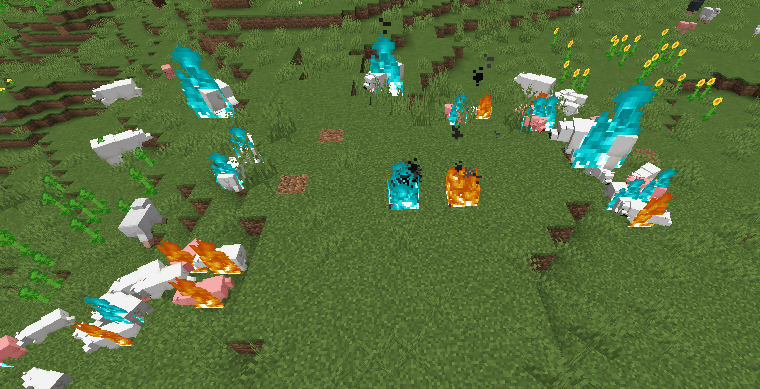
Hace que el fuego de alma queme a las entidades con una llama azul en lugar de las aburridas llamas amarillas habituales cuando se prenden fuego por una fuente de fuego de alma.
- El fuego de alma, al prender fuego al jugador o a una entidad, hará que la entidad arda con una llama azul
- Un zombi ardiendo con una llama azul que prende fuego a otras entidades hará que esas entidades también ardan en azul
- Compatibilidad con fluidos de mods que prenden fuego al jugador
El cambio que añade este mod es puramente visual.
El mod es necesario en ambos lados.
Ven a Discord si necesitas ayuda o tienes preguntas: https://discord.gg/69YVMbvhTC
Muchos osos polares resultaron heridos durante la creación de este mod
Cómo instalar Blue Flame Burning
With Millida Launcher
Install Millida Launcher
The launcher is free: download it at millida.net/launcher and sign in with any nickname.
Click “Install” on this page
The launcher opens and installs the mod for Minecraft 1.18.2–1.21.1 on Forge or NeoForge automatically.
Launch the game
A profile with it appears in the launcher: click “Play”.
Manually
Install Forge or NeoForge
The loader must match the game version of the mod file, for example Minecraft 1.21.1. After installing it, a separate profile appears in your launcher.
Download the file for your version
In the version list above, pick the file blueflame-1.21.1-1.1.1.jar (18 KB) for your game version and loader.
Put it in the mods folder
The folder is inside .minecraft (Windows: %appdata%\.minecraft\mods). If it does not exist, create it.
Launch the loader profile
Open “Mods” in the main menu: Blue Flame Burning should be in the list.
Minecraft 1.21.1 runs on Java 21: with a different Java version the game may close right after launch.
Versiones
Con dependencias
| Minecraft | Cargador | Archivo | Fecha | Acciones |
|---|---|---|---|---|
| 1.21.1 | NeoForge | blueflame-1.21.1-1.1.1.jar17.5 KB 1 | ||
| 1.20.1 | NeoForge, Forge | blueflame-1.20.0-1.0.3.jar26 KB | ||
| 1.18.2 | Forge | blueflame-1.18.2-0.1.0.0.jar26.2 KB |
FAQ
Which Minecraft versions does Blue Flame Burning work on?
There are files for 1.21.1, 1.20.1, 1.20, 1.18.2. The newest is 1.21.1.
Is Blue Flame Burning for Forge or Fabric?
There are files for Forge: 1.18.2–1.20.1 and for NeoForge: 1.20–1.21.1. There are no files for Fabric: a mod for another loader will not start.
Does Blue Flame Burning need other mods?
The author lists no required dependencies: the Forge or NeoForge loader is enough.
Which Java does Blue Flame Burning need?
Minecraft 1.21.1 runs on Java 21. If the game closes right after launch, the usual cause is the wrong Java version in the profile settings.
Where can I download Blue Flame Burning safely?
On this page: the file blueflame-1.21.1-1.1.1.jar (18 KB) is stored on Millida’s server, with no link shorteners. SHA-1 checksum: 0e78defafd6cf08759c656a54f8a33315e3ab924.
Reseñas
Sé el primero en valorar Blue Flame Burning


