
Better Beacon Placement Mod para Minecraft 26.3
✔️ Coloca fácilmente bases de balizas haciendo clic derecho sobre las balizas con bloques minerales.
 Fabric
 Forge
 NeoForge
 Quilt
Acerca del mod Better Beacon Placement
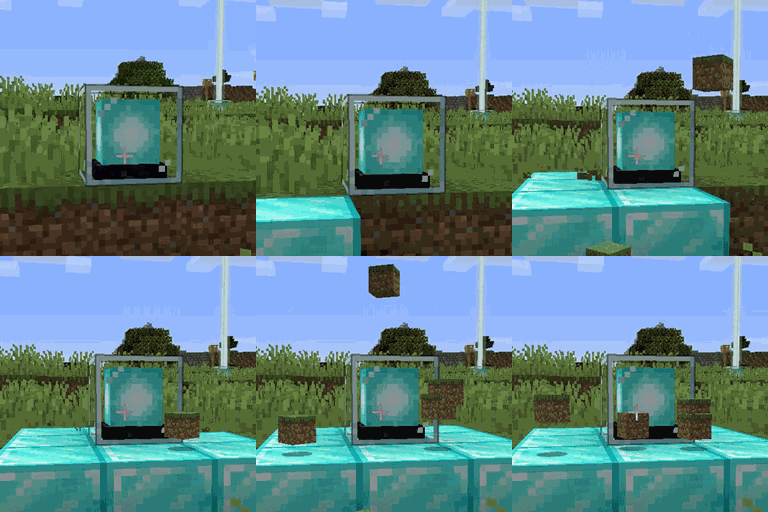
Better Beacon Placement is a minimalistic configurable mod which allows player to easily place beacon bases by right-clicking the beacon with a mineral block. Sneak/crouch+right-clicking places the entire stack in hand. Breaking the beacon will also break all the base blocks and drop them at the beacon's location. Replaced blocks are dropped on top of the beacon.
Bedrock won't be replaced.
You may also be interested in Better Conduit Placement.
All available config options:
breakBeaconBaseBlocks default true If enabled, drops all beacon base blocks when the beacon itself is broken.
dropReplacedBlockTopBeacon default true If enabled, when a mineral block replaces a normal block that block is dropped on top of the beacon.
You can right-click a beacon with a mineral block in hand and it will place it in the next base position:
You can also sneak+right-click to place an entire stack of mineral blocks:
Configurably you can set to drop the replaced blocks on top of the beacon:
Breaking the beacon block will also break all the base blocks:
You may freely use this mod in any modpack, as long as the download remains hosted within the CurseForge or Modrinth ecosystem.
Serilum.com contains an overview and more information on all mods available.
Comments are disabled as I'm unable to keep track of them across so many separate mod pages. For issues, ideas, suggestions or anything else there is the Github repo. Thanks!
Cómo instalar Better Beacon Placement
With Millida Launcher
Install Millida Launcher
The launcher is free: download it at millida.net/launcher and sign in with any nickname.
Click “Install” on this page
The launcher opens and installs the mod for Minecraft 1.19.3–26.3 on Fabric, Forge, NeoForge or Quilt automatically.
Launch the game
A profile with it appears in the launcher: click “Play”.
Manually
Install Fabric, Forge, NeoForge or Quilt
The loader must match the game version of the mod file, for example Minecraft 26.3. After installing it, a separate profile appears in your launcher.
Download the file for your version
In the version list above, pick the file betterbeaconplacement-26.3.0-3.6.jar (46 KB) for your game version and loader.
Put it in the mods folder
The folder is inside .minecraft (Windows: %appdata%\.minecraft\mods). If it does not exist, create it.
Launch the loader profile
Open “Mods” in the main menu: Better Beacon Placement should be in the list.
Versiones
Con dependencias
| Minecraft | Cargador | Archivo | Fecha | Acciones |
|---|---|---|---|---|
| 26.3 | Fabric, Forge, NeoForge, Quilt | [Fabric/Forge/Neo] 26.3.0-3.6 | Better Beacon Placement45.7 KB 2 | ||
| 1.19.3 | Forge | betterbeaconplacement_1.19.3-2.1.jar10.7 KB |
FAQ
Which Minecraft versions does Better Beacon Placement work on?
There are files for 26.3, 1.19.3. The newest is 26.3.
Is Better Beacon Placement for Forge or Fabric?
There are files for Fabric: 26.3, for Forge: 1.19.3–26.3, for NeoForge: 26.3 and for Quilt: 26.3.
Does Better Beacon Placement need other mods?
The author lists no required dependencies: the Fabric, Forge, NeoForge or Quilt loader is enough.
Where can I download Better Beacon Placement safely?
On this page: the file betterbeaconplacement-26.3.0-3.6.jar (46 KB) is stored on Millida’s server, with no link shorteners. SHA-1 checksum: b1478328fcc708623e36468321015ec8e678a534.
Reseñas
Sé el primero en valorar Better Beacon Placement


