
- descargas
- 6 descargas
- visualizaciones
- 28 visualizaciones
- Actualizado
- Actualizado 22.10.2026
- 1.20.1
 Fabric
Acerca del mod Archon
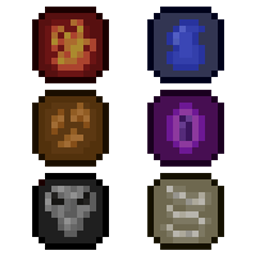
Archon is an elemental based magic mod for Fabric 1.18+. It includes:
- A Unique Mana System
- Elemental Weapons with Abilities
- Spellcasting system with unique spells
- Necromancy
- Helpful Miscellaneous Items
- Summonable Bosses
- And More!
If you have Patchouli installed, you can craft a Grimoire to view all about the content. Archon uses the Spell Power system for spell scaling and to enhance compatibility with other Fabric magic mods.
Requires Spell Power Attributes as of version 0.7.0!
Recommended Mods:
- Patchouli: Allows you to use the guide book
- REI: Allows you to view all recipes
Compatible Mods:
- EMI: REI alternative
FAQ & Tips
Q: Can I configure this mod?
A: Yes, you can find a config file in your run folder. You can configure many aspects of the mod, including the mana display position.
Q: Will this be ported to Forge?
A: No
Q: What if I found an issue or have a suggestion?
A: Create a detailed post on the github issues page
Q: Why are some of the textures bad?
A: I'm not a great artist, so I do what I can with textures
- You may add other mobs to the tags c:bosses, archon:creatures, and archon:players to allow souls to be dropped from modded mobs.
- You can customize the maximum mana of individual players by using the /mana setMax command
- To increase the difficulty of a modpack, it is recommended you adjust spell recipes to make them harder to craft
If you find any issues or have suggestions, please let me know on GitHub or in my discord
Cómo instalar Archon
With Millida Launcher
Install Millida Launcher
The launcher is free: download it at millida.net/launcher and sign in with any nickname.
Click “Install” on this page
The launcher opens and installs the mod for Minecraft 1.20.1 on Fabric automatically.
Launch the game
A profile with it appears in the launcher: click “Play”.
Manually
Install Fabric
The loader must match the game version of the mod file, for example Minecraft 1.20.1. After installing it, a separate profile appears in your launcher.
Download the file for your version
In the version list above, pick the file ArchonGithub-0.8.2.jar (1.9 MB) for your game version.
Put it in the mods folder
The folder is inside .minecraft (Windows: %appdata%\.minecraft\mods). If it does not exist, create it.
Launch the loader profile
Open “Mods” in the main menu: Archon should be in the list.
Minecraft 1.20.1 runs on Java 17: with a different Java version the game may close right after launch.
Versiones
Con dependencias
| Minecraft | Cargador | Archivo | Fecha | Acciones |
|---|---|---|---|---|
| 1.20.1 | Fabric | 0.8.21.9 MB 6 |
FAQ
Which Minecraft versions does Archon work on?
Only Minecraft 1.20.1: there are no files for other versions.
Is Archon for Forge or Fabric?
Only for Fabric: 1.20.1. There are no files for Forge or NeoForge: a mod for another loader will not start.
Does Archon need other mods?
The author lists no required dependencies: the Fabric loader is enough.
Which Java does Archon need?
Minecraft 1.20.1 runs on Java 17. If the game closes right after launch, the usual cause is the wrong Java version in the profile settings.
Where can I download Archon safely?
On this page: the file ArchonGithub-0.8.2.jar (1.9 MB) is stored on Millida’s server, with no link shorteners. SHA-1 checksum: 2dbe0d553eeece6a543b9a4ebb1be2e675c050d7.
Reseñas
Sé el primero en valorar Archon


