
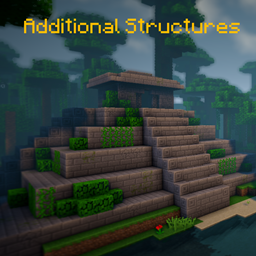
Additional Structures Mod para Minecraft 1.20.1, 1.12.2
¡Añade más de 250 estructuras nuevas que se integran perfectamente en tu mundo!
 NeoForge
 Forge
Forge📖 Descripción
¡Este mod añade unas 250 estructuras nuevas pequeñas y medianas al juego para ampliar tu mundo!
- ¡compatible con mods de generación de biomas, como Terralith, Traverse, Biomes O' Plenty, Biome Bundle y más!
- integración con Mystcraft (MC 1.12)
- ¡con opciones de configuración para cambiar los valores de aparición de cada tipo de estructura! (MC 1.12)
- funciona con el comando /locate
- con comprobador de actualizaciones
- ¡se generan diferentes estructuras en biomas vanilla y modificados en el overworld y el end!
- Datapack de configuración
¿Quieres modificar o cambiar algunos valores de estructuras en 1.18+? ¡Aquí te explicamos cómo hacerlo!
¡Aquí puedes encontrar todas las estructuras de la versión actual!
¿Usas Fabric o Quilt? ¡Entonces usa esta versión!
📷 Presentación
🗃️ Dependencias
Requerido:
- Magma Core [≥ MC 1.21.5]
- Proporciona código y funciones básicas como el comprobador de actualizaciones
- CurseForge | Modrinth
Compatible:
- Mystcraft [MC 1.12]
- Símbolos de características de las estructuras de AS añadidos
- CurseForge | Modrinth
- Antique Atlas [≥ MC 1.21]
- Marcador de mapa para algunas estructuras en el mapa
- CurseForge | Modrinth
Cómo instalar Additional Structures
With Millida Launcher
Install Millida Launcher
The launcher is free: download it at millida.net/launcher and sign in with any nickname.
Click “Install” on this page
The launcher opens and installs the mod for Minecraft 1.12–1.21.10 on Forge or NeoForge automatically.
Launch the game
A profile with it appears in the launcher: click “Play”.
Manually
Install Forge or NeoForge
The loader must match the game version of the mod file, for example Minecraft 1.21.10. After installing it, a separate profile appears in your launcher.
Download the file for your version
In the version list above, pick the file AdditionalStructures-1.21.10-(v.8.1.1-NEO).jar (1.5 MB) for your game version and loader.
Put it in the mods folder
The folder is inside .minecraft (Windows: %appdata%\.minecraft\mods). If it does not exist, create it.
Launch the loader profile
Open “Mods” in the main menu: Additional Structures should be in the list.
Minecraft 1.21.10 runs on Java 21: with a different Java version the game may close right after launch.
Versiones
Con dependencias
| Minecraft | Cargador | Archivo | Fecha | Acciones |
|---|---|---|---|---|
| 1.21.9 | NeoForge | AdditionalStructures v.8.1.1-NEO1.5 MB 1 | ||
| 1.20.2 | Forge | Additional Structures v.4.2.21.5 MB 23 | ||
| 1.12.1 | — | Additional Structures v.2.2.2782 KB 5 |
FAQ
Which Minecraft versions does Additional Structures work on?
There are files for 1.12–1.21.10, 12 versions in total. The newest is 1.21.10.
Is Additional Structures for Forge or Fabric?
There are files for Forge: 1.20–1.20.6 and for NeoForge: 1.21.9–1.21.10. There are no files for Fabric: a mod for another loader will not start.
Does Additional Structures need other mods?
The author lists no required dependencies: the Forge or NeoForge loader is enough.
Which Java does Additional Structures need?
Minecraft 1.21.10 runs on Java 21. If the game closes right after launch, the usual cause is the wrong Java version in the profile settings.
Where can I download Additional Structures safely?
On this page: the file AdditionalStructures-1.21.10-(v.8.1.1-NEO).jar (1.5 MB) is stored on Millida’s server, with no link shorteners. SHA-1 checksum: 05bfd35a858149e7e18e7eecd841f14dee9e504b.
Reseñas
Sé el primero en valorar Additional Structures


