
Shaders for Minecraft Java Iris — page 24
766 itemsShaders: list


Aragorn's Light Shader
A light shader which adds basic shadows, anti aliasing, realistic clouds and semi-realistic water to Minecraft.Install

Zero Shader
This shader pack makes everything except players, particles, arrows, and ender pearls gray.Install

Lost signal
A lightweight horror shaderpack for low end devices this shaderpack is currently in betaInstall

Cozy Autumn
It completely replaces the basic lighting with features like glowing sunrises, realistic water reflections, and natural, deep shadows.Install

FESGlow
A shader for PvP and beautiful replays for video recording.Install

EmberVoid Shader
EmberVoid Shader – High Contrast, High Performance & Fantasy AtmospheresInstall

ReLighting
Near-vanilla shaders with realistic lighting: sun and moon shadows, warm torchlight with soft shadows, backlighting (rim lighting), and corner shading. OptiFine and Iris; Minecraft 1.16.5–26.3.Install

Henry's Drunk
Six degrees of hammered. A shaderpack that simulates being drunk. Include double vision,motion trails,and heavy blinking.Install
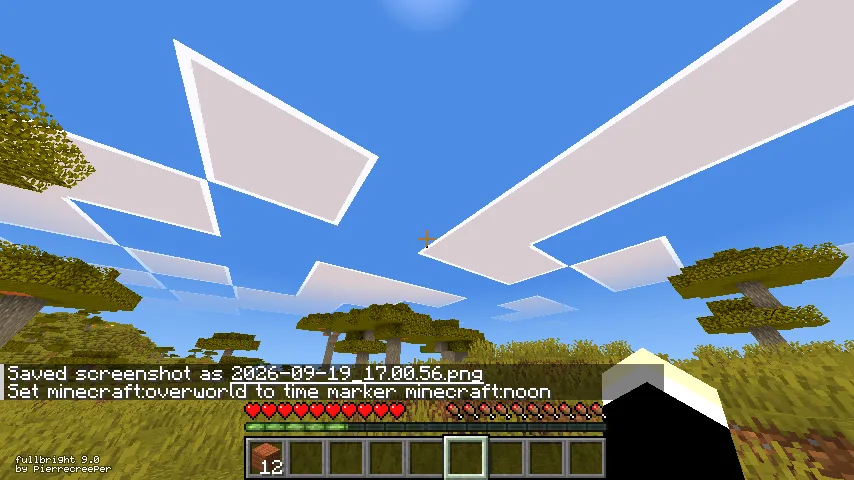
Java Vibrance
Java Vibrance is a custom shaderpack created by Cuber_ZYT designed to enhance vanilla color profiles based on Vibrant Visuals from Bedrock Edition.Install

ReAlexey
This shader replaces most pixels with Alexey Navalny's texture.Install

SimpleShader
New SimpleShader for mini youtubers, and potato pc users.Install

Bright Pixels
My first attempt making shaders. Has a cool greyscale effect!Install

Super Halftone Shaders
A shader that makes your world look like a comic book/manga.Install

NEXA: LowShader
This Shader for low-end device smooth gameplay on shaderInstall

Pale Shaders
Shaders with glowing ores, cinematic godrays, and noisy water.Install

RetroPixel
A shader that adds graphics from (super secret settings - Bits)Install
Nyolxel
Performant and lightweight retro-like shaders, custom made for the Nyoldarria mod, but may work in any other context.Install

Realis
Realistic shader pack for Iris: physically based sky, volumetric clouds, detailed water, rain with puddles and drops, soft shadows, coloured block light and northern lights.Install

MCF Shaders
Sky, clouds, fog, and water all lean into dreamy purple and pink hues.Install

Orion Shaders
A great shaderpack to give the true cinematic feel to Minecraft.Install

AmiArchiveShader
an AI coded base Shader by Yt:@AmiChoiGameInstall

SomeRandomPhotoShaders
A simple shaderpack that adds shadows, reflections, better lighting and a custom sky for the end.Install

AetherVisuals
AetherVisuals is a inspired with vibrant visuals for Minecraft Java shaderpack with colorful lighting, realistic waving water, atmospheric skies, soft shadows, and immersive day and night visuals.InstallRequired to run
FAQ
What do I need to get shaders working?
Iris or OptiFine. Iris installs as a Fabric mod and is usually faster; OptiFine is a separate installer. Without one of them the game simply won't see the shader. Millida Launcher installs Iris along with the shader for you.
Which shaders run on a low-end PC?
Light packs without ray tracing and with low shadow resolution. They're marked in the catalog — they give you shadows and water while costing noticeably fewer frames.
How do I install shaders?
Click “Install” and Millida Launcher will put the shader into the shaderpacks folder of the right modpack. Then select the pack in the video settings — no need to unpack the archive.
Iris or OptiFine — which should I choose?
For new versions, Iris: it works with Sodium, usually gives more FPS and supports almost all modern shaders. OptiFine is needed on old versions and for packs that rely on its special features. The two cannot be installed in the same instance.
Are there shaders for Bedrock?
The shaders in this section are for the Java edition; their format does not work in Minecraft PE and Bedrock. Bedrock has a built-in Vibrant Visuals graphics mode and resource packs with deferred rendering support, which are turned on in the game settings.
Shaders for Minecraft Java Iris
Shaders for Minecraft Iris: 766 items in the Shaders section. Compatibility is checked against the files, not the description: only items with a build for exactly these conditions stay in the list.
Beauty costs frames. Heavy ray-traced shaders can cut performance several times over even on a good graphics card, so the catalog separately marks light packs built for weak machines: they give you shadows and decent water while barely touching FPS. In practice: first install Iris or OptiFine, then put the shader archive in the shaderpacks folder and select it in the video settings. It's best to start with a light pack, and the quality profiles inside the shader itself lower the load even further.