
Shaders for Minecraft Java 1.21 — page 23
736 itemsShaders: list


LightWeight Atmospherica
A lightweight shaderpack optimized for integrated graphics like Intel Core i3 or AMD Ryzen 3.Install

Helios Shaders
Helio Shaders is a lightweight Minecraft shaderpack focused on improved lighting, realistic sun and sky colors, soft atmospheric fog, and enhanced terrain shading.Install

Tachyon Shaders
A highly customizable shader designed for performance, offering both vanilla+ and a more visuals oriented style.Install
Goldelion Shaders
It implements basic functions for the game's visual experience, adding small details and subtle changes while maintaining the vanilla appearance. This shader does not contain realistic shadows or lighting.Install
Polaroid90s
Polaroid 90s Shader — Cold, faded, like an old photo from the 90s!Install

ink-wash-shaderpack
is an Iris shader pack for Minecraft, inspired by traditional Chinese ink wash painting art. Using post-processing shader technology, it transforms the game's visuals into a real-time ink painting style—featuring natural gradations of ink tones, varied bruInstall

WarmToon
WarmToon: warm, cartoon-style shaders for OptiFine and Iris. Minecraft as it looks in the trailers: soft golden light, gentle shadows and cozy warm colors.Install

ISKRA Shaders
A performance-friendly fork of MakeUp — Ultra Fast with a warm custom palette, reworked water, shoreline foam, rain ripples, caustics and cinematic colour grading.Install

Silva Pro
A lightweight Minecraft shader focused on beautiful visuals and high performance for low-end and mid-range PCs.Install

Slugs Vibrant Visuals
This is a vibrant shaderpack made by ThegodlyslugInstall

Red And Black Shaders
A Minecraft Shader that changes everything to black and all the entities to Red.Install

Lumavane Shaders
A shaders for low end system but still give good lighting and performanceInstall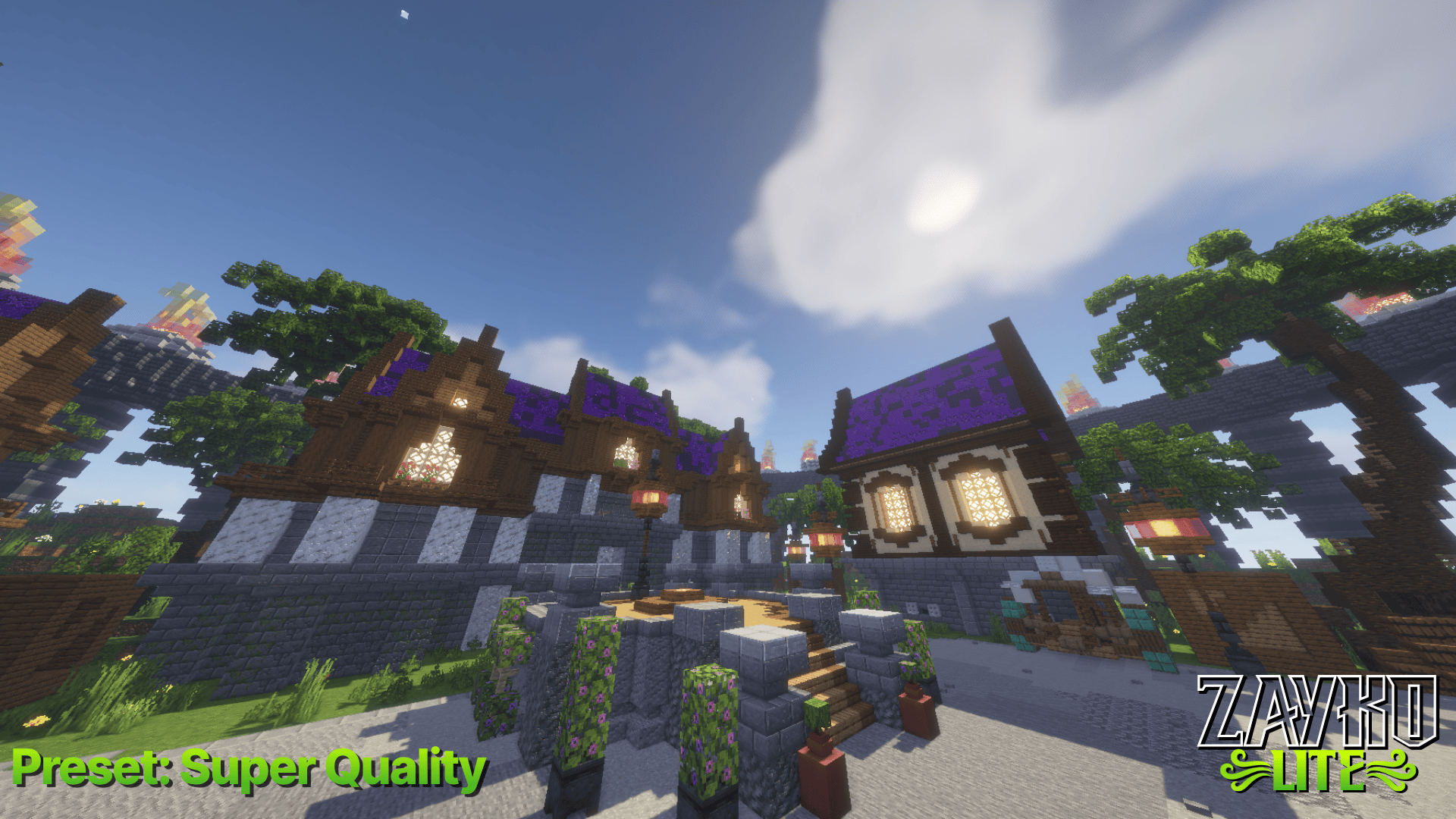

Zayko Lite
Zayko Lite was built for Performance First Quality Second.Install

Spirit Shader
High Performance Shader With Simple Lighting And No ShadowsInstall

NPC-Shaders
A lightweight shader for Iris/Oculus and Optifine adding nice visuals.Install

Chroma Lite Shaderpack Realism Low-End
This is a Shaderpack for the Chroma Lite Shaderpack Realism Low-End.Install

Vice Wave
Vice City Wave Shader, inpired from GTA 6 aesthetic.Install

EcoShift Lite
A lighter, refined version of EchoShift with cleaner lighting, balanced colors, improved water, softer bloom.Install

Rob's Vanilla Reshaded
Lightweight shader that aims to improve the vanilla look while staying as close to it as possibleInstall

Upside Down Shader
Upside Down Shader — Turns Minecraft completely upside down. Sky is now on the bottom, ground on top. That's it. Have fun!Install

Torch Shader
Torch Shader is a shader pack for Minecraft, created to add a dark and atmospheric look to the game. It makes nights darker, caves dim, and the light from torches and other sources becomes more noticeable and more important for navigation. The shaders do not aim for realismInstall

Kinescope Shaders
A highly customizable semi-realistic shaderpack that is very cinematic.Install

It's Cherry Shaders
a magenta/crimson fork of MellowShaders by TheCMK, built for a dark fantasy vibeInstallRequired to run
FAQ
What do I need to get shaders working?
Iris or OptiFine. Iris installs as a Fabric mod and is usually faster; OptiFine is a separate installer. Without one of them the game simply won't see the shader. Millida Launcher installs Iris along with the shader for you.
Which shaders run on a low-end PC?
Light packs without ray tracing and with low shadow resolution. They're marked in the catalog — they give you shadows and water while costing noticeably fewer frames.
How do I install shaders?
Click “Install” and Millida Launcher will put the shader into the shaderpacks folder of the right modpack. Then select the pack in the video settings — no need to unpack the archive.
Iris or OptiFine — which should I choose?
For new versions, Iris: it works with Sodium, usually gives more FPS and supports almost all modern shaders. OptiFine is needed on old versions and for packs that rely on its special features. The two cannot be installed in the same instance.
Are there shaders for Bedrock?
The shaders in this section are for the Java edition; their format does not work in Minecraft PE and Bedrock. Bedrock has a built-in Vibrant Visuals graphics mode and resource packs with deferred rendering support, which are turned on in the game settings.
Shaders for Minecraft Java 1.21
Shaders for Minecraft 1.21: 736 items in the Shaders section. Compatibility is checked against the files, not the description: only items with a build for exactly these conditions stay in the list.
Beauty costs frames. Heavy ray-traced shaders can cut performance several times over even on a good graphics card, so the catalog separately marks light packs built for weak machines: they give you shadows and decent water while barely touching FPS. In practice: first install Iris or OptiFine, then put the shader archive in the shaderpacks folder and select it in the video settings. It's best to start with a light pack, and the quality profiles inside the shader itself lower the load even further.