
Shaders for Minecraft 1.21 Iris — page 12
597 itemsShaders: list


Dithered Shader
A Minecraft shader with multiple dithering styles to stylize your game!Install

HyShaders - Vanilla Edition
A lightweight vanilla-like shader - enhanced immersion, while retaining Minecraft's pixel aestheticInstall

RAY TRACING POTATO
Performance-focused Minecraft shaders that bring beautiful lighting to potato PCs.Install

Dappled Shaders
Dappled Shaders by Eptune is a re-colored, autumn-themed fork of Complementary Shaders.Install
PathMax
Enchanting look with smooth and simple path tracing.Install

Mode 13h: MS-DOSify!
An Iris shader pack for Minecraft that recreates the look of late-90s MS-DOS 3D graphics with deliberate retro accuracy.Install

Round World
A simple Shader that adds a slight visual curve to the world and darkens the lightingInstall

Principal
Dynamic atmospheric Minecraft shader with cinematic skies, volumetric clouds, immersive lighting, and reactive weather.Install

Pholas Shaders
Pholas Shaders is a heavy shaders with godrays, reflections etc.Install

Pagoda Shaders
Pagoda Shaders is a Japanese-themed Minecraft shader pack that enhances the game's visuals with a serene and traditional Eastern aesthetic. It features soft lighting, warm tones, sakura-style ambience.Install

EchoShift
EchoShift is a cinematic Minecraft Java shader that makes the world feel more alive with realistic lighting, clearer skies, softer shadows, moving foliage, reflective ores, improved water, and a custom star-filled End atmosphere.Install

Better End Portal Shader
A Shader that changed the End Portal effect to look more cleanInstall

Negative Colors
Transform Minecraft with the Negative Color shader,Install

Vividness
Enhance Minecraft with vivid, vibrant colors - a simple color grading shader.Install

InvertColors-Shader
Make your Minecraft graphics render invertedInstall

Dusk
Dusk is a work in progress minecraft shader.Install

3D Displacement Test Shader
Screen Space Displacement as a replacement for POM. As a result blocks are re-rendered per-pixel as 3D objects. Experimental.Install

Vantage PVP
A PvP-optimized Minecraft shader (Iris & OptiFine): lifted shadows, sharpened image, vivid cinematic tones — see every enemy, look great doing it.Install

N87 Shaders
This is N87 Shaders, creating realistic graphics with a modern and advanced look. They add physically based lighting, detailed shadows and reflections, realistic water with refraction and underwater ray effects, as well as god ray effects, light rays through clouds. The Sun and Moon look believable, with changing brightness and color palette depending on the time of day. Special attention is paidInstall

Aetheria Fantasy
Lightweight, RTX-like vanilla shaders are perfect for low-end devices and are also supported in the render dragon engineInstall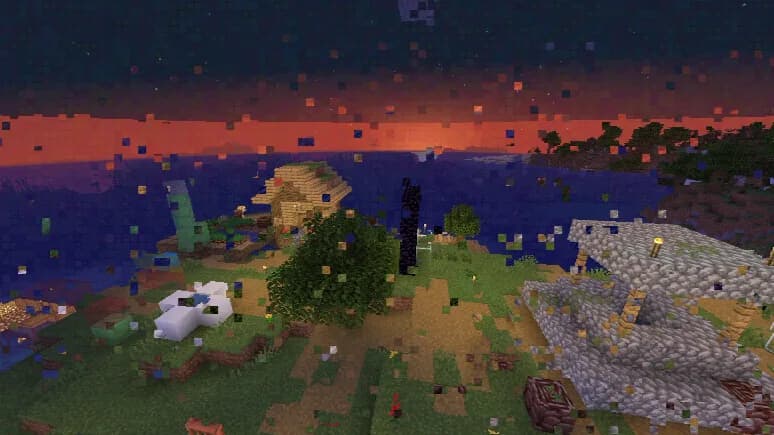

Datamosh
MPEG-style datamosh compression artifacts.Install

Valentine Shader
an edit of Super Duper Vanilla with a Pinky-ThemeInstall

Colorblind Swap
Time-varying color perception remapping shader.InstallRequired to run
FAQ
What do I need to get shaders working?
Iris or OptiFine. Iris installs as a Fabric mod and is usually faster; OptiFine is a separate installer. Without one of them the game simply won't see the shader. Millida Launcher installs Iris along with the shader for you.
Which shaders run on a low-end PC?
Light packs without ray tracing and with low shadow resolution. They're marked in the catalog — they give you shadows and water while costing noticeably fewer frames.
How do I install shaders?
Click “Install” and Millida Launcher will put the shader into the shaderpacks folder of the right modpack. Then select the pack in the video settings — no need to unpack the archive.
Iris or OptiFine — which should I choose?
For new versions, Iris: it works with Sodium, usually gives more FPS and supports almost all modern shaders. OptiFine is needed on old versions and for packs that rely on its special features. The two cannot be installed in the same instance.
Are there shaders for Bedrock?
The shaders in this section are for the Java edition; their format does not work in Minecraft PE and Bedrock. Bedrock has a built-in Vibrant Visuals graphics mode and resource packs with deferred rendering support, which are turned on in the game settings.
Shaders for Minecraft 1.21 Iris
Shaders for Minecraft 1.21 Iris: 597 items in the Shaders section. Compatibility is checked against the files, not the description: only items with a build for exactly these conditions stay in the list.
Beauty costs frames. Heavy ray-traced shaders can cut performance several times over even on a good graphics card, so the catalog separately marks light packs built for weak machines: they give you shadows and decent water while barely touching FPS. In practice: first install Iris or OptiFine, then put the shader archive in the shaderpacks folder and select it in the video settings. It's best to start with a light pack, and the quality profiles inside the shader itself lower the load even further.