
Minecraft server plugins — page 42
3,787 itemsPlugins: list


Strength SMP S1
A plugin inspired by the Strength SMP.On a server

PAPIProxyBridge
A bridge library plugin for using PlaceholderAPI on proxy serversOn a serverTeamPlugin
This plugin allows users in kitpvp servers to create teams.On a serverAutoRepair
AutoRepairOn a server

SimpleHubTeleport 4
Easy Plugin for Setspawn (NOT BUNGEECORD)On a server

UltimateShop
UltimateShop is a open source GUI shop plugin with many features!On a server

LevelHearts
Increase your maxhealth by getting exp!On a serverAllPermissions
AllPermissionsOn a server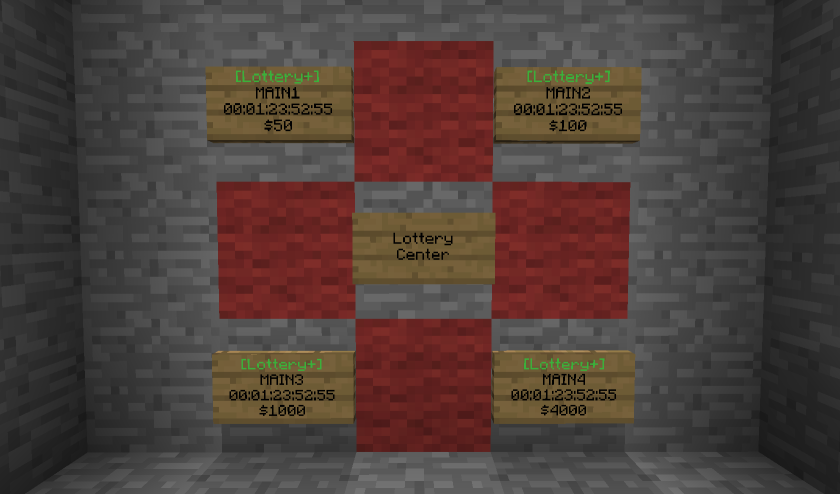

Lottery+
A powerful multi-lottery plugin with unlimited settings and built with a powerful easy to use GUI application.On a server

Discord Statusbot
A discord bot, that shows the status of your server! Made for Spigot, NeoForge, Fabric, Forge, Bungee, and many more.On a server

Stables
Stables provide steed protection, and other horse related things.On a server

Population Density
Guarantees players available space, resouces, and active neighbors, even on a high-population server.On a serverSimple Vote Listener
A simple vote listener for Votifier with lots of features!On a server

Waypoints
Allows teleporting to and from points to save time and make traveling easier!On a server
[1.9-1.16] Custom Recipes and Crafting (CraftEnhance)
Make any recipes through GUI's only - the only plugin that supports itemmeta, like enchantments - The most powerful crafting plugin.On a server

BentoBox
SkyBlock, OneBlock, Boxed, SkyGrid, AcidIsland, CaveBlock, Poseidon, StrangerRealms - and more! These are just some of the island-based game modes that BentoBox powers. From the author of the original ASkyBlock.On a server
Color Portals
Create Different Colored Portals Out Of Wool And Let The Fun Begin! (No Commands Necessary)On a server

Disease
Bring the terror of Disease into your quiet little townOn a serverPortals
Create block portals!On a server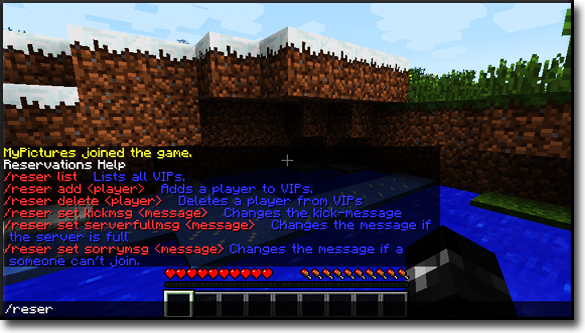
Reservations
Kick players on a full server with a rank systemOn a serverFe - Economy
A Simple, Solid EconomyOn a serverNPCCreatures
Spawn NPCs of any mob type you want!On a serverUltimatePlugin
UltimatePluginOn a serverFAQ
How is a plugin different from a mod?
A plugin runs only on the server and requires nothing from players: the client stays vanilla. A mod has to be installed by everyone, and it changes the game itself.
Where do I put a plugin?
Put the .jar file in the plugins folder on the server, then restart the server. The plugin will create its config on first launch.
Will a Spigot plugin work on Paper?
Usually yes: Paper and Purpur are built on Spigot and are compatible with its plugins. The reverse isn't true — a plugin that uses Paper features won't work on plain Spigot.
How do I install a plugin on Aternos?
On Aternos, plugins can only be installed from the built-in list in the “Plugins” section of the panel. You can't upload your own .jar file, so paid and rare plugins can't be installed on Aternos. If the plugin you need isn't on the list, you need hosting with access to the plugins folder: put the file there and restart the server.
Which plugins should I install on a server first?
People usually start with four: EssentialsX (homes, warps, kits, teleport), LuckPerms (groups and permissions), WorldGuard together with WorldEdit (spawn and region protection) and ViaVersion (joining from other game versions). For a server with nickname login, add AuthMe for passwords and SkinsRestorer for skins.
Which plugins should I install on a server for playing with friends?
A small server for friends needs just a few: EssentialsX (home, teleport to a friend, warps), CoreProtect (rolling back griefing and finding who broke a block) and Simple Voice Chat for voice chat, which needs the mod of the same name on players' side. Permissions and region protection are usually unnecessary on such a server.
How do I install a plugin on Paper?
Download the plugin file for your Paper version, put the .jar into the plugins folder and restart the server — the /plugins command will list it. On Millida Hosting the On a server button on the plugin page does the same.
Minecraft server plugins
A plugin is installed on the server, not by the player, and that's the whole difference from a mod: the client stays plain vanilla, and you can join the server without downloading a single file. Plugins run on server cores — Paper, Spigot, Bukkit, Purpur, Folia — while Velocity and BungeeCord are used for proxies between servers. The core matters as much as the version: a Paper plugin will almost always run on Purpur, but a Velocity plugin won't start on a regular server at all.
The useful minimum for a server is almost always the same: EssentialsX for basic commands, LuckPerms for permissions, WorldGuard together with WorldEdit for region protection and CoreProtect to roll back griefing. Servers with nickname login add AuthMe and SkinsRestorer, servers for friends add Simple Voice Chat. On Millida Hosting a free plugin from the catalog goes onto the server with the On a server button on its page, no manual .jar upload.
Plugins handle almost everything behind the scenes on a server: ranks and permissions, land protection, economy and shops, anti-cheat, map rotation, menus and voting. You install them by copying the .jar file into the plugins folder and restarting the server; most create their own config on first launch, which is what you then edit. The card lists supported cores and game versions, the author and license, and all releases are gathered on one page — you can update the plugin right from there.