Create: Easy Structures
by Ma_Do · ModrinthA mod that adds some structures to Minecraft which have Create mod blocks included.
A mod that adds some structures to Minecraft which have Create mod blocks included.
Higher version Create mod porting to Fabric
Adds various decorative plushies to Minecraft, along with some Easter Eggs!
bring back to the Minecraft Earth Mobs with own twist on gameplay!
Unofficial Architectury Port of Wall-Jump! by genandnic for 1.16.5/1.17.1/1.18.2/1.19.3
This pack adds many well built structures to your minecraft world that invite you to explore them. Now with TERRALITH support!🫐
A graphical user interface for WorldEdit.
Removes the main menu FPS limit. Fabric port of SmoothMenu by BookerCatch
Allows players to decorate their enchanting table setup by fixing the "enchantment power transmitter" block tag.
Create lush gardens with new flowers and plants!
Bigger & Bigger Storages :3
An unofficially maintained continuation of WunderLib for Fabric and NeoForge, providing automated configuration screens, grid-based UI layouts, simplified networking, and other utilities used by BetterX mods
Reduces Minecraft's resource usage while it runs in the background.
More paintings for Minecraft, includes popular paintings too!
This project adds compatibility between Traveler's Backpack and Transmog.
Glowing Trims adds permanent glow to armor trims.
ViaVersion addon to allow 1.8.x and 1.7.x clients on newer server versions.
Double Jump Attribute adds a new attribute giving the players extra mid-air jumps.
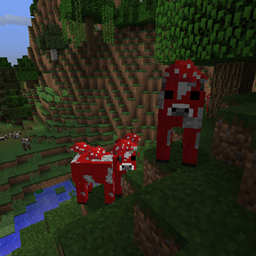
🐮🍄 Adds a chance for mooshrooms to spawn naturally everywhere in place of a cow.
Decorate your railroad world with decorations like catenary!
🟣 Allows the creation of nether portals with crying obsidian blocks.
A mod that smooths out the third person view making it more cinematic
Removes darkening on sides of geometry, inspired by the old lighting from OptiFine's internal shaders, for in-game blocks, clouds, and (block) entities.
Adds slime armor and items with cool abilities
They're two different mod loaders that aren't compatible with each other. Forge is the older one and better suited to big tech and magic modpacks; Fabric is lighter, updates to new game versions faster, and hosts most performance mods. NeoForge is a Forge fork for newer versions, and Quilt is a Fabric fork. A Forge mod won't run on Fabric, and vice versa. Millida Launcher installs the right loader for you.
The one that matches your game version and loader. The “Install” button picks the file for you: Millida Launcher grabs the version for your modpack. A mod for 1.20.1 usually won't work on 1.21.
Click “Install” and Millida Launcher will download the mod, its dependencies and the right loader for you. To install a downloaded file manually, put it in the mods folder inside the game directory.
No. The Install button on a mod page opens Millida Launcher: it downloads the mod, its dependencies and the right loader into the chosen instance by itself. No CurseForge and no manual file copying.
1.20.1 is one of the most modded versions, especially on Forge: tech, magic, RPG, furniture, weapons. Pick 1.20.1 in the version filter to keep only mods with a file built exactly for it, then pick Forge or Fabric next to it.
On Android, yes: Millida Launcher runs the Java edition on a phone, and mods work there just like on a PC, though light ones run much better than heavy ones. Minecraft PE (Bedrock) cannot load PC mods — it has add-ons instead, in the Minecraft PE mods section.
The usual picks are Simple Voice Chat for proximity voice chat, Waystones for fast travel, Xaero's Minimap and something big to work on together, such as Create. Mods that change the world must be installed by every player and on the server, while client-side ones like a minimap or performance mods are up to each player.
A mod is an add-on that changes the game itself: it adds blocks, mobs and mechanics, or speeds up world rendering. It isn't installed into the game directly but on top of a loader — Forge, Fabric, NeoForge or Quilt — and it's the loader that decides whether the file will run. That's why every card here lists both the game version and the loader: two mods with the same name for 1.12.2 Forge and 1.21 Fabric are two different files, and mixing them up means a crash on launch.
The most searched Minecraft mods are weapon, furniture, horror and performance mods: each theme has its own collection, and links to the themes and the most wanted versions are in the Popular block. Version 1.20.1 on Forge still holds the most big tech, magic and RPG mods, while the fresh 1.21.11 and 26.2 get Fabric and NeoForge mods fastest.
One mod in the catalog, one page. Every version the author has released is listed on its card: pick your game version and loader right there instead of jumping between ten similar pages. Each file shows its size, release date and checksum, and the mod itself shows the author, license and a link to the original source. Files whose license allows rehosting are stored with us and download directly — no link shorteners, timers or ad redirects. If the license forbids rehosting, the button honestly takes you to the author.