KubeJS Powah
by BobVarioa · CurseForgeLets you modify the recipes of the Powah mod
Lets you modify the recipes of the Powah mod
REI addon for showing various loot tables
Faster crop growing
Store, receive and harvest your experience points.
Library for mods.
Overlay a timer on the Vanilla status effect HUD icons
Multiblocks made easy with source of ars nouveau
Turn Minecraft into a hack and slash looter!
Now windows are connecting diagonally, too?! This is getting out of hand!
Craft and wear villager hats.
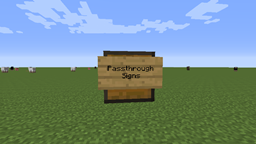
Enable the ability to right-click through wall signs, to interact with chests & other TileEntities
Trinkets and Utilities to enhance casual play
Cataclysm's Ignited Berserkers can now spawn in YUNG's Better Nether Fortresses after defeating Ignis
stop downloading, this thing sucks // An addon for Alex's Mobs that adds music which will play during boss fights.
Adding fictional fish and other aquatic creatures!
Load resources on game start, like a resource pack, but enabled by default.
The missing diagonal blocks are here! After all these years. Finally, you have them all.
An innovative natural magic themed tech mod
Automatically hides the recipe viewer when not searching.
Karat Garden - Not regular carrots
Minecraft's Boogeyman
Stop the bonemeal discrimination! Grow all plants, no limitations.
MobsBeGone allows you to get rid of entities spawning in your world in a very simple and straightforward way!
Adds a system for integrating AE2 and Replication
They're two different mod loaders that aren't compatible with each other. Forge is the older one and better suited to big tech and magic modpacks; Fabric is lighter, updates to new game versions faster, and hosts most performance mods. NeoForge is a Forge fork for newer versions, and Quilt is a Fabric fork. A Forge mod won't run on Fabric, and vice versa. Millida Launcher installs the right loader for you.
The one that matches your game version and loader. The “Install” button picks the file for you: Millida Launcher grabs the version for your modpack. A mod for 1.20.1 usually won't work on 1.21.
Click “Install” and Millida Launcher will download the mod, its dependencies and the right loader for you. To install a downloaded file manually, put it in the mods folder inside the game directory.
No. The Install button on a mod page opens Millida Launcher: it downloads the mod, its dependencies and the right loader into the chosen instance by itself. No CurseForge and no manual file copying.
1.20.1 is one of the most modded versions, especially on Forge: tech, magic, RPG, furniture, weapons. Pick 1.20.1 in the version filter to keep only mods with a file built exactly for it, then pick Forge or Fabric next to it.
On Android, yes: Millida Launcher runs the Java edition on a phone, and mods work there just like on a PC, though light ones run much better than heavy ones. Minecraft PE (Bedrock) cannot load PC mods — it has add-ons instead, in the Minecraft PE mods section.
The usual picks are Simple Voice Chat for proximity voice chat, Waystones for fast travel, Xaero's Minimap and something big to work on together, such as Create. Mods that change the world must be installed by every player and on the server, while client-side ones like a minimap or performance mods are up to each player.
A mod is an add-on that changes the game itself: it adds blocks, mobs and mechanics, or speeds up world rendering. It isn't installed into the game directly but on top of a loader — Forge, Fabric, NeoForge or Quilt — and it's the loader that decides whether the file will run. That's why every card here lists both the game version and the loader: two mods with the same name for 1.12.2 Forge and 1.21 Fabric are two different files, and mixing them up means a crash on launch.
The most searched Minecraft mods are weapon, furniture, horror and performance mods: each theme has its own collection, and links to the themes and the most wanted versions are in the Popular block. Version 1.20.1 on Forge still holds the most big tech, magic and RPG mods, while the fresh 1.21.11 and 26.2 get Fabric and NeoForge mods fastest.
One mod in the catalog, one page. Every version the author has released is listed on its card: pick your game version and loader right there instead of jumping between ten similar pages. Each file shows its size, release date and checksum, and the mod itself shows the author, license and a link to the original source. Files whose license allows rehosting are stored with us and download directly — no link shorteners, timers or ad redirects. If the license forbids rehosting, the button honestly takes you to the author.