
Mods for Minecraft Java Datapack — page 2
128 itemsMods: list


Remove Stardust Labs Intro Message
A datapack/mod to remove the intro message that appears with Stardust Labs projects.InstallOn a server

[Let's Do Addon] Structures
An addon for the Let's Do mod series that adds themed, let's do-like structures to the world.InstallOn a server

Repurposed Structures - Farmer's Delight Compat
Add Farmer's Delight to Repurposed Structures VillagesInstallOn a server

CTOV - Friends and Foes Compat
Compatibility add-on for Friends and Foes mod and CTOVInstallOn a server

Lost Cities Modern Tweaks
A datapack that applies various tweaks to the default Lost Cities generation using modern Minecraft blocks, adding additional buildings and interior details while keeping the original style.InstallOn a server

Vanilla Refresh
Enhancing Minecraft's experience with a variety of 30+ QOL features, like player sitting and a day counter.InstallOn a server

Repurposed Structures - Friends and Foes Compat
Add Copper Golems and Beekeepers to RS VillagesInstallOn a server

CTOV - Beautify Compat
Compatibility datapack for beautify mod and CTOVInstallOn a server

More Radical Trainers: SV
Additional Trainers for the Radical Cobblemon Trainers modInstallOn a server

Dungeons and Taverns Stronghold Overhaul
This Datapack, the Standalone version of Dungeons and Taverns Overhaul of the Stronghold, Overhauls the Stronghold from the ground up With 417 Different rooms and 5 sub stronghold types Fair warning, your world will Freeze Upon first Structure generation.InstallOn a server

Ender Dragon Fight Remastered
A difficulty increase of Minecraft's final boss, with a focus on a somewhat Vanilla feel.InstallOn a server
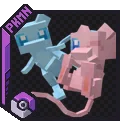
MelloMons
A datapack adding a remodel for Mew to Cobblemon.InstallOn a server

CTOV - Chef's delight Compat
Compatibility add-on for Chef's delight mod and CTOVInstallOn a server

Day Counter (Original)
For Minecraft 1.16 - Latest! This datapack/mod add text on top of your hotbar that will count the day realtime.InstallOn a server

Amplified Nether
The nether explorer's simple dream: doubled height and amplified terrain. What more is needed?InstallOn a server

Guns ++
Multiplayer and Survival Friendly Vanilla Guns Datapack, Many versions starting from 1.17, Adds 50+ Guns and 4 Grenades all with Custom Models and Sounds!InstallOn a server
Farmer's Cutting: Biomes O' Plenty
Adds Farmer's Delight cutting recipes for Biomes O' PlentyInstallOn a server

Geophilic Reforged
A subtle overhaul of vanilla and mod Overworld biomesInstallOn a server

CTOV - Incubation Compat
Compatibility add-on for Incubation mod and CTOVInstallOn a server

CTOV - Savage and Ravage Compat
Compatibility datapack between ChoiceTheorem's overhauled village and Savage and Ravage modInstallOn a server

Tool Trims
Allows you to trim your weapons and tools on a Smithing Table. There are almost 2000 trim combinations!InstallOn a server
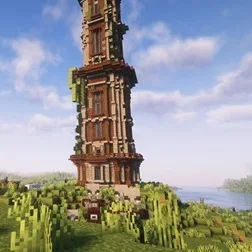
Improved Pillager Outpost
The "Improved Pillager Outpost" Datapack revamps the standard Minecraft Pillager Outpost into a challenging, multi-level tower. This overhaul adds detailed architecture, tougher enemies, and exclusive loot, creating a more immersive and rewarding experieInstallOn a server

Hopo Better Ruined Portals
Improve how the portals look in your worldInstallOn a serverFAQ
How is Forge different from Fabric?
They're two different mod loaders that aren't compatible with each other. Forge is the older one and better suited to big tech and magic modpacks; Fabric is lighter, updates to new game versions faster, and hosts most performance mods. NeoForge is a Forge fork for newer versions, and Quilt is a Fabric fork. A Forge mod won't run on Fabric, and vice versa. Millida Launcher installs the right loader for you.
How do I know which mod version I need?
The one that matches your game version and loader. The “Install” button picks the file for you: Millida Launcher grabs the version for your modpack. A mod for 1.20.1 usually won't work on 1.21.
How do I install a mod?
Click “Install” and Millida Launcher will download the mod, its dependencies and the right loader for you. To install a downloaded file manually, put it in the mods folder inside the game directory.
Do I need CurseForge to install mods?
No. The Install button on a mod page opens Millida Launcher: it downloads the mod, its dependencies and the right loader into the chosen instance by itself. No CurseForge and no manual file copying.
Which mods are there for 1.20.1?
1.20.1 is one of the most modded versions, especially on Forge: tech, magic, RPG, furniture, weapons. Pick 1.20.1 in the version filter to keep only mods with a file built exactly for it, then pick Forge or Fabric next to it.
Can I install mods on my phone?
On Android, yes: Millida Launcher runs the Java edition on a phone, and mods work there just like on a PC, though light ones run much better than heavy ones. Minecraft PE (Bedrock) cannot load PC mods — it has add-ons instead, in the Minecraft PE mods section.
Which mods are best to play with friends?
The usual picks are Simple Voice Chat for proximity voice chat, Waystones for fast travel, Xaero's Minimap and something big to work on together, such as Create. Mods that change the world must be installed by every player and on the server, while client-side ones like a minimap or performance mods are up to each player.
Mods for Minecraft Java Datapack
Mods for Minecraft Datapack: 128 items in the Mods section. Compatibility is checked against the files, not the description: only items with a build for exactly these conditions stay in the list.
One mod in the catalog, one page. Every version the author has released is listed on its card: pick your game version and loader right there instead of jumping between ten similar pages. Each file shows its size, release date and checksum, and the mod itself shows the author, license and a link to the original source. Files whose license allows rehosting are stored with us and download directly — no link shorteners, timers or ad redirects. If the license forbids rehosting, the button honestly takes you to the author.