
Entity Culling Mod für Minecraft 1.12.2
Überspringt das Rendern verborgener Entitäten
- Downloads
- 7 Downloads
- Aufrufe
- 19 Aufrufe
- Aktualisiert
- Aktualisiert 17.10.2026
- 1.12.2
 Forge
Forge
Über die Entity Culling-Mod
Entity Culling - 1.16.5 - 2.1.4 und neuere Versionen sind nur mit Optifine G8 kompatibel! Entity Culling - 1.16.5 - 2.1.3 und ältere Versionen sind nur mit Optifine G7 kompatibel! Entity Culling - 1.12.2 - 2.0.8 und neuere Versionen sind nur mit Optifine G5 kompatibel! Entity Culling - 1.12.2 - 2.0.7 und ältere Versionen sind nur mit Optifine F5 kompatibel!
Diese Mod benötigt MixinBootstrap (curseforge, modrinth) und RenderLib (curseforge, modrinth), um zu laufen (nur MC 1.12.2)! Mixin 0.7-0.8 Compatibility (curseforge, modrinth) kann hilfreich sein, wenn eine andere Mod eine ältere Mixin-Version verwendet und du dadurch das Spiel nicht starten kannst (nur MC 1.12.2).
Entity Culling ist eine clientseitige Performance-Mod, die das Rendern von versteckten (Tile-)Entities überspringen soll. In Vanilla werden einfach alle (Tile-)Entities gerendert, die sich im Sichtfeld des Spielers befinden. Das bedeutet, dass es Hunderte von (Tile-)Entities geben kann, die deine FPS fressen, während du sie nicht einmal sehen kannst, weil sie hinter einer Wand versteckt sind.
Culling von versteckten Entities Standardmäßig verwendet diese Mod eine OpenGL-Occlusion-Culling-Implementierung, die dir pixelgenaues Bounding-Box-Culling mit nur einer Verzögerung von einem Frame und einem sehr geringen Overhead bietet.
Wenn deine Hardware OpenGL 4.3 nicht unterstützt, verwendet diese Mod eine Raytracing-Culling-Implementierung. Das Raytracing-Culling ist CPU-intensiver, während das OpenGL-Culling GPU-intensiver ist, und je nach deiner Hardware möchtest du vielleicht das eine dem anderen vorziehen. Dies kann zu massiven FPS-Verbesserungen führen, wenn viele (Tile-)Entities auf dem Bildschirm sind, aber nicht sichtbar, weil sie verdeckt sind.
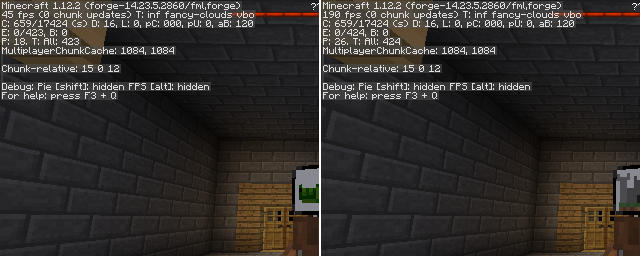
Ein Test mit EntityCulling-1.12.2-6.0.2 in einem Chocolate Quest Repoured-Dungeon mit etwa 200 Entities auf dem Bildschirm zeigt enorme Verbesserungen!
Installation von Entity Culling
With Millida Launcher
Install Millida Launcher
The launcher is free: download it at millida.net/launcher and sign in with any nickname.
Click “Install” on this page
The launcher opens and installs the mod for Minecraft 1.12.2 on Forge automatically.
Launch the game
A profile with it appears in the launcher: click “Play”.
Manually
Install Forge
The loader must match the game version of the mod file, for example Minecraft 1.12.2. After installing it, a separate profile appears in your launcher.
Download the file for your version
In the version list above, pick the file EntityCulling-1.12.2-6.5.0.jar (62 KB) for your game version.
Put it in the mods folder
The folder is inside .minecraft (Windows: %appdata%\.minecraft\mods). If it does not exist, create it.
Launch the loader profile
Open “Mods” in the main menu: Entity Culling should be in the list.
Minecraft 1.12.2 runs on Java 8: with a different Java version the game may close right after launch.
Versionen
Mit Abhängigkeiten
| Minecraft | Loader | Datei | Datum | Aktionen |
|---|---|---|---|---|
| 1.12.2 | Forge | EntityCulling-1.12.2-6.5.0.jar62.4 KB 6 | ||
| 1.12.2 | — | EntityCulling-1.12.2-6.3.1.jar64.4 KB 1 | ||
| 1.12.2 | — | EntityCulling-1.12.2-6.0.2.jar54.1 KB |
FAQ
Which Minecraft versions does Entity Culling work on?
Only Minecraft 1.12.2: there are no files for other versions.
Is Entity Culling for Forge or Fabric?
Only for Forge: 1.12.2. There are no files for Fabric or NeoForge: a mod for another loader will not start.
Does Entity Culling need other mods?
The author lists no required dependencies: the Forge loader is enough.
Which Java does Entity Culling need?
Minecraft 1.12.2 runs on Java 8. If the game closes right after launch, the usual cause is the wrong Java version in the profile settings.
Where can I download Entity Culling safely?
On this page: the file EntityCulling-1.12.2-6.5.0.jar (62 KB) is stored on Millida’s server, with no link shorteners. SHA-1 checksum: cf4a4a6b11b1721fbda1edeb32bdc3b1ac3a8560.
Bewertungen
Bewerten Sie Entity Culling als Erster


