

 原版游戏
‼️ Archived ‼️
The textures have been added to the base Cobblemon Interface resourcepack and can be accessed by using respackopts mod to change the resourcepack config.

Cobblemon Interface: Recolored
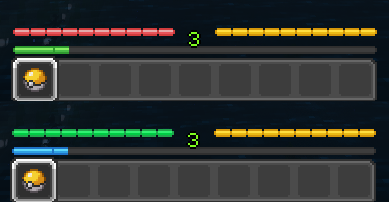
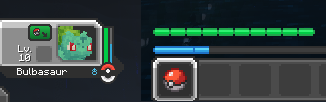
An optional addon to Cobblemon Interface resourcepack that changes the health and experience bars to pair with the colors used in Pokémon's HP and EXP in Cobblemon.

Comparison
Before -> After
Matching Colors
on the Official Cobblemon Discord Server
如何安装 Cobblemon Interface: Recolored
With Millida Launcher
Install Millida Launcher
The launcher is free: download it at millida.net/launcher and sign in with any nickname.
Click “Install” on this page
The launcher opens and installs the resource pack for Minecraft 1.20–1.21.1 automatically, together with its dependencies: Cobblemon Interface.
Launch the game
A profile with it appears in the launcher: click “Play”.
Manually
Download the archive
Pick the file Cobblemon Interface Recolored v1.0.1.zip (15 KB) for your game version. No need to unpack it.
Put it in the resourcepacks folder
The easiest way: “Options”, then “Resource Packs”, then “Open Pack Folder”, and drag the archive there.
Enable the pack
In the same window, move the pack to the right-hand “Selected” column and click “Done”.
版本
含依赖项
| Minecraft | 加载器 | 文件 | 操作 |
|---|---|---|---|
| 1.21 | — | 1.2114.5 KB | |
| 1.20.1 | — | 1.20.114.5 KB |
运行所需
评价
成为第一个评价 Cobblemon Interface: Recolored 的人


