

 Forge
关于 Security Point 整合包
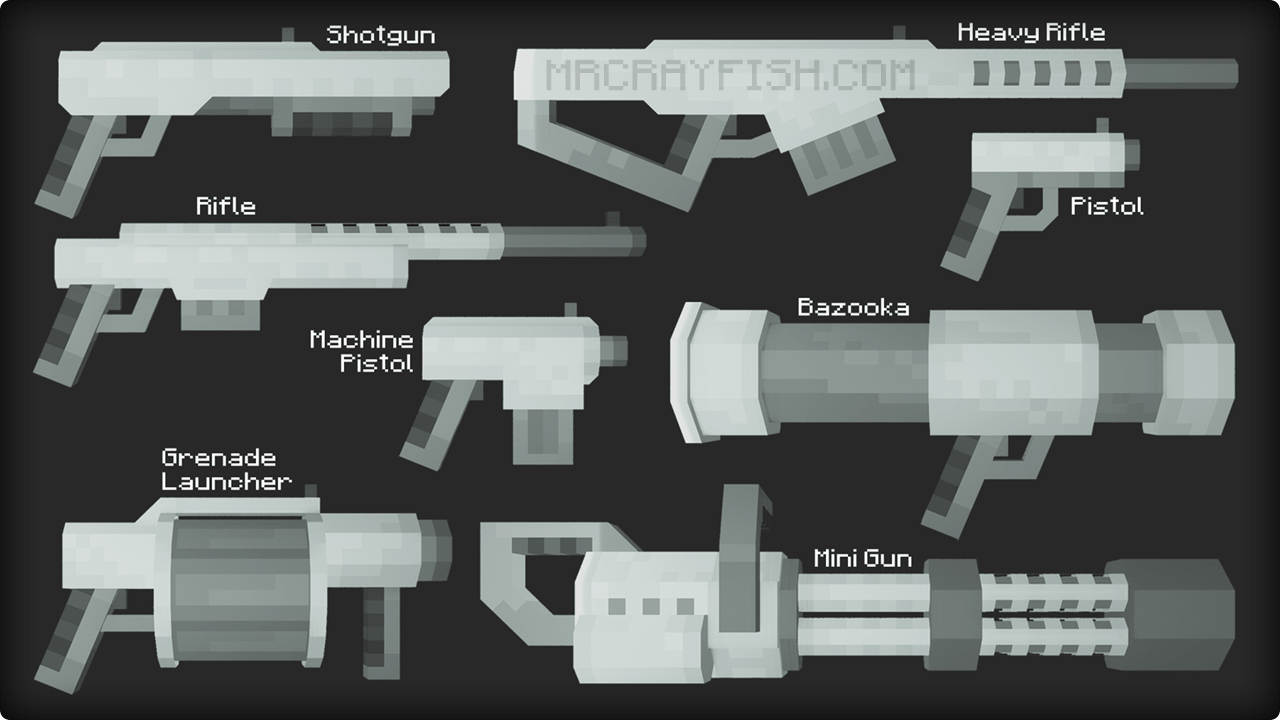
This modpack is designed for RPG and multiplayer games, with a focus on war, roleplay, and survival. It implements a weapon system using the MrCrayfish's Gun Mod — pistols, rifles, and other types of firearms appear. Additionally, security mechanics have been added: surveillance cameras, password-protected safes, minefields, and other elements from SecurityCraft. The modpack also contains new food items and recipes from Farmers Delight, which helps diversify farming and nutrition. This is suitable for servers with roleplay storylines where dynamics, conflicts, and strategy matter.
The modpack runs on Forge and is compatible with Minecraft versions from 1.19.2 to 1.20.1. The archive takes up only 85 KB, but that doesn't mean it's lightweight — mods are enabled through the launcher, and they are downloaded automatically on startup. The file size is due to the fact that this is not just a folder with mods, but a ready-to-install modpack that can be launched through the launcher without manual setup. For stable operation, it is recommended to allocate at least 4 GB of RAM, especially if the player plans to play with others in multiplayer.
Frequently asked questions
How do I install this modpack?
Open the archive in a launcher that supports Forge — the mods will be installed automatically.
Which versions does the modpack work on?
The modpack is compatible with Minecraft versions 1.19.2 and 1.20.1, and uses the Forge loader.
What is needed for the modpack to work?
To run it, you need a launcher with Forge support and 4 GB of RAM.
如何安装 Security Point
With Millida Launcher
Install Millida Launcher
The launcher is free: download it at millida.net/launcher and sign in with any nickname.
Click “Install” on this page
The launcher opens and installs the modpack for Minecraft 1.19.2–1.20.1 on Forge automatically.
Launch the game
A profile with it appears in the launcher: click “Play”.
Manually
Download the modpack archive
In the version list above, pick the file SecurityPoint-V.1.5.2.zip (85 KB).
Import it into a launcher
A launcher that supports modpacks (Millida Launcher, Prism) takes the archive via “Add modpack”, then “From file”. No need to unpack it yourself.
Allocate memory
Modpacks need more memory than the plain game: set 4–6 GB in the profile settings.
On a server
Use the “To server” button
On Millida Hosting, the button at the top of the page uploads the file to your server and restarts it for you.
Invite friends: they install the same modpack
To join the server, every player needs the same modpack version.
Minecraft 1.20.1 runs on Java 17: with a different Java version the game may close right after launch.
版本
含依赖项
| Minecraft | 加载器 | 文件 | 日期 | 操作 |
|---|---|---|---|---|
| 1.20.1 | Forge | V.1.5.184.7 KB 8 | ||
| 1.19.2 | Forge | V.1.4.1718 KB | ||
| 1.19.2 | — | V.1.3.0478 KB |
常见问题
Is Security Point for Forge or Fabric?
Only for Forge: 1.19.2–1.20.1.
Which Java does Security Point need?
Minecraft 1.20.1 runs on Java 17. If the game closes right after launch, the usual cause is the wrong Java version in the profile settings.
Where can I download Security Point safely?
On this page: the file SecurityPoint-V.1.5.2.zip (85 KB) is stored on Millida’s server, with no link shorteners. SHA-1 checksum: 7ba0dbf357b9b905bc487ee81bf70407f996fc4a.
评价
成为第一个评价 Security Point 的人


