
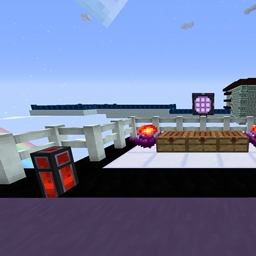
关于 Wrenched - Project Ozone version 地图
A Wrenched map compatible with Project Ozone.
I do not claim in any shape or form the "Wrenched" game format. This is made for the impatient people like me who wanted to try playing for themselves.
Enjoy!
Photos: http://imgur.com/a/zx45t
如何安装 Wrenched - Project Ozone version
With Millida Launcher
Install Millida Launcher
The launcher is free: download it at millida.net/launcher and sign in with any nickname.
Click “Install” on this page
The launcher opens and installs the map for Minecraft 1.7.10 automatically.
Launch the game
A profile with it appears in the launcher: click “Play”.
Manually
Download the map archive
Pick the file world.zip (1.9 MB).
Unpack it into the saves folder
The world folder (with level.dat inside) must sit directly in .minecraft/saves.
Open the world
“Singleplayer”: the map will be in your world list.
On a server
Replace the world folder
Stop the server and put the map folder in place of world (or set its name in level-name).
Use the “To server” button
On Millida Hosting, the button at the top of the page uploads the file to your server and restarts it for you.
版本
含依赖项
| Minecraft | 加载器 | 文件 | 日期 | 操作 |
|---|---|---|---|---|
| 1.7.10 | — | Wrenched map V1.21.9 MB |
常见问题
Which Minecraft versions does Wrenched - Project Ozone version work on?
Only Minecraft 1.7.10: there are no files for other versions.
Where can I download Wrenched - Project Ozone version safely?
On this page: the file world.zip (1.9 MB) is stored on Millida’s server, with no link shorteners. SHA-1 checksum: 04d9da54fb2c222b6152cadab78cd3de539821fe.
评价
成为第一个评价 Wrenched - Project Ozone version 的人



