

XXL Packets Mod cho Minecraft 1.20.1, 1.21.1
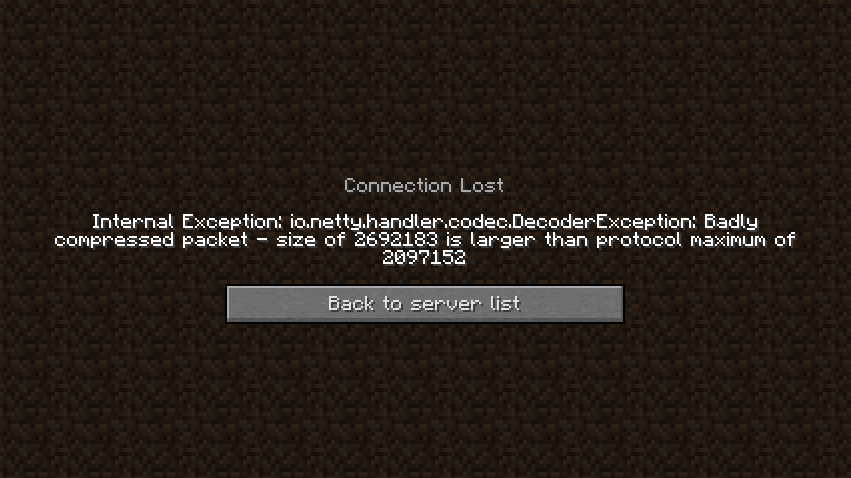
XXL Packets là một bản fork của XL Packets, nâng giới hạn kích thước gói tin từ 2MB lên giới hạn Integer của Java (2.147483647 GB).
 Fabric
 Forge
Forge Quilt
QuiltGiới thiệu mod XXL Packets
DISCLAIMER: This is a fork of the original XL Packets mod, This fork extends the packet limit to the Java Integer limit
Fixes https://bugs.mojang.com/browse/MC-185901 by raising the packet size limit from 2MB to 2.14GB (2147483647), so that servers with large datapacks, packets, etc don't kick the client. This mod is needed clientside for any connecting clients.
Cách cài đặt XXL Packets
With Millida Launcher
Install Millida Launcher
The launcher is free: download it at millida.net/launcher and sign in with any nickname.
Click “Install” on this page
The launcher opens and installs the mod for Minecraft 1.18–26.3 on Fabric, Forge or Quilt automatically, together with its dependencies: Dependency.
Launch the game
A profile with it appears in the launcher: click “Play”.
Manually
Install Fabric, Forge or Quilt
The loader must match the game version of the mod file, for example Minecraft 26.3. After installing it, a separate profile appears in your launcher.
Download the file for your version
In the version list above, pick the file xlpackets-1.0.6.jar (14 KB) for your game version and loader.
Put it in the mods folder
The folder is inside .minecraft (Windows: %appdata%\.minecraft\mods). If it does not exist, create it. Required dependencies go there too: Dependency.
Launch the loader profile
Open “Mods” in the main menu: XXL Packets should be in the list.
On a server
A server on Fabric, Forge or Quilt
The mod only works on a server with the same loader and game version, for example 26.3.
File goes into the server’s mods folder
Stop the server, put the mod file into the mods folder and start the server again.
Use the “To server” button
On Millida Hosting, the button at the top of the page uploads the file to your server and restarts it for you.
Phiên bản
Kèm phụ thuộc
| Minecraft | Loader | Tệp | Ngày | Hành động |
|---|---|---|---|---|
| 26.3 | Fabric | 26.314.3 KB 1 | ||
| 1.20.1 | Fabric | 1.20.116.8 KB | ||
| 1.20.1 | Forge | 1.20.116.9 KB 1 | ||
| 1.21.11 | Fabric | 1.21.1114.9 KB 1 | ||
| 1.19.4 | Forge | 1.19.46.1 KB | ||
| 1.18.2 | Forge | 1.18.26.1 KB | ||
| 1.20.1 | Quilt | 1.20.17.6 KB | ||
| 1.20.6 | Fabric | 1.20.610.1 KB |
Yêu cầu để chạy
- Dependencybắt buộc
Câu hỏi thường gặp
Which Minecraft versions does XXL Packets work on?
There are files for 1.18–26.3, 32 versions in total. The newest is 26.3.
Is XXL Packets for Forge or Fabric?
There are files for Fabric: 1.20–26.3, for Forge: 1.18–1.20.1 and for Quilt: 1.20–1.20.1. There are no files for NeoForge: a mod for another loader will not start.
What does XXL Packets need to work?
Required: Dependency. Without it the mod will not start: dependencies go into the same mods folder.
Does XXL Packets work on a server?
Yes. XXL Packets works both in singleplayer and on a server.
Where can I download XXL Packets safely?
On this page: the file xlpackets-1.0.6.jar (14 KB) is stored on Millida’s server, with no link shorteners. SHA-1 checksum: 34e7ee1a82c575ed676a24993dd7dfa2628c03b5.
Đánh giá
Hãy là người đầu tiên đánh giá XXL Packets


