
Transparent Mod cho Minecraft 1.20.1, 1.21.5
Cho phép gói tài nguyên làm cho một số thực thể nhất định hỗ trợ độ trong suốt.
 Fabric
 Quilt
Quilt NeoForge
 Forge
ForgeGiới thiệu mod Transparent
Transparent cho phép resource pack cung cấp cho một số entity nhất định texture với các pixel trong suốt (hoặc bán trong suốt). Để sử dụng, chỉ cần cài đặt mod và dùng hoặc tạo một resource pack cung cấp cho một trong các entity được hỗ trợ một texture trong suốt.
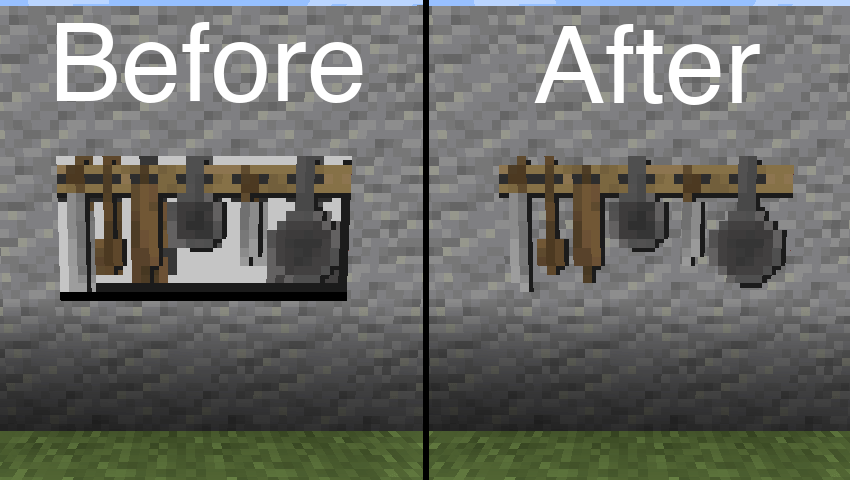
Resource pack được dùng trong hình trên: BwW Texturepack.
Hỗ trợ chính thức Paintings++ Mod!
Các Entity được hỗ trợ
- Armor Stand (1.19.4+)
- End Crystal
- End Crystal Beam (1.21+)
- Item Frame
- Painting
- Player Cape (1.21+)
- Player Armor (1.21+)
- Beacon Beam (tắt theo mặc định)
Nếu bạn muốn một entity khác được mod này hỗ trợ, hãy cho tôi biết trên Discord hoặc GitHub Issues.
Cấu hình
Để thay đổi cấu hình mặc định, hãy dán nội dung tệp json sau vào một tệp trong resource pack của bạn nằm tại /assets/transparent/transparent.json.
{ "armorstand": true, "beaconbeam": false, "endcrystal": true, "endcrystalbeam": true, "itemframe": true, "painting": true, "playercape": true, "playerarmor": true }
Báo cáo mọi vấn đề trên GitHub. Trò chuyện trên Discord trong kênh transparent.
Ủng hộ sự phát triển các mod của tôi trên Ko-fi.
Cách cài đặt Transparent
With Millida Launcher
Install Millida Launcher
The launcher is free: download it at millida.net/launcher and sign in with any nickname.
Click “Install” on this page
The launcher opens and installs the mod for Minecraft 1.20.1–1.21.5 on Fabric, Forge, NeoForge or Quilt automatically.
Launch the game
A profile with it appears in the launcher: click “Play”.
Manually
Install Fabric, Forge, NeoForge or Quilt
The loader must match the game version of the mod file, for example Minecraft 1.21.5. After installing it, a separate profile appears in your launcher.
Download the file for your version
In the version list above, pick the file transparent-fabric-21.5.0.jar (35 KB) for your game version and loader.
Put it in the mods folder
The folder is inside .minecraft (Windows: %appdata%\.minecraft\mods). If it does not exist, create it.
Launch the loader profile
Open “Mods” in the main menu: Transparent should be in the list.
Minecraft 1.21.5 runs on Java 21: with a different Java version the game may close right after launch.
Phiên bản
Kèm phụ thuộc
| Minecraft | Loader | Tệp | Ngày | Hành động |
|---|---|---|---|---|
| 1.21.5 | Fabric, Quilt | [Fabric 1.21.5] v21.5.035.3 KB | ||
| 1.21.5 | NeoForge | [NeoForge 1.21.5] v21.5.033.6 KB | ||
| 1.20.6 | Forge | [Forge 1.20.6] v20.6.125.8 KB | ||
| 1.20.1 | Quilt | [Quilt 1.20.1] v8.0.129.4 KB |
Câu hỏi thường gặp
Which Minecraft versions does Transparent work on?
There are files for 1.21.5, 1.20.6, 1.20.1. The newest is 1.21.5.
Is Transparent for Forge or Fabric?
There are files for Fabric: 1.21.5, for Forge: 1.20.6, for NeoForge: 1.21.5 and for Quilt: 1.20.1–1.21.5.
Does Transparent need other mods?
The author lists no required dependencies: the Fabric, Forge, NeoForge or Quilt loader is enough.
Which Java does Transparent need?
Minecraft 1.21.5 runs on Java 21. If the game closes right after launch, the usual cause is the wrong Java version in the profile settings.
Where can I download Transparent safely?
On this page: the file transparent-fabric-21.5.0.jar (35 KB) is stored on Millida’s server, with no link shorteners. SHA-1 checksum: b1ad3807de859e41029047644e38377a0f023716.
Đánh giá
Hãy là người đầu tiên đánh giá Transparent


