
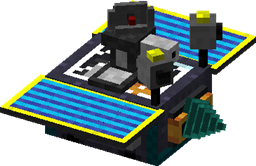
Steve's Carts 2 Mod cho Minecraft 1.7.10
Giới thiệu xe goòng mô-đun vào Minecraft. Hãy để xe goòng của bạn khai thác, làm nông, chạy bằng ánh sáng mặt trời, bắn mob, chế tạo vật phẩm và nhiều hơn nữa.
Giới thiệu mod Steve's Carts 2
Bạn có thể thoải mái sử dụng Steve's Carts 2 trên máy chủ của mình và trong các mod pack của bạn (công khai hoặc riêng tư) miễn là bạn ghi công cho tôi về mod này và không bán các vật phẩm trong trò chơi để lấy tiền thật.
Cách cài đặt Steve's Carts 2
With Millida Launcher
Install Millida Launcher
The launcher is free: download it at millida.net/launcher and sign in with any nickname.
Click “Install” on this page
The launcher opens and installs the mod for Minecraft 1.7.10 automatically.
Launch the game
A profile with it appears in the launcher: click “Play”.
Manually
Download the file for your version
In the version list above, pick the file StevesCarts2.0.0.b18.jar (2.4 MB) for your game version.
Put it in the mods folder
The folder is inside .minecraft (Windows: %appdata%\.minecraft\mods). If it does not exist, create it.
Launch the loader profile
Open “Mods” in the main menu: Steve's Carts 2 should be in the list.
Minecraft 1.7.10 runs on Java 8: with a different Java version the game may close right after launch.
Phiên bản
Kèm phụ thuộc
| Minecraft | Loader | Tệp | Ngày | Hành động |
|---|---|---|---|---|
| 1.7.10 | — | StevesCarts2.0.0.b18.jar2.4 MB |
Câu hỏi thường gặp
Which Minecraft versions does Steve's Carts 2 work on?
Only Minecraft 1.7.10: there are no files for other versions.
Which Java does Steve's Carts 2 need?
Minecraft 1.7.10 runs on Java 8. If the game closes right after launch, the usual cause is the wrong Java version in the profile settings.
Where can I download Steve's Carts 2 safely?
On this page: the file StevesCarts2.0.0.b18.jar (2.4 MB) is stored on Millida’s server, with no link shorteners. SHA-1 checksum: 8cef6d96120bbb8f90e7e111207b74b38df79af9.
Đánh giá
Hãy là người đầu tiên đánh giá Steve's Carts 2


