

Status Effect Bars Mod cho Minecraft 26.2
Thêm các thanh tùy chỉnh vào lớp phủ hiệu ứng trạng thái để hiển thị thời gian còn lại của hiệu ứng.
 Fabric
 Quilt
QuiltGiới thiệu mod Status Effect Bars
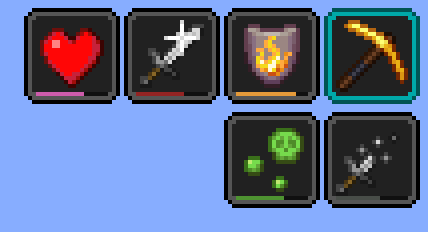
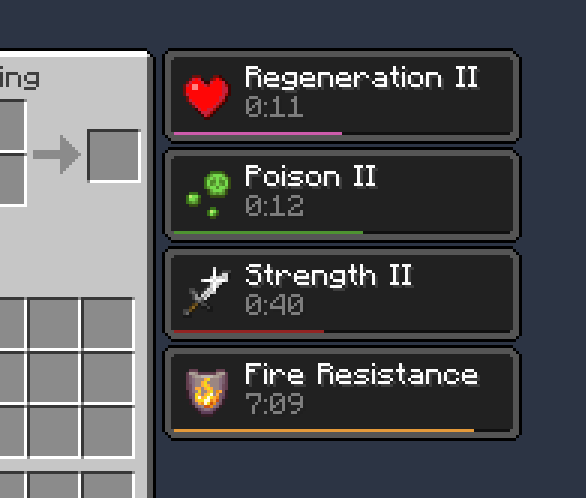
Một mod Fabric phía client thêm các thanh nhỏ tùy chỉnh vào lớp phủ hiệu ứng trạng thái và trong túi đồ để hiển thị thời gian còn lại của các hiệu ứng.
Tính năng:

- Các thanh nhỏ xinh
- Màn hình cấu hình để chỉnh màu sắc và vị trí thanh
- Các thanh có thể tự động ẩn trong một số trường hợp cụ thể để giảm sự lộn xộn (ví dụ: hiệu ứng beacon và hiệu ứng có thời gian rất dài)
Yêu cầu [Cloth Config]. Có thể truy cập màn hình cấu hình bằng Mod Menu.
Ghi công
- Có thể lấy cảm hứng từ HUD hiệu ứng đang hoạt động của SkyUI
- Màn hình cấu hình được cung cấp bởi [Cloth Config]
- Bản dịch ptbr bởi FITFC
Liên kết: CurseForge · GitHub · Modrinth
[Cloth Config]: https://modrinth.com/mod/cloth-config

Cách cài đặt Status Effect Bars
With Millida Launcher
Install Millida Launcher
The launcher is free: download it at millida.net/launcher and sign in with any nickname.
Click “Install” on this page
The launcher opens and installs the mod for Minecraft 1.21.11–26.2 on Fabric or Quilt automatically.
Launch the game
A profile with it appears in the launcher: click “Play”.
Manually
Install Fabric or Quilt
The loader must match the game version of the mod file, for example Minecraft 26.2. After installing it, a separate profile appears in your launcher.
Download the file for your version
In the version list above, pick the file status-effect-bars-1.0.12.jar (44 KB) for your game version and loader.
Put it in the mods folder
The folder is inside .minecraft (Windows: %appdata%\.minecraft\mods). If it does not exist, create it.
Launch the loader profile
Open “Mods” in the main menu: Status Effect Bars should be in the list.
Status Effect Bars works on the player’s side only: there is no need to install it on a server.
Phiên bản
Kèm phụ thuộc
| Minecraft | Loader | Tệp | Hành động |
|---|---|---|---|
| 26.2 | Fabric, Quilt | 26.243.9 KB 18 | |
| 26.1 | Fabric, Quilt | 26.147.4 KB 7 | |
| 1.21.11 | Fabric, Quilt | 1.21.1146.6 KB 62 |
Câu hỏi thường gặp
Which Minecraft versions does Status Effect Bars work on?
There are files for 26.2, 26.1.2, 26.1.1, 26.1, 1.21.11. The newest is 26.2.
Is Status Effect Bars for Forge or Fabric?
There are files for Fabric: 1.21.11–26.2 and for Quilt: 1.21.11–26.2. There are no files for Forge or NeoForge: a mod for another loader will not start.
Does Status Effect Bars need other mods?
The author lists no required dependencies: the Fabric or Quilt loader is enough.
Do I need to install Status Effect Bars on a server?
No. Status Effect Bars works on the player’s side only: there is no need to install it on a server.
Where can I download Status Effect Bars safely?
On this page: the file status-effect-bars-1.0.12.jar (44 KB) is stored on Millida’s server, with no link shorteners. SHA-1 checksum: f29719c3101ebe009dae76bca5215cf7482f8b9c.
Đánh giá
Hãy là người đầu tiên đánh giá Status Effect Bars


