

Spatial GUI Mod cho Minecraft 26.3
Một mod phía máy khách hiển thị màn hình túi đồ & thùng chứa dưới dạng mặt phẳng 3D.
 Fabric
 NeoForge
Spatial GUI
A client-side Minecraft mod that turns screens into immersive 3D displays, with fully configurable first-person and third-person modes.
Features
General
- Visual editor
- Per-screen enable and disable lists for mod compatibility
- Optional world blur behind the screen
- Screen drop shadow
- Configurable HUD and hotbar visibility
- Adjustable GUI scale, render scale, screen opacity, and FOV-aware scaling
- Screen opening animation
- FOV override
- Auto-detect camera mode, switches the camera mode based on perspective
First-person Mode
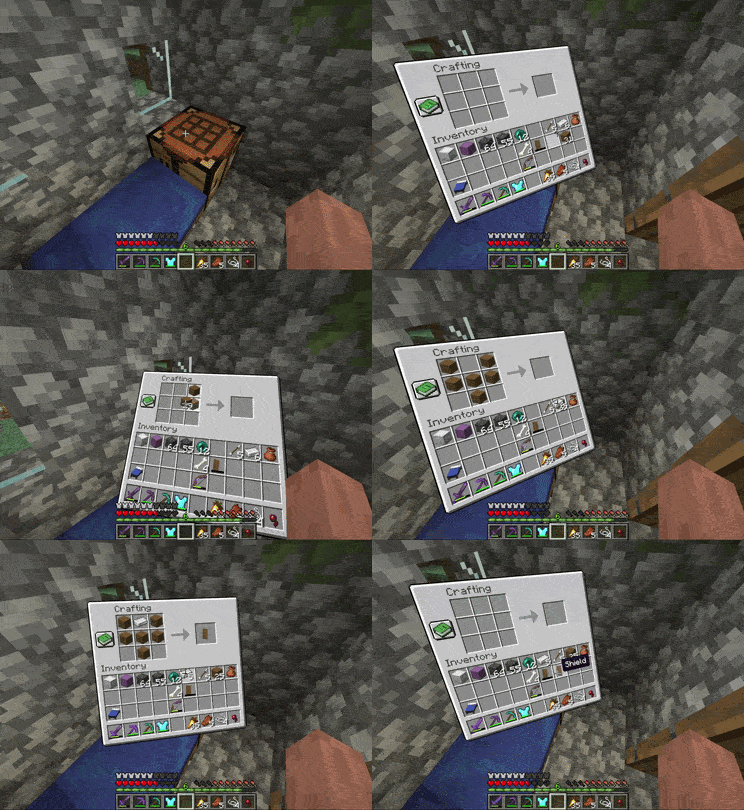
- Crosshair and mouse modes
- Screen position, distance, scale, and rotation are all configurable
- Configurable screen opening animation
- Curved screen option, especially good with mods that add large GUI extensions, such as JEI
Third-person Mode
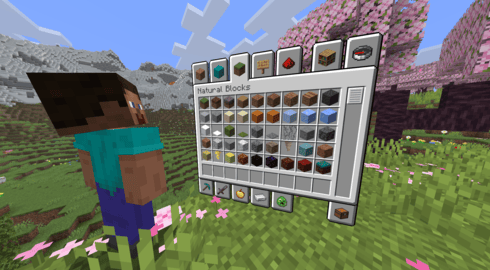
- Camera and screen position, distance, scale, and rotation are all configurable
- Configurable avatar body rotation
- Smooth camera transition and configurable screen opening animation
- Optional fallback to first person when the camera is blocked
Dependencies
Loader - Mod
All - YACL Fabric - Fabric API & Mod Menu
Configuration
Open the config through the keybind (unbound by default), Mod Menu, or the config file. Spatial GUI has many options, so it is worth looking through them to tailor the mod to your preferences.
For advanced users and modpack creators, per-screen configuration profiles are supported via config/spatial-gui/profiles.json5. This file contains documentation.
Visual Editor
Spatial GUI includes a built-in visual editor that lets you configure screen position and scale in real-time. Press the button in the config to enter editor mode, or bind it to a keybind in controls.

Compatibility
Spatial GUI is a client-side mod and does not need to be installed on the server.
However, compatibility isn't guaranteed with every mod. Spatial GUI modifies GUI and camera rendering, which may conflict with mods that modify these as well.
If you find a reproducible incompatibility with another mod, please report it on GitHub so it can be investigated. Reporting an issue helps make the mod better for everyone!
Punchy has built-in compatibility with Spatial GUI in first-person mode! This can be toggled in Punchy's config.
Question - Answer
Does Spatial GUI work in multiplayer? - Yes. Other players and the server do not need to have Spatial GUI installed. Does Spatial GUI give a gameplay advantage? - Spatial GUI is primarily visual and does not add or automate gameplay mechanics. Some settings can change how the camera behaves, so whether it is allowed on a particular server is up to that server's rules. Is Spatial GUI compatible with _____? - Probably! However, compatibility isn't guaranteed, especially with mods that modify GUIs, cameras, or rendering. If you encounter an issue with a specific mod, feel free to report it on GitHub. Why is my GUI behaving strangely? - Another installed mod may be incompatible. Try to identify the mod involved, then check existing GitHub issues or open a new issue with steps to reproduce the problem. Can I use Spatial GUI in a modpack? - Yes. Spatial GUI is welcome in modpacks and no additional permission is required. Compatibility with other mods is not guaranteed. Is Spatial GUI purely visual? - Almost entirely. Spatial GUI changes how existing screens and the camera are presented. One setting intentionally allows your rotation to persist after closing a GUI, which can turn your character's view.
Notes
- Feel free to suggest features or report bugs on the GitHub.
- Spatial GUI is welcome in modpacks, no additional permission required. Be aware that compatibility with some mods may vary.
Special thanks to:
vibing for all of their GitHub contributions Dizabanik for tons of code fixes and improvements BUILDLCS for the Brazilian Portuguese translation suheckii for the Russian translation 22SSendo & jankeverse for particularly awesome feature suggestions Anyone else who reported bugs or suggested features :)
Cách cài đặt Spatial GUI
With Millida Launcher
Install Millida Launcher
The launcher is free: download it at millida.net/launcher and sign in with any nickname.
Click “Install” on this page
The launcher opens and installs the mod for Minecraft 1.21.11–26.3 on Fabric or NeoForge automatically, together with its dependencies: YetAnotherConfigLib (YACL), Fabric API, Mod Menu.
Launch the game
A profile with it appears in the launcher: click “Play”.
Manually
Install Fabric or NeoForge
The loader must match the game version of the mod file, for example Minecraft 26.3. After installing it, a separate profile appears in your launcher.
Download the file for your version
In the version list above, pick the file spatial-gui-1.9+26.3-fabric.jar (307 KB) for your game version and loader.
Put it in the mods folder
The folder is inside .minecraft (Windows: %appdata%\.minecraft\mods). If it does not exist, create it. Required dependencies go there too: YetAnotherConfigLib (YACL), Fabric API, Mod Menu.
Launch the loader profile
Open “Mods” in the main menu: Spatial GUI should be in the list.
Spatial GUI works on the player’s side only: there is no need to install it on a server.
Phiên bản
Kèm phụ thuộc
| Minecraft | Loader | Tệp | Ngày | Hành động |
|---|---|---|---|---|
| 26.3 | Fabric | 26.3307 KB 4 | ||
| 26.3 | NeoForge | 26.3304 KB 1 | ||
| 26.2 | NeoForge | 26.2303 KB | ||
| 26.2 | Fabric | 26.2306 KB 3 | ||
| 26.1.2 | NeoForge | 26.1.2303 KB | ||
| 26.1.2 | Fabric | 26.1.2306 KB | ||
| 1.21.11 | Fabric | 1.21.11303 KB 3 | ||
| 1.21.11 | NeoForge | 1.21.11301 KB 1 |
Yêu cầu để chạy
- YetAnotherConfigLib (YACL)bắt buộc
- Fabric APIbắt buộc
- Mod Menubắt buộc
Đánh giá
Hãy là người đầu tiên đánh giá Spatial GUI


