

Server Tab Info Mod cho Minecraft 1.20.1, 1.12.2
Một mod máy khách và/hoặc máy chủ cung cấp cách tiện lợi để xem thời gian tick trung bình và số tick mỗi giây (TPS) của trò chơi
 NeoForge
 Forge
ForgeGiới thiệu mod Server Tab Info
Đúng ra nên gọi là Tab Info, vì giờ nó cũng hoạt động khi chơi đơn!
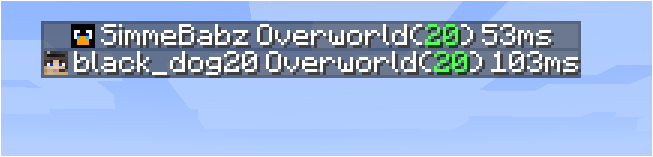
Giới thiệu
Đây là một mod có thể cài trên cả client lẫn server mà không gây lỗi thiếu mod cho client không có mod hoặc server không có mod. Khi kết nối tới server, mod chỉ hoạt động khi server cũng có mod. Phiên bản trên server không cần khớp với phiên bản trên client, nhưng nếu client kết nối tới server có phiên bản quá cũ thì một số tính năng sẽ bị thiếu.
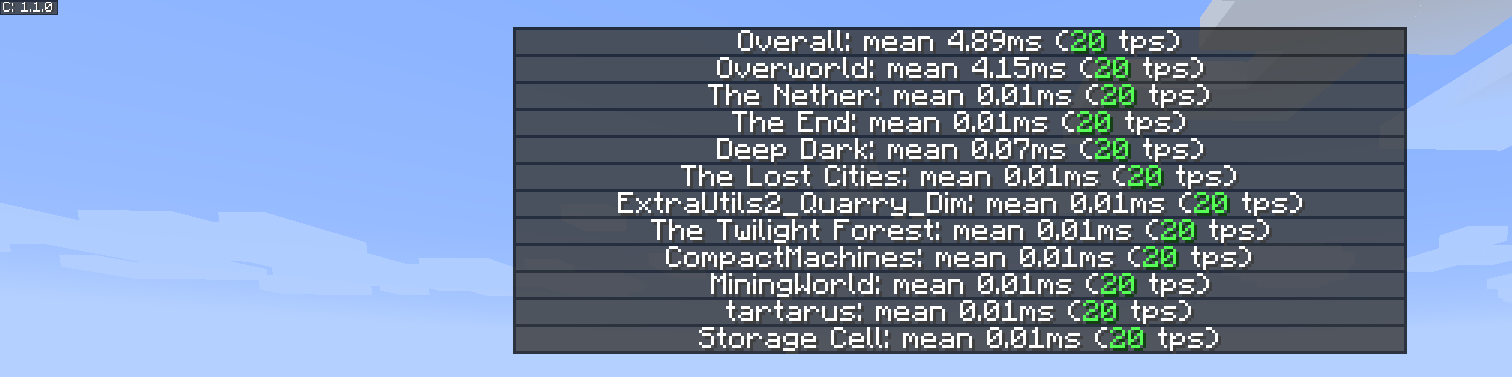
Trình diễn tính năng
Danh sách tps theo chiều không gian mới và cải tiến
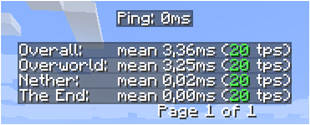
Danh sách người chơi mới

Nguồn cảm hứng
Nguồn cảm hứng cho mod và phần trình bày đều dựa trên một tính năng nhỏ từ MineTogether, khi một mod tùy chọn được cài trên server và tính năng truy vấn đang hoạt động, bạn có thể xem thông tin như tps và thực thể trong thế giới. Nó sẽ hiển thị thông tin này giống như danh sách tab người chơi, khi nhấn Tab + Ctrl.
Điều thôi thúc tôi là nó đã ngừng hoạt động, vì vậy tôi làm mod nhỏ này để xem tps cho tất cả các chiều không gian.
Để kích hoạt gui, nhấn Tab + Ctrl (mặc định nhưng có thể cấu hình trong keybindings), sau đó bạn sẽ thấy tps tổng thể của server và của từng chiều không gian.
Các vấn đề đã biết
- Nếu MineTogether được cài và tích hợp siv được bật cùng với ServerInfoProvider không được cài, bạn có thể gặp vấn đề lag khi dùng keybind cho trang tps, vì chúng dùng cùng keybind.
Để khắc phục vấn đề này, hãy tắt tích hợp siv trong MineTogether hoặc đổi keybind cho trang tps.
Cách cài đặt Server Tab Info
With Millida Launcher
Install Millida Launcher
The launcher is free: download it at millida.net/launcher and sign in with any nickname.
Click “Install” on this page
The launcher opens and installs the mod for Minecraft 1.12–1.20.4 on Forge or NeoForge automatically.
Launch the game
A profile with it appears in the launcher: click “Play”.
Manually
Install Forge or NeoForge
The loader must match the game version of the mod file, for example Minecraft 1.20.4. After installing it, a separate profile appears in your launcher.
Download the file for your version
In the version list above, pick the file ServerTabInfo-1.20.4-1.3.8.jar (109 KB) for your game version and loader.
Put it in the mods folder
The folder is inside .minecraft (Windows: %appdata%\.minecraft\mods). If it does not exist, create it.
Launch the loader profile
Open “Mods” in the main menu: Server Tab Info should be in the list.
Minecraft 1.20.4 runs on Java 17: with a different Java version the game may close right after launch.
Phiên bản
Kèm phụ thuộc
| Minecraft | Loader | Tệp | Ngày | Hành động |
|---|---|---|---|---|
| 1.20.4 | NeoForge | ServerTabInfo-1.20.4-1.3.8.jar109 KB | ||
| 1.20.1 | Forge | ServerTabInfo-1.20-1.3.8.jar101 KB | ||
| 1.17.1 | Forge | ServerTabInfo-1.17.1-1.3.4-b2.jar102 KB | ||
| 1.16.1 | Forge | ServerTabInfo-1.16.1-1.2.7-alpha.jar71.3 KB | ||
| 1.12.1 | — | ServerTabInfo-1.12.2-1.2.6.jar53.5 KB | ||
| 1.13.2 | — | ServerTabInfo-1.13.2-1.2.4-beta.jar51.5 KB |
Câu hỏi thường gặp
Which Minecraft versions does Server Tab Info work on?
There are files for 1.12–1.20.4, 9 versions in total. The newest is 1.20.4.
Is Server Tab Info for Forge or Fabric?
There are files for Forge: 1.16.1–1.20.1 and for NeoForge: 1.20.4. There are no files for Fabric: a mod for another loader will not start.
Does Server Tab Info need other mods?
The author lists no required dependencies: the Forge or NeoForge loader is enough.
Which Java does Server Tab Info need?
Minecraft 1.20.4 runs on Java 17. If the game closes right after launch, the usual cause is the wrong Java version in the profile settings.
Where can I download Server Tab Info safely?
On this page: the file ServerTabInfo-1.20.4-1.3.8.jar (109 KB) is stored on Millida’s server, with no link shorteners. SHA-1 checksum: 10b7839c442bfb1d3ba61870a11344b0db072e3e.
Đánh giá
Hãy là người đầu tiên đánh giá Server Tab Info


