
RFTools Control Mod cho Minecraft 1.20.1, 1.21.1
Tiện ích máy tính tự động hóa và logic cho RFTools
 NeoForge
 Forge
ForgeGiới thiệu mod RFTools Control
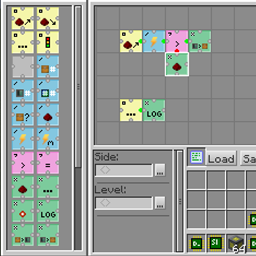
RFTools Control là một mod addon cho các mod RFTools, bổ sung khả năng điều khiển tự động hóa bằng ngôn ngữ lập trình dựa trên lưới trực quan. Sử dụng các opcode mà bạn sắp xếp trong một lưới, bạn có thể di chuyển vật phẩm, điều khiển redstone, kiểm tra năng lượng (RF), v.v. Bạn có thể truy cập các inventory thông thường nhưng mod này cũng hỗ trợ truy cập trực tiếp vào hệ thống được điều khiển bởi storage scanner. Trong tương lai, nó cũng sẽ cung cấp cách để storage scanner tự động chế tạo vật phẩm. Tuy nhiên, điều này chưa được triển khai đầy đủ.
Hai khối chính trong mod này là programmer, được dùng để tạo chương trình, và processor, thực thi các chương trình đó. Networking cũng được cung cấp.
Lưu ý! Phần bình luận đã bị tắt vì tôi khó có thể kiểm tra việc này ở quá nhiều nơi. Nếu bạn muốn gửi báo cáo lỗi thì hãy vào tab 'Issues' hoặc tại đây: RFTools Control Issue Tracker. Nếu bạn muốn thảo luận chung về RFTools, bạn có thể làm điều đó tại đây: RFTools Control on MC Forums
Cách cài đặt RFTools Control
With Millida Launcher
Install Millida Launcher
The launcher is free: download it at millida.net/launcher and sign in with any nickname.
Click “Install” on this page
The launcher opens and installs the mod for Minecraft 1.12–1.21.1 on Forge or NeoForge automatically.
Launch the game
A profile with it appears in the launcher: click “Play”.
Manually
Install Forge or NeoForge
The loader must match the game version of the mod file, for example Minecraft 1.21.1. After installing it, a separate profile appears in your launcher.
Download the file for your version
In the version list above, pick the file rftoolscontrol-1.21-8.0.2.jar (662 KB) for your game version and loader.
Put it in the mods folder
The folder is inside .minecraft (Windows: %appdata%\.minecraft\mods). If it does not exist, create it.
Launch the loader profile
Open “Mods” in the main menu: RFTools Control should be in the list.
Minecraft 1.21.1 runs on Java 21: with a different Java version the game may close right after launch.
Phiên bản
Kèm phụ thuộc
| Minecraft | Loader | Tệp | Ngày | Hành động |
|---|---|---|---|---|
| 1.21.1 | NeoForge | RFToolsControl - 1.21-8.0.2662 KB 1 | ||
| 1.20.1 | Forge | RFToolsControl - 1.20-7.0.4587 KB 1 | ||
| 1.20.1 | Forge | RFToolsControl - 1.20-7.0.0576 KB | ||
| 1.12.2 | — | RFToolsControl - 1.12-2.0.2587 KB | ||
| 1.12.2 | — | RFToolsControl - 1.12-1.9.0-alpha577 KB | ||
| 1.12 | — | rftoolsctrl-1.12-1.6.8beta1.jar568 KB |
Câu hỏi thường gặp
Which Minecraft versions does RFTools Control work on?
There are files for 1.21.1, 1.20.1, 1.12.2, 1.12. The newest is 1.21.1.
Is RFTools Control for Forge or Fabric?
There are files for Forge: 1.20.1 and for NeoForge: 1.21.1. There are no files for Fabric: a mod for another loader will not start.
Does RFTools Control need other mods?
The author lists no required dependencies: the Forge or NeoForge loader is enough.
Which Java does RFTools Control need?
Minecraft 1.21.1 runs on Java 21. If the game closes right after launch, the usual cause is the wrong Java version in the profile settings.
Where can I download RFTools Control safely?
On this page: the file rftoolscontrol-1.21-8.0.2.jar (662 KB) is stored on Millida’s server, with no link shorteners. SHA-1 checksum: ff976f8f58feaf6cc101ab2e51fbfaecac3f27ff.
Đánh giá
Hãy là người đầu tiên đánh giá RFTools Control


