
Respawning Structures Mod cho Minecraft 1.20.1, 1.21.1
Cho phép cấu trúc tự động tái sinh sau một thời gian
 Fabric
 NeoForge
 Forge
ForgeGiới thiệu mod Respawning Structures
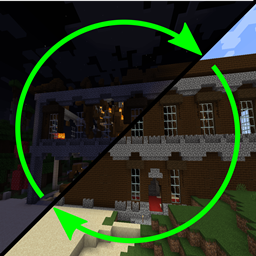
Respawning Structures lets explored structures reset after a configurable amount of time. Think of it like Lootr, but for the whole structure instead of just the loot.
Features:
- Set how long a structure should stay cleared before it can respawn.
- Respawns are delayed while players are nearby or still using the area.
- Structures near beds, spawn points, portals, or player builds are left alone.
- Respawned dungeons can become harder, with stronger mobs, enchanted gear, potion effects, and other upgrades.
- Use whitelists and blacklists to choose exactly which structures can respawn.
- Designed to stay lightweight, with no extra lag beyond the structure generation itself.
Commands:
Respawn the closest structure within 5 chunks to your current player position: /respawningstructures respawnClosestStructure
List nearby structures and their position and respawn stats: /respawningstructures listNearbyStructures
Displays the respawn status of the structure closest to the given position
/respawningstructures structureRespawnStatus <pos>
Sets the flag whether respawning is allowed, true = can respawn(default), false = disabled respawn /respawningstructures setClosestStructureRespawningFlag <true/false>
Requires Cupboard dependency
- Enable/Disable automatic respawn
- Set the time it takes to respawn
- Enable/Disable increased mob difficulty for respawned structures
- White/Blacklist which structures are allowed to respawn
- Dimension black/whitelist
- Minimum distance from player respawn point
No known incompatibilities, should work with any other mods.
Only required on serverside.
Cách cài đặt Respawning Structures
With Millida Launcher
Install Millida Launcher
The launcher is free: download it at millida.net/launcher and sign in with any nickname.
Click “Install” on this page
The launcher opens and installs the mod for Minecraft 1.20.1–1.21.1 on Fabric, Forge or NeoForge automatically.
Launch the game
A profile with it appears in the launcher: click “Play”.
Manually
Install Fabric, Forge or NeoForge
The loader must match the game version of the mod file, for example Minecraft 1.21.1. After installing it, a separate profile appears in your launcher.
Download the file for your version
In the version list above, pick the file respawningstructures-fabric-1.21.1-4.4.jar (78 KB) for your game version and loader.
Put it in the mods folder
The folder is inside .minecraft (Windows: %appdata%\.minecraft\mods). If it does not exist, create it.
Launch the loader profile
Open “Mods” in the main menu: Respawning Structures should be in the list.
Minecraft 1.21.1 runs on Java 21: with a different Java version the game may close right after launch.
Phiên bản
Kèm phụ thuộc
| Minecraft | Loader | Tệp | Ngày | Hành động |
|---|---|---|---|---|
| 1.21.1 | Fabric | respawningstructures-fabric-1.21.1-4.4.jar78.4 KB | ||
| 1.21.1 | NeoForge | respawningstructures-1.21.1-4.4.jar70.2 KB | ||
| 1.20.1 | Forge, NeoForge | respawningstructures-1.20.1-4.4.jar74.9 KB 1 |
Câu hỏi thường gặp
Which Minecraft versions does Respawning Structures work on?
There are files for 1.21.1, 1.20.1. The newest is 1.21.1.
Is Respawning Structures for Forge or Fabric?
There are files for Fabric: 1.21.1, for Forge: 1.20.1 and for NeoForge: 1.20.1–1.21.1.
Does Respawning Structures need other mods?
The author lists no required dependencies: the Fabric, Forge or NeoForge loader is enough.
Which Java does Respawning Structures need?
Minecraft 1.21.1 runs on Java 21. If the game closes right after launch, the usual cause is the wrong Java version in the profile settings.
Where can I download Respawning Structures safely?
On this page: the file respawningstructures-fabric-1.21.1-4.4.jar (78 KB) is stored on Millida’s server, with no link shorteners. SHA-1 checksum: baceb07cbaa039423b7b91a7ba5d1b5066f0fed8.
Đánh giá
Hãy là người đầu tiên đánh giá Respawning Structures


