

Productive Trees Mod cho Minecraft 1.20.1, 1.21.1
Các loài cây có thể nhân giống
 NeoForge
 Forge
ForgeGiới thiệu mod Productive Trees
Giới thiệu mod 'Productive Trees' cho Minecraft, một sản phẩm kế thừa tinh thần của trò chơi nhỏ nhân giống cây từ Forestry. Với mod này, bạn giờ đây có thể tham gia vào nghệ thuật nhân giống cây, cho phép bạn thụ phấn chéo các loài cây khác nhau và trồng những giống cây lai độc đáo. Thời kỳ xây dựng bằng gỗ từ những cây vanilla cũ kỹ nhàm chán đã qua, với bộ sưu tập hơn 160 bộ gỗ độc đáo mới.
Với Productive Trees, bạn có khả năng nhân giống cây một cách chiến lược để tạo ra những loại gỗ đẹp mắt. Hãy thử nghiệm với nhiều sự kết hợp khác nhau để khám phá và mở khóa vô số khả năng thú vị. Hãy tưởng tượng thu hoạch một cái cây không chỉ cung cấp gỗ quý hiếm mà còn mang trái cây hay hạt ngon lành!
Nâng cao kỹ năng lâm nghiệp của bạn, tạo ra những loài cây độc đáo của riêng bạn, và biến thế giới trong game của bạn thành một hệ sinh thái thịnh vượng của những điều kỳ diệu được trồng tùy chỉnh. Tải mod Productive Trees ngay hôm nay và bắt đầu hành trình đổi mới cây cối trong những vùng đất pixel rộng lớn của Minecraft.
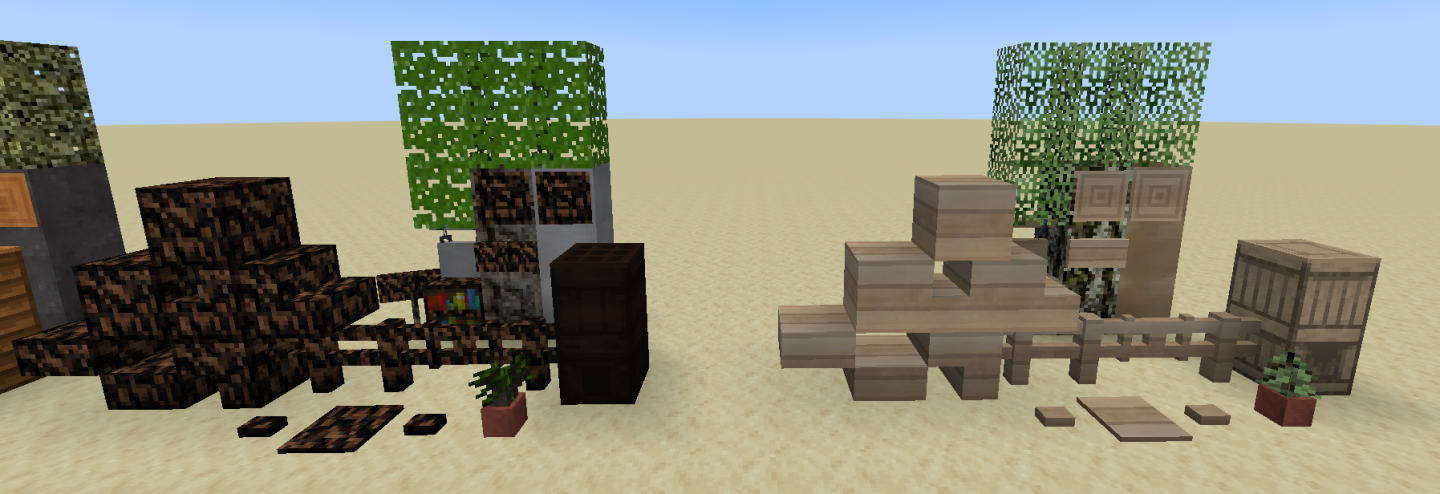
Mod này đang trong giai đoạn beta và chưa hoàn thiện. Những thứ đáng chú ý còn thiếu là các đặc điểm của cây (hình dáng của chúng khi trưởng thành).
Có một server discord nếu bạn cần giúp đỡ hoặc muốn ghé qua và khen ngợi các texture.
"Nhiều gỗ đến mức bạn sẽ phải tìm đến sự chăm sóc y tế" - ẩn danh
Cách cài đặt Productive Trees
With Millida Launcher
Install Millida Launcher
The launcher is free: download it at millida.net/launcher and sign in with any nickname.
Click “Install” on this page
The launcher opens and installs the mod for Minecraft 1.20.1–1.21.1 on Forge or NeoForge automatically.
Launch the game
A profile with it appears in the launcher: click “Play”.
Manually
Install Forge or NeoForge
The loader must match the game version of the mod file, for example Minecraft 1.21.1. After installing it, a separate profile appears in your launcher.
Download the file for your version
In the version list above, pick the file productivetrees-1.21.1-1.1.1.jar (13 MB) for your game version and loader.
Put it in the mods folder
The folder is inside .minecraft (Windows: %appdata%\.minecraft\mods). If it does not exist, create it.
Launch the loader profile
Open “Mods” in the main menu: Productive Trees should be in the list.
Minecraft 1.21.1 runs on Java 21: with a different Java version the game may close right after launch.
Phiên bản
Kèm phụ thuộc
| Minecraft | Loader | Tệp | Ngày | Hành động |
|---|---|---|---|---|
| 1.21.1 | NeoForge | productivetrees-1.21.1-1.1.1.jar13.4 MB 2 | ||
| 1.21.1 | NeoForge | productivetrees-1.21.1-0.6.0.jar3.2 MB | ||
| 1.20.1 | NeoForge, Forge | productivetrees-1.20.1-0.2.6.jar14 MB | ||
| 1.20.1 | NeoForge, Forge | productivetrees-1.20.1-0.1.0.jar13.3 MB |
Câu hỏi thường gặp
Which Minecraft versions does Productive Trees work on?
There are files for 1.21.1, 1.20.1. The newest is 1.21.1.
Is Productive Trees for Forge or Fabric?
There are files for Forge: 1.20.1 and for NeoForge: 1.20.1–1.21.1. There are no files for Fabric: a mod for another loader will not start.
Does Productive Trees need other mods?
The author lists no required dependencies: the Forge or NeoForge loader is enough.
Which Java does Productive Trees need?
Minecraft 1.21.1 runs on Java 21. If the game closes right after launch, the usual cause is the wrong Java version in the profile settings.
Where can I download Productive Trees safely?
On this page: the file productivetrees-1.21.1-1.1.1.jar (13 MB) is stored on Millida’s server, with no link shorteners. SHA-1 checksum: 33b7f304e4e13297fdbbef4822f8b178d73868cc.
Đánh giá
Hãy là người đầu tiên đánh giá Productive Trees


