
 NeoForge
 Forge
ForgeGiới thiệu mod Petrock - Forge
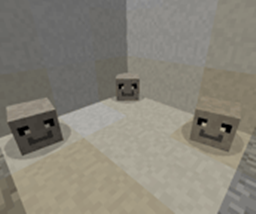
Pet Rock Mod là Pet Rock Mod duy nhất mà bạn sẽ cần. Bạn sẽ không bao giờ phải cho ăn, dắt đi dạo, tắm rửa, chải lông hay triệt sản! Mọi Pet Rock đều được huấn luyện để "ngồi" và "ở yên" và tuyệt nhất là thú cưng đá của bạn là thú cưng duy nhất sẽ không bao giờ bỏ chạy!
Những gì bạn sẽ nhận được trong Hộp:
- 1 Petrock
Đảm bảo cứng như đá 100%!
Cách để có một con:
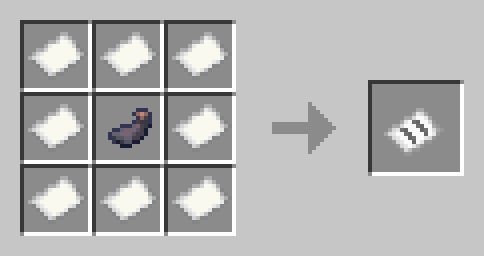
nhấp chuột phải và bạn sẽ nhận được một PetRock trong hộp. Nếu bạn nhấp chuột phải vào hộp, một Untamed PetRock sẽ xuất hiện dưới chân bạn. Để thuần hóa một PetRock bạn cần lấy Stoneium từ Stoneium Ore
Để hồi máu cho một con đá bị hư hại bạn sẽ cần chế tạo Rock Kibble:
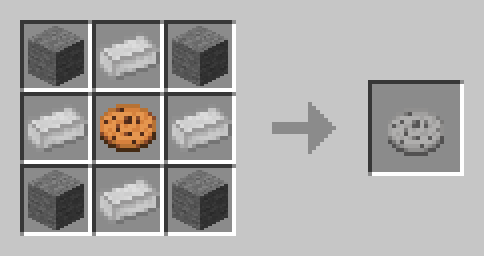
Chưa thuần hóa:
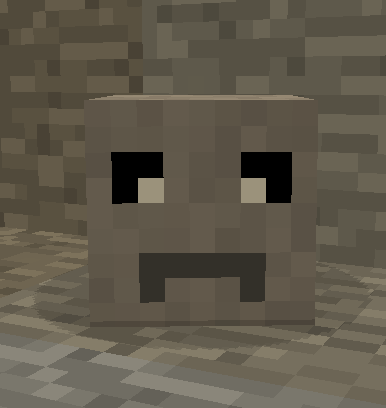
Đã thuần hóa: Đi theo và Ngồi:
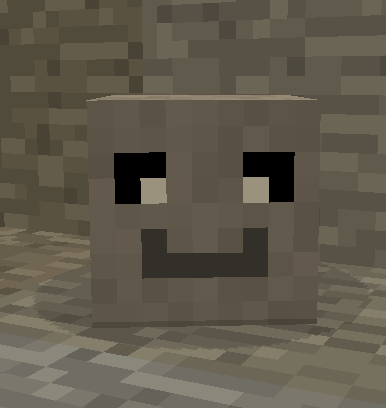
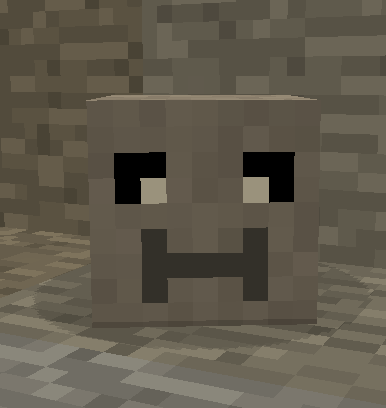
Thông tin phân phối lại Mod:
Để phân phối lại ngoài CuseForge vui lòng truy cập đây:
https://manmaed.net/mod-redistribution-info/
Câu trả lời nhiều khả năng sẽ là Không
Cách cài đặt Petrock - Forge
With Millida Launcher
Install Millida Launcher
The launcher is free: download it at millida.net/launcher and sign in with any nickname.
Click “Install” on this page
The launcher opens and installs the mod for Minecraft 1.10.2–1.21.1 on Forge or NeoForge automatically.
Launch the game
A profile with it appears in the launcher: click “Play”.
Manually
Install Forge or NeoForge
The loader must match the game version of the mod file, for example Minecraft 1.21.1. After installing it, a separate profile appears in your launcher.
Download the file for your version
In the version list above, pick the file petrock-neo-0.18.7.jar (658 KB) for your game version and loader.
Put it in the mods folder
The folder is inside .minecraft (Windows: %appdata%\.minecraft\mods). If it does not exist, create it.
Launch the loader profile
Open “Mods” in the main menu: Petrock - Forge should be in the list.
Minecraft 1.21.1 runs on Java 21: with a different Java version the game may close right after launch.
Phiên bản
Kèm phụ thuộc
| Minecraft | Loader | Tệp | Ngày | Hành động |
|---|---|---|---|---|
| 1.21 | NeoForge | PetRock v0.18.7 - NeoForge - 1.21658 KB | ||
| 1.21 | NeoForge | PetRock v0.18.4 - NeoForge - 1.21647 KB | ||
| 1.19.2 | Forge | Petrock v0.11.16 - 1.19.2240 KB | ||
| 1.19.2 | Forge | Petrock v0.11.14 - 1.19.2250 KB | ||
| 1.12.2 | — | PetRock v 0.3.0 - 1.12.286.1 KB | ||
| 1.10.2 | — | PetRock v0.1.0 - 1.10.238.5 KB |
Câu hỏi thường gặp
Which Minecraft versions does Petrock - Forge work on?
There are files for 1.21.1, 1.21, 1.19.2, 1.12.2, 1.10.2. The newest is 1.21.1.
Is Petrock - Forge for Forge or Fabric?
There are files for Forge: 1.19.2 and for NeoForge: 1.21–1.21.1. There are no files for Fabric: a mod for another loader will not start.
Does Petrock - Forge need other mods?
The author lists no required dependencies: the Forge or NeoForge loader is enough.
Which Java does Petrock - Forge need?
Minecraft 1.21.1 runs on Java 21. If the game closes right after launch, the usual cause is the wrong Java version in the profile settings.
Where can I download Petrock - Forge safely?
On this page: the file petrock-neo-0.18.7.jar (658 KB) is stored on Millida’s server, with no link shorteners. SHA-1 checksum: 600d8956869925d65bd8cbf181fe163b2fcfa9ac.
Đánh giá
Hãy là người đầu tiên đánh giá Petrock - Forge


