

Pack Analytics Mod cho Minecraft 1.20.1, 1.21.1
Thu thập số liệu đếm người chơi cho các tác giả modpack.
 NeoForge
 Fabric
 Forge
ForgeGiới thiệu mod Pack Analytics

Mod đơn giản thu thập số liệu thống kê ẩn danh về số lượng người chơi cho các tác giả modpack, gửi đến một máy chủ web tập trung và lưu trữ trong InfluxDB để dễ dàng xem dữ liệu lịch sử bằng Grafana.



Mod này tích hợp với Better Compatibility Checker và sẽ sử dụng số phiên bản từ cấu hình BCC của bạn nếu có thể.
URL điểm cuối số liệu có thể cấu hình được, cùng với ID gói và tốc độ gửi các yêu cầu keepalive.
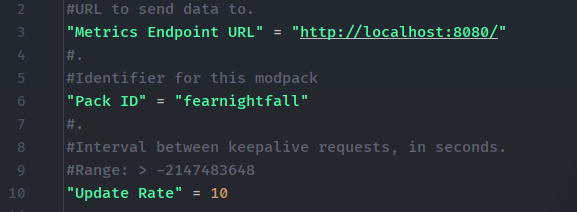
Bạn có thể tìm thấy một máy chủ ví dụ tại đây trên GitHub, máy chủ này chỉ thu thập số liệu sử dụng hiện tại cho mỗi ID modpack và tùy chọn gửi đến Grafana.
Lưu ý: mod này không gửi thông tin người chơi, tên người dùng hay ID. Nó chỉ thực hiện một yêu cầu đơn giản kiểu "tôi đang chơi" kèm theo phiên bản modpack bạn đang dùng, định kỳ, để theo dõi người chơi trực tuyến.
Cách cài đặt Pack Analytics
With Millida Launcher
Install Millida Launcher
The launcher is free: download it at millida.net/launcher and sign in with any nickname.
Click “Install” on this page
The launcher opens and installs the mod for Minecraft 1.20–1.21.1 on Fabric, Forge or NeoForge automatically.
Launch the game
A profile with it appears in the launcher: click “Play”.
Manually
Install Fabric, Forge or NeoForge
The loader must match the game version of the mod file, for example Minecraft 1.21.1. After installing it, a separate profile appears in your launcher.
Download the file for your version
In the version list above, pick the file packanalytics-neoforge-1.0.5-1.21.1.jar (706 KB) for your game version and loader.
Put it in the mods folder
The folder is inside .minecraft (Windows: %appdata%\.minecraft\mods). If it does not exist, create it.
Launch the loader profile
Open “Mods” in the main menu: Pack Analytics should be in the list.
Minecraft 1.21.1 runs on Java 21: with a different Java version the game may close right after launch.
Phiên bản
Kèm phụ thuộc
| Minecraft | Loader | Tệp | Ngày | Hành động |
|---|---|---|---|---|
| 1.21.1 | NeoForge | PackAnalytics Neoforge 1.0.5 for 1.21.1706 KB | ||
| 1.21.1 | Fabric | PackAnalytics Fabric 1.0.4 for 1.21.11.3 MB | ||
| 1.20.1 | Forge | PackAnalytics Forge 1.0.4 for 1.20.1706 KB |
Câu hỏi thường gặp
Which Minecraft versions does Pack Analytics work on?
There are files for 1.21.1, 1.20.1, 1.20. The newest is 1.21.1.
Is Pack Analytics for Forge or Fabric?
There are files for Fabric: 1.21.1, for Forge: 1.20–1.20.1 and for NeoForge: 1.21.1.
Does Pack Analytics need other mods?
The author lists no required dependencies: the Fabric, Forge or NeoForge loader is enough.
Which Java does Pack Analytics need?
Minecraft 1.21.1 runs on Java 21. If the game closes right after launch, the usual cause is the wrong Java version in the profile settings.
Where can I download Pack Analytics safely?
On this page: the file packanalytics-neoforge-1.0.5-1.21.1.jar (706 KB) is stored on Millida’s server, with no link shorteners. SHA-1 checksum: 2bd790f7347c95f6227d0030cfa335a5422f1997.
Đánh giá
Hãy là người đầu tiên đánh giá Pack Analytics


