
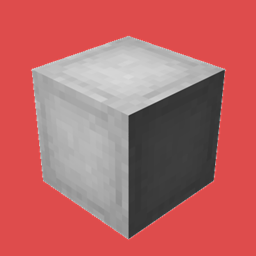
OpenBlocks Elevator (Fabric) Mod cho Minecraft 1.21.11
Mod này thêm khối Elevator nổi tiếng từ 1.12.2, hoạt động đầy đủ để bạn có thể dịch chuyển lên xuống trong thế giới của mình.
- lượt tải
- 2 lượt tải
- lượt xem
- 17 lượt xem
- Đã cập nhật
- Đã cập nhật 19.10.2026
- 1.21.9 — 1.21.11
 Fabric
GIỜ ĐÃ CÓ NGỤY TRANG tương thích với mọi khối!!!
Giới thiệu
Bản port đơn giản của mod OpenBlocks Elevator sang Fabric
Mod này thêm khối Elevator nổi tiếng của 1.12.2, hoạt động đầy đủ để bạn có thể dịch chuyển lên xuống trong thế giới của mình. Nhấp chuột phải vào bất kỳ khối nào để ngụy trang thang máy.
Công thức chế tạo vẫn giống như vậy.
Để chỉnh sửa phạm vi khối, bạn phải chỉnh sửa config thủ công.
Vào thư mục minecraft của bạn và mở thư mục config. Chỉnh sửa tệp "openblocksconfig.properties" và thay đổi giá trị 20 thành giá trị bạn muốn.
Nếu bạn đang host một server, hãy vào thư mục server của bạn và chỉnh sửa tệp config.
Yêu cầu Fabric API
Chỉ dành cho fabric
Cài đặt mod này trên cả Client và Server để hoạt động
Tải phiên bản mới nhất để không gặp lỗi trong game
Hình ảnh
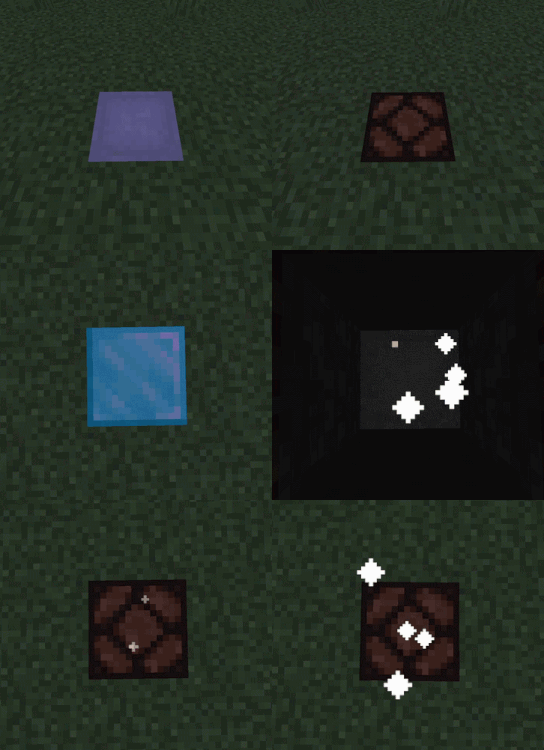
Công thức
Nếu bạn muốn tôi port mod này sang một phiên bản minecraft cụ thể, chỉ cần để lại bình luận :)
Thoải mái sử dụng mod này trong modpack của bạn
Mod gốc Open Blocks
Cách cài đặt OpenBlocks Elevator (Fabric)
With Millida Launcher
Install Millida Launcher
The launcher is free: download it at millida.net/launcher and sign in with any nickname.
Click “Install” on this page
The launcher opens and installs the mod for Minecraft 1.21.9–1.21.11 on Fabric automatically.
Launch the game
A profile with it appears in the launcher: click “Play”.
Manually
Install Fabric
The loader must match the game version of the mod file, for example Minecraft 1.21.11. After installing it, a separate profile appears in your launcher.
Download the file for your version
In the version list above, pick the file openblocks-1.0.0-1.21.9_1.21.11.jar (37 KB) for your game version.
Put it in the mods folder
The folder is inside .minecraft (Windows: %appdata%\.minecraft\mods). If it does not exist, create it.
Launch the loader profile
Open “Mods” in the main menu: OpenBlocks Elevator (Fabric) should be in the list.
Minecraft 1.21.11 runs on Java 21: with a different Java version the game may close right after launch.
Phiên bản
Kèm phụ thuộc
| Minecraft | Loader | Tệp | Ngày | Hành động |
|---|---|---|---|---|
| 1.21.9 | Fabric | openblocks-1.0.0-1.21.9_1.21.11.jar37.4 KB 2 |
Câu hỏi thường gặp
Which Minecraft versions does OpenBlocks Elevator (Fabric) work on?
There are files for 1.21.11, 1.21.10, 1.21.9. The newest is 1.21.11.
Is OpenBlocks Elevator (Fabric) for Forge or Fabric?
Only for Fabric: 1.21.9–1.21.11. There are no files for Forge or NeoForge: a mod for another loader will not start.
Does OpenBlocks Elevator (Fabric) need other mods?
The author lists no required dependencies: the Fabric loader is enough.
Which Java does OpenBlocks Elevator (Fabric) need?
Minecraft 1.21.11 runs on Java 21. If the game closes right after launch, the usual cause is the wrong Java version in the profile settings.
Where can I download OpenBlocks Elevator (Fabric) safely?
On this page: the file openblocks-1.0.0-1.21.9_1.21.11.jar (37 KB) is stored on Millida’s server, with no link shorteners. SHA-1 checksum: 80ae51317758a0f56352719a2ac478f02997ff3d.
Đánh giá
Hãy là người đầu tiên đánh giá OpenBlocks Elevator (Fabric)


