

Moving Elevators Mod cho Minecraft 1.12.2, 26.3
Moving Elevators thêm thang máy thực thụ vào Minecraft!
 NeoForge
 Fabric
 Quilt
Quilt Forge
ForgeGiới thiệu mod Moving Elevators
Moving Elevators allows you to build real moving elevators! These elevator will move you as well as other entities on the platform to multiple floors at the press of a button! The platform can have different sizes and can move at different speeds! You can even disguise the Elevator Controller and Display as other blocks!
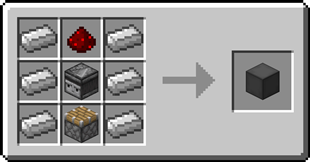
#### Elevator Controller
- The Elevator Controller will be your button panel at every floor!
- Right-click a side without buttons to change the platform speed and size, and the floor name
- Right-click the middle button to request the platform and use the other two to move up and down
- Right-click with a block to disguise the Elevator Controller as that block
- Send a redstone signal to request the platform and see if the platform is there with a comparator
Recipe
#### Elevator Display
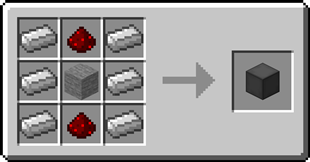
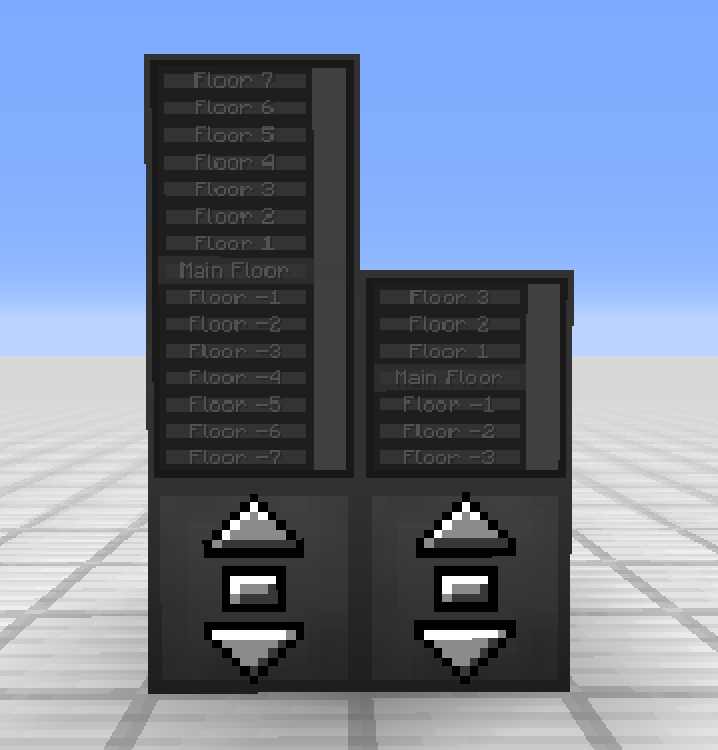
- The Elevator Display shows the different floors and the current elevator position
- Right-click the current floor to request the platform and use the other buttons to go to different floors
- Right-click a floor button with a dye to change the color of that floor
- Right-click with a block to disguise the Elevator Display as that block
Recipe
#### Remote Elevator Panel
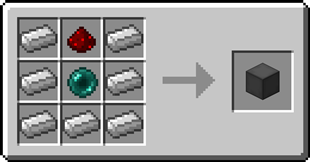
- Can be bound to an Elevator Controller and can be placed anywhere
- Elevator Displays can be put on top just like the Elevator Controller
Recipe
Step-by-step Guide:
Creating an Elevator
- Craft at least 2 Elevator Controllers
- Place the first Elevator Controller where you want your elevator
- Right-Click on a side of the Elevator Controller that has no buttons
- Set your desired platform size and speed
- Gather the blocks for your platform
- Place the blocks one block lower than the Elevator Controller in front of the side with the buttons
- Place the other Elevator Controllers above or below the first one and facing the same direction
- Use the middle button to request the platform and the other two to move up or down

Adding an Elevator Display
- Craft 1 or 2 Elevator Displays
- Place the first Elevator Display on top of an Elevator Controller
- (Optional) Place the second Elevator Display on top of the first one for an extra tall display
- Use the button for the current floor to request the platform and use the other buttons to go to different floors
Disguising an Elevator Controller or Elevator Display
- Hold the block you want to use as a disguise in your hand
- Right-Click one of the sides of the Elevator Controller or Elevator Display without buttons

Removing the disguise from an Elevator Controller or Elevator Display
- Grab an empty hand
- Shift-Right-Click one of the sides of the Elevator Controller or Elevator Display without buttons
Changing a floor name
- Right-Click one of the sides of the Elevator Controller or Elevator Display without buttons
- Enter the desired floor name in the text field
Coloring a floor
- Hold a dye in your hand
- Right-Click the button of a floor on the Elevator Display
Binding a Remote Elevator Panel
- Hold an Elevator Controller in your hand
- Right-Click on an Elevator Controller
My elevator just went through a block, is this normal? Yes, the platform will ignore blocks not at floor level. This is for performance reasons, as checking hundreds of blocks every tick is not a good idea Is there a limit on the distance between floors? No, there is no limit Does the Elevator Controller consume energy? No, the Elevator Controller does not consume energy Can I use your mod in my modpack? Yes, feel free to use my mod in your modpack
Discord
For future content, upcoming mods, and discussion, feel free to join the SuperMartijn642 discord server! [ ](https://discord.gg/QEbGyUYB2e)
Cách cài đặt Moving Elevators
With Millida Launcher
Install Millida Launcher
The launcher is free: download it at millida.net/launcher and sign in with any nickname.
Click “Install” on this page
The launcher opens and installs the mod for Minecraft 1.12–26.3 on Fabric, Forge, NeoForge or Quilt automatically, together with its dependencies: SuperMartijn642's Config Lib, Fabric API, SuperMartijn642's Core Lib.
Launch the game
A profile with it appears in the launcher: click “Play”.
Manually
Install Fabric, Forge, NeoForge or Quilt
The loader must match the game version of the mod file, for example Minecraft 26.3. After installing it, a separate profile appears in your launcher.
Download the file for your version
In the version list above, pick the file movingelevators-1.4.12-neoforge-mc26.3.jar (341 KB) for your game version and loader.
Put it in the mods folder
The folder is inside .minecraft (Windows: %appdata%\.minecraft\mods). If it does not exist, create it. Required dependencies go there too: SuperMartijn642's Config Lib, Fabric API, SuperMartijn642's Core Lib.
Launch the loader profile
Open “Mods” in the main menu: Moving Elevators should be in the list.
On a server
A server on Fabric, Forge, NeoForge or Quilt
The mod only works on a server with the same loader and game version, for example 26.3.
File goes into the server’s mods folder
Stop the server, put the mod file into the mods folder and start the server again.
Use the “To server” button
On Millida Hosting, the button at the top of the page uploads the file to your server and restarts it for you.
Phiên bản
Kèm phụ thuộc
| Minecraft | Loader | Tệp | Ngày | Hành động |
|---|---|---|---|---|
| 26.3 | NeoForge | 26.3341 KB 1 | ||
| 26.3 | Fabric, Quilt | 26.3346 KB 4 | ||
| 26.2 | NeoForge | 26.2341 KB | ||
| 1.12.2 | Forge | 1.12.21.2 MB 2 | — |
Yêu cầu để chạy
- SuperMartijn642's Config Libbắt buộc
- Fabric APIbắt buộc
- SuperMartijn642's Core Libbắt buộc
Câu hỏi thường gặp
Which Minecraft versions does Moving Elevators work on?
There are files for 26.3, 26.2, 1.12.2, 1.12.1, 1.12. The newest is 26.3.
Is Moving Elevators for Forge or Fabric?
There are files for Fabric: 26.3, for Forge: 1.12–1.12.2, for NeoForge: 26.2–26.3 and for Quilt: 26.3.
What does Moving Elevators need to work?
Required: SuperMartijn642's Config Lib, Fabric API, SuperMartijn642's Core Lib. Without them the mod will not start: dependencies go into the same mods folder.
Does Moving Elevators work on a server?
Yes. Moving Elevators works both in singleplayer and on a server.
Where can I download Moving Elevators safely?
On this page: the file movingelevators-1.4.12-neoforge-mc26.3.jar (341 KB) is stored on Millida’s server, with no link shorteners. SHA-1 checksum: 2dfda2f5f688f015c05b850cc8c896448a73c0ef.
Đánh giá
Hãy là người đầu tiên đánh giá Moving Elevators


