

Modpack Configuration Checker Mod cho Minecraft 1.12.2, 1.21
Một mod cho phép người tạo modpack hiển thị ghi công modpack và xác minh modpack đã được thiết lập đúng cách.
 Forge
Forge Fabric
Giới thiệu mod Modpack Configuration Checker
Vui lòng báo cáo mọi lỗi trong trình theo dõi vấn đề tại đây
Modpack Configuration Checker
Modpack Configuration Checker là một mod có thể tùy chỉnh cao, cho phép người tạo modpack tùy chỉnh Minecraft để hỗ trợ modpack tốt hơn. Nó cung cấp các tính năng như hiển thị trang web khi khởi chạy cho đến các tính năng như kiểm tra xem người dùng modpack đã cấp đủ RAM cho modpack hay chưa. Mod này mở rộng đáng kể số lượng tùy chọn mà tác giả modpack có.
Mod có thể dễ dàng được cấu hình ngay trong game (hướng dẫn bên dưới). Tuy nhiên, nếu không cấu hình, Modpack Configuration Checker sẽ xác minh rằng ít nhất 2gb RAM đã được cấp cho modpack, giúp tăng đáng kể hiệu năng và giảm thiểu crash.
Một số tính năng mà mod cung cấp:
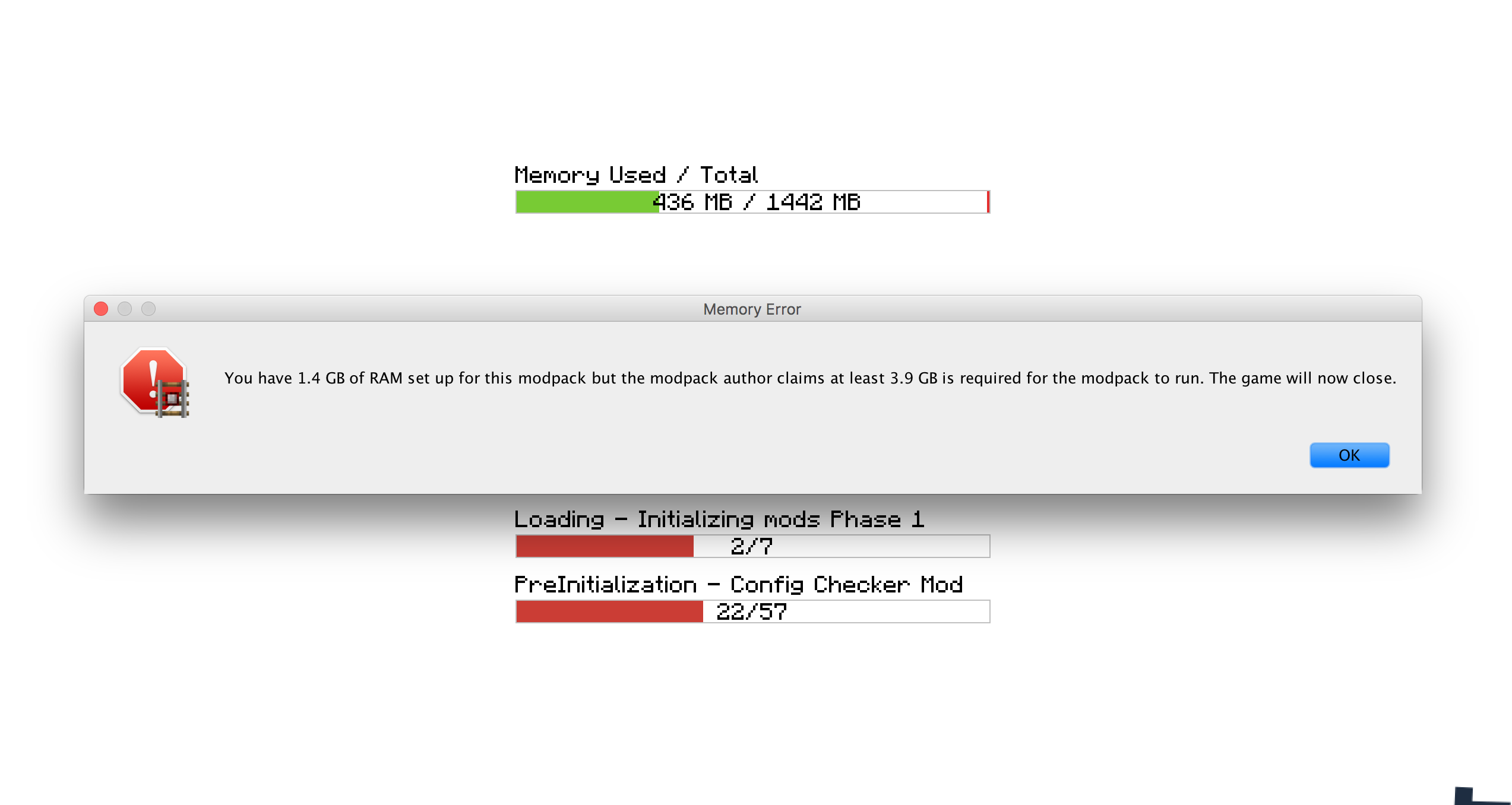
- Đặt mức RAM yêu cầu cần thiết để modpack chạy. Nếu yêu cầu này không được đáp ứng, nó sẽ cảnh báo người dùng và đóng game.
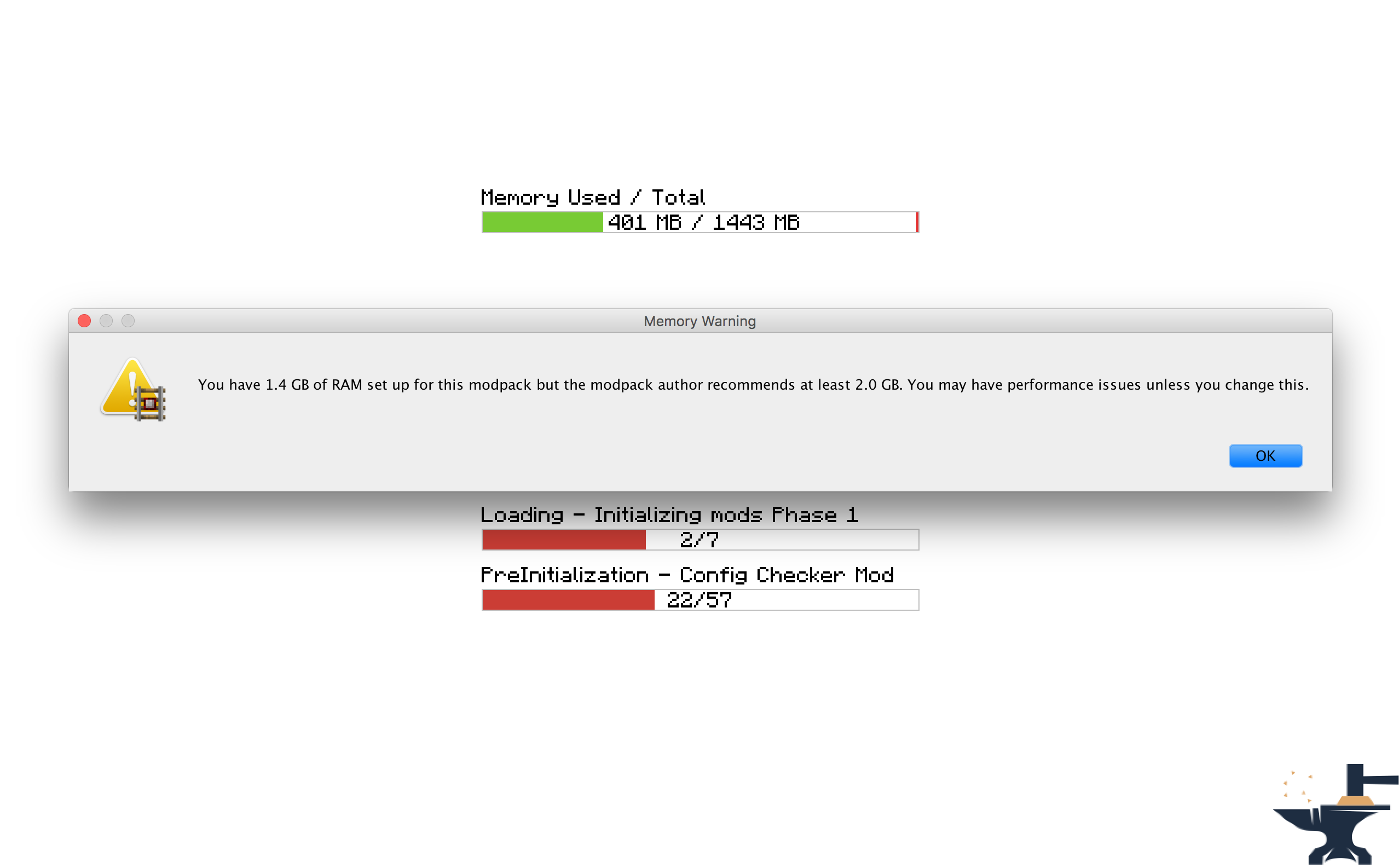
- Đặt mức RAM khuyến nghị cho modpack chạy. Nếu yêu cầu này không được đáp ứng thì người dùng sẽ được cảnh báo.
- Đặt một trang web để mở khi game khởi chạy. Hữu ích để mở trang web modpack hoặc trang hỗ trợ.
- Đặt một thông báo tùy chỉnh để hiển thị khi game tải, ví dụ để hiển thị credits.
- Đặt thông báo tùy chỉnh để hiển thị khi yêu cầu RAM không được đáp ứng. Hữu ích để làm cho mod phù hợp với phong cách của pack của bạn.
- Khả năng thay đổi xem các hộp thông báo có xuất hiện trên các cửa sổ khác hay không.
- Đặt thông báo chào mừng tùy chỉnh xuất hiện trong chat khi game được tải.
Giấy phép
Hãy thoải mái sử dụng mod này trong bất kỳ modpack nào và đăng trên các diễn đàn khác. Chỉ cần đảm bảo đặt liên kết trở lại đây. Xem Toàn bộ Giấy phép Tại đây
Ảnh chụp màn hình
Cách Cấu hình (Minecraft 1.13 +
Tôi rất khuyến khích đưa mod này vào modpack của bạn: https://www.curseforge.com/minecraft/mc-mods/configured.
Điều này sẽ cho phép cấu hình ngay trong game, giúp công việc của bạn dễ dàng hơn nhiều.
Bước 1) Nhấp vào nút 'Mods' trên màn hình menu chính.
Bước 2) Chọn 'Modpack Config Checker từ danh sách các mod bên trái.
Bước 3) Nhấp vào nút 'Config' ở góc dưới bên trái.
Ghi chú
- Nếu bạn không chắc một cài đặt làm gì, di chuột qua nó sẽ hiển thị một mô tả ngắn giúp mọi thứ rõ ràng hơn. Tuy nhiên nếu bạn vẫn không chắc, hãy thử nghiệm!! Hoặc nếu bạn muốn, hãy gửi cho tôi một PM hoặc để lại bình luận trên chủ đề này. Tôi sẽ sẵn lòng giải thích bất kỳ cơ chế nào của mod cho bạn.
Cấu hình Thủ công (1.13.x - 1.20.x)
Cấu hình Thủ công (Nằm trong thư mục game tại: Config\concheckrmd-client.toml)
Phần này hướng dẫn bạn cách cấu hình mod thủ công mà không cần GUI tùy chọn. Mở tệp cấu hình bằng notepad hoặc trình soạn thảo văn bản.
Phiên bản tô màu của tệp cấu hình. Điều này sẽ cho bạn thấy những giá trị nào có thể và không thể thay đổi.
Chú giải Màu
XANH DƯƠNG: Boolean (Nghĩa là chúng chỉ có thể được đổi thành 'true' hoặc 'false')
ĐỎ: String (Nghĩa là chúng có thể được đổi thành bất kỳ văn bản nào. ví dụ: 'Hello World')
Xanh lá: Integers (Nghĩa là chúng có thể được đổi thành bất kỳ số nào. ví dụ: '512')
["Customisable Chat Greeting Message"] The color of the message to be displayed in chat. Allowed Values: Blue, Green, Red, Aqua, Yellow, White, Black, Grey, Purple, DarkBlue, DarkGreen, DarkRed, DarkPurple "3) Greeting Message Color" = "Yellow" The text to be displayed in chat. "2) Greeting Message Text" = "Hello there! Welcome to my modpack." Customisable message that will be displayed in chat when a world is loaded. "1) Display Chat Greeting Message?" = true
["Customisable Start Message"] Customisable message that will appear each time the game starts. This is useful for displaying credits. "1) Display message box?" = true Will the window show on top of all other windows? Recommended to keep set to True. "2) Display message box topmost?" = true The text that will be displayed in the message box. "3) Message Box Text" = "Hello Modpack Users! Made by mattr"
["Customisable First Start Message"] A message box that will be displayed when the game is started for the first time. This is useful for displaying instructions. "1) Display message box?" = true Will the window show on top of all other windows? Recommended to keep set to True. "2) Display message box topmost?" = true The text that will be displayed in the message box. "3) Message Box Text" = "Welcome. Thank you for starting my mofdpack for the first time!"
["Open A Website when the Game Starts"] Opens a webpage when the game starts. This is useful for modpack support. "1) Display Website when game starts?" = true The URL of the website that will be displayed. This can be formatted like: http://google.com, www.google.com or google.com. "2) Website URL" = "minecraft.curseforge.com/projects/config-checker"
["Amount of RAM Recommended for Game to Start"] The amount of RAM recommended for stable gameplay. Range: 128 ~ 51200 "1) Ram Recommended (IN MB)" = 12048 If the player has less than the recommended amount of RAM assigned to the modpack then a warning will be displayed when the game is started. "2) Check RAM meets recommendation?" = true The custom message to be displayed if you have set the previous setting to 'True'. Will display custom message instead of the default text. "5) Custom Message" = "You should assign more RAM to experience better performance." Will the window show on top of all other windows? I highly recommend this is left as true. "3) Display message box topmost?" = true Customise the text that appears in the warning message. Will display custom message instead of the default text. "4) Customise low RAM Warning?" = false
["Recommended RAM Chat Message"] The amount of RAM recommended for stable gameplay. Range: 128 ~ 51200 "1) Ram Recommended (IN MB)" = 51200 If the player has less than the recommended amount of RAM assigned to the modpack then a warning will be displayed in chat when a world is loaded. "2) Check RAM meets recommendation?" = true Customise the text that appears in the warning message. Will display custom message instead of the default text. "3) Customise low RAM Warning?" = true The custom message to be displayed in chat if you have set the previous setting to 'True'. Will display custom message instead of the default text. "4) Custom Message" = "You should assign more RAM to experience better performance."
["Amount of RAM Required for Game to Start"] If the player has less than the required amount of RAM assigned to the modpack then they will be alerted as the game starts and the game will close. "2) Check RAM meets requirement?" = true The amount of RAM required for the game to run. Range: 128 ~ 51200 "1) Ram Required (IN MB)" = 1024 The custom message to be displayed if you have set the previous setting to 'True'. Will display custom message instead of the default text. "5) Custom Message" = "You need more RAM. The game will close." Will the window show on top of all other windows? I highly recommend this is left as true. "3) Display message box topmost?" = true Customise the text that appears in the error message. Will display custom message instead of the default text. "4) Display custom text in messagebox?" = false
["Game Launch Time Limit"] If the game exceeds the launch timeout then a message box will be displayed and the game will close. "2) Check game meets launch timeout?" = false The custom message to be displayed if you have set the previous setting to 'True'. Will display custom message instead of the default text. "5) Custom Message" = "The game has taken too long too start to start this modpack. This is probably due to insufficient system resources. The game will now close." The maximum amount of time the game will be allowed to spend booting. (IN SECONDS) Range: 5 ~ 5400 "1) Launch Timeout (IN SECONDS)" = 30 Will the window show on top of all other windows? I highly recommend this is left as true. "3) Display message box topmost?" = true Customise the text that appears in the error message. Will display custom message instead of the default text. "4) Display custom text in error message?" = false
Cách Cấu hình (Minecraft 1.11 + 1.12)
Kể từ phiên bản 1.6, mod giờ đây có thể được cấu hình hoàn toàn ngay trong game. Điều này có nghĩa là không còn cần thiết phải chỉnh sửa bất kỳ tệp cấu hình nào thủ công, giúp mod DỄ sử dụng hơn NHIỀU. Màn hình cấu hình có thể được truy cập bằng cách làm theo các bước sau:
Bước 1) Nhấp vào nút 'Mods' trên màn hình menu chính.
Bước 2) Chọn 'Modpack Config Checker từ danh sách các mod bên trái.
Bước 3) Nhấp vào nút 'Config' ở góc dưới bên trái.
Ghi chú
- Nếu bạn không chắc một cài đặt làm gì, di chuột qua nó sẽ hiển thị một mô tả ngắn giúp mọi thứ rõ ràng hơn. Tuy nhiên nếu bạn vẫn không chắc, hãy thử nghiệm!! Hoặc nếu bạn muốn, hãy gửi cho tôi một PM hoặc để lại bình luận trên chủ đề này. Tôi sẽ sẵn lòng giải thích bất kỳ cơ chế nào của mod cho bạn.
- Tôi đã tạo một công cụ di chuyển, nghĩa là tất cả các cài đặt của bạn sẽ được chuyển sang các phiên bản cập nhật của mod. Điều này đảm bảo việc chuyển đổi liền mạch, để không ảnh hưởng đến người dùng thông thường. Nếu phát hiện tệp Config cũ thì game sẽ tự động cho bạn tùy chọn nhập các cài đặt cũ. Tôi đã dành rất nhiều thời gian cho tính năng này, nghĩa là nó có tỷ lệ thành công rất rất cao.
- Cấu hình trong game chỉ khả dụng trên 1.11.2 trở lên (Hiện tại). Điều này là do thiết lập này phức tạp hơn trên các phiên bản forge cũ hơn. Nếu bạn đang dùng phiên bản Minecraft thấp hơn, bạn sẽ phải sử dụng cấu hình cũ, được giải thích bên dưới. Nếu có đủ sự quan tâm, tôi có thể backport về 1.10.2 hoặc 1.7.10 trong tương lai, nhưng hiện tại các phiên bản này sẽ không còn được cập nhật nữa.
Cấu hình Cũ (Minecraft 1.10 trở xuống) (Nằm trong thư mục game tại: Config/concheckrmd.cfg)
Phiên bản tô màu của tệp cấu hình. Điều này sẽ cho bạn thấy những giá trị nào có thể và không thể thay đổi.
Chú giải Màu
XANH DƯƠNG: Boolean (Nghĩa là chúng chỉ có thể được đổi thành 'true' hoặc 'false')
ĐỎ: String (Nghĩa là chúng có thể được đổi thành bất kỳ văn bản nào. ví dụ: 'Hello World')
Xanh lá: Integers (Nghĩa là chúng có thể được đổi thành bất kỳ số nào. ví dụ: '512')
Tệp Cấu hình
"custom greeting message" {
B:"1. Display custom greeting message when joining a world?"=false
Một thông báo sẽ được hiển thị trong chat khi game được tải. Chỉ hiển thị nếu 'Display custom greeting message when joining a world?' bằng true [mặc định: Hello there! Welcome to my modpack.]
S:"2. Custom greeting message text"=Hello there! Welcome to my modpack. }
"custom messagebox" { B:"1. Show custom messagebox when game loads?"=false B:"2. Display message box on top of all other windows?"=true
Nhập văn bản popup. Chỉ hiển thị nếu 'Show custom messagebox when game loads?' bằng true [mặc định: Hello World!!]
S:"3. Custom Messagebox text"=Hello World!! }
"display webpage" { B:"1. Open web browser to URL when game loads?"=false
Nhập URL để khởi chạy. Chỉ hiển thị nếu 'Open web browser to URL when game loads?' bằng true [mặc định: http://minecraft.curseforge.com/projects/config-checker]
S:"2. URL to webpage"=minecraft.curseforge.com/projects/config-checker }
"ram recommendation" { I:"1. Ram Recommended (IN MB)"=2048 B:"2. Check RAM meets recommendation?"=true B:"3. Display message box on top of all other windows?"=true B:"4. Display custom text in message box if RAM recommendations not met?"=false
Nhập văn bản tùy chỉnh để hiển thị nếu khuyến nghị RAM không được đáp ứng. Chỉ hiển thị nếu 'Display custom text in message box if RAM recommendation not met?' bằng true [mặc định: You should add more RAM.]
S:"5. Custom recommendation text"=You should add more RAM. B:"6. Display warning in game chat if RAM recommendation not met?"=true B:"7. Customise game chat RAM recommendation message?"=false
Nhập văn bản tùy chỉnh để hiển thị trong chat game nếu khuyến nghị RAM không được đáp ứng. Chỉ hiển thị nếu 'Customise game chat RAM recommendation message?"' bằng true [mặc định: [WARNING] You should assign more RAM to this modpack.]
S:"8. Custom chat message"=[WARNING] You should assign more RAM to this modpack. }
"ram requirement" { I:"1. Ram Required (IN MB)"=1024 B:"2. Check RAM meets requirement?"=false B:"3. Display message box on top of all other windows?"=true B:"4. Display custom text in message box if RAM requirement not met?"=false
Nhập văn bản tùy chỉnh để hiển thị nếu yêu cầu RAM không được đáp ứng. Chỉ hiển thị nếu 'Display custom text in message box if RAM requirement not met?' bằng true [mặc định: You need more RAM.]
S:"5. Custom requirement text"=You need more RAM. }
Cách cài đặt Modpack Configuration Checker
With Millida Launcher
Install Millida Launcher
The launcher is free: download it at millida.net/launcher and sign in with any nickname.
Click “Install” on this page
The launcher opens and installs the mod for Minecraft 1.12–1.21 on Fabric or Forge automatically.
Launch the game
A profile with it appears in the launcher: click “Play”.
Manually
Install Fabric or Forge
The loader must match the game version of the mod file, for example Minecraft 1.21. After installing it, a separate profile appears in your launcher.
Download the file for your version
In the version list above, pick the file Modpack Configuration Checker-1.21.x-v1.9.5-forge.jar (146 KB) for your game version and loader.
Put it in the mods folder
The folder is inside .minecraft (Windows: %appdata%\.minecraft\mods). If it does not exist, create it.
Launch the loader profile
Open “Mods” in the main menu: Modpack Configuration Checker should be in the list.
Minecraft 1.21 runs on Java 21: with a different Java version the game may close right after launch.
Phiên bản
Kèm phụ thuộc
| Minecraft | Loader | Tệp | Ngày | Hành động |
|---|---|---|---|---|
| 1.20.6 | Fabric | Modpack Configuration Checker-1.20.6-v1.9.8-fabric.jar84 KB | ||
| 1.21 | Forge | Modpack Configuration Checker-1.21.x-v1.9.5-forge.jar146 KB | ||
| 1.12.1 | — | Modpack Configuration Checker-1.12.2-v1.9.5.jar154 KB | ||
| 1.14.4 | — | Modpack Configuration Checker-1.14.x-v1.7.1.jar135 KB |
Câu hỏi thường gặp
Which Minecraft versions does Modpack Configuration Checker work on?
There are files for 1.21, 1.20.6, 1.14.4, 1.12.2, 1.12.1, 1.12. The newest is 1.21.
Does Modpack Configuration Checker need other mods?
The author lists no required dependencies: the Fabric or Forge loader is enough.
Which Java does Modpack Configuration Checker need?
Minecraft 1.21 runs on Java 21. If the game closes right after launch, the usual cause is the wrong Java version in the profile settings.
Đánh giá
Hãy là người đầu tiên đánh giá Modpack Configuration Checker


