

Mediumcore Mode Mod cho Minecraft 1.20.1
Một tùy chọn độ khó giữa Hardcore và Sinh tồn thông thường
 NeoForge
 Forge
ForgeGiới thiệu mod Mediumcore Mode
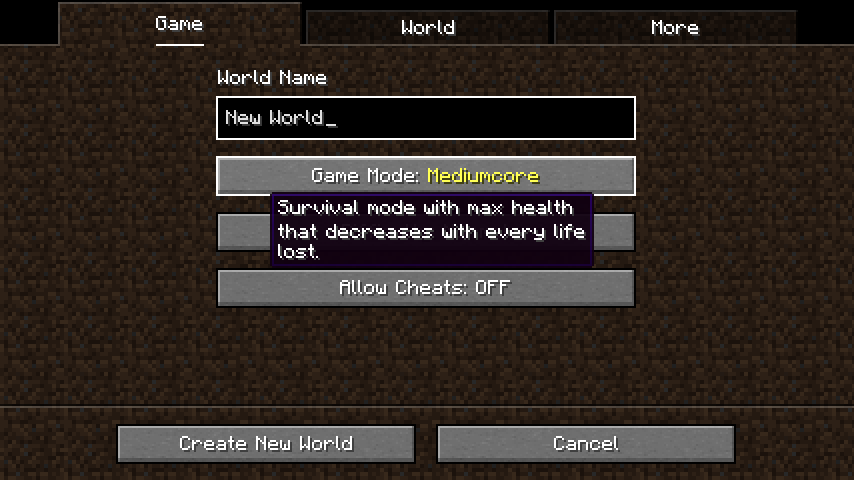
Mediumcore Mediumcore là một tùy chọn độ khó mới được thiết kế để khó hơn chế độ sinh tồn thông thường, nhưng ít trừng phạt hơn nhiều so với Chế độ Hardcore của bản gốc. Nó có thể được chọn khi tạo thế giới (và đối với người điều hành máy chủ, đặt "mediumcore=true" trong server.properties).
Mediumcore cũng là một game rule có thể được đặt bằng lệnh /gamerule mediumcoreMode true trên các thế giới đã có sẵn. Chế độ Mediumcore đang hoạt động được biểu thị bằng hình dạng đặc biệt của các trái tim trên HUD trong game.
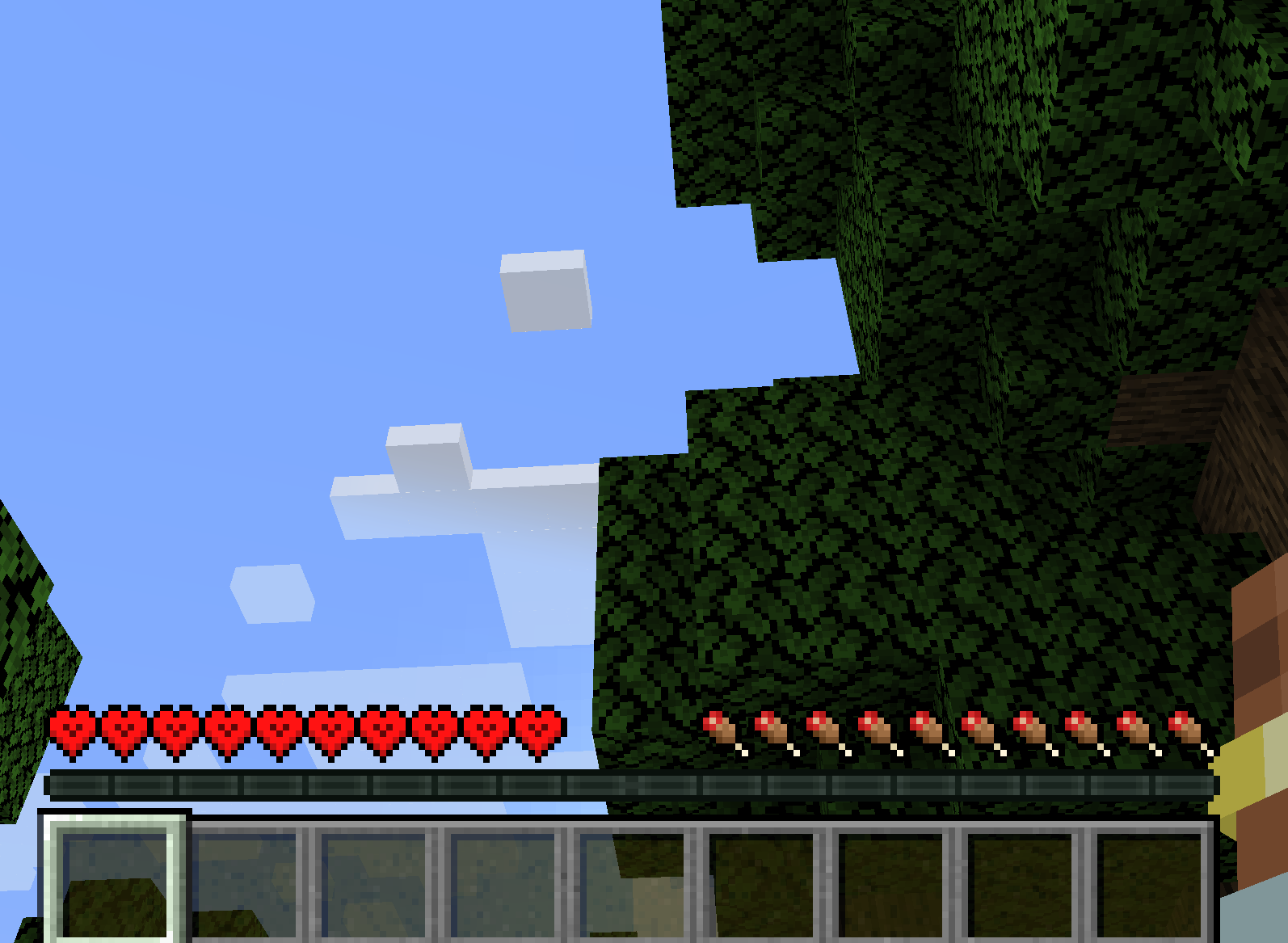
Cách hoạt động Thay đổi đáng kể duy nhất của mediumcore so với chế độ sinh tồn mặc định là mỗi lần chết sẽ giảm lượng máu tối đa mà người chơi có thể hồi phục. Người chơi mất một trái tim máu tối đa mỗi lần chết, cho đến khi chỉ còn 3 trái tim máu. Tại thời điểm này, họ sẽ không mất thêm nữa và có thể tiếp tục chơi game trong trạng thái yếu ớt, què quặt của mình.
May mắn thay, hình phạt này không phải là vĩnh viễn - nếu bạn sẵn sàng làm những gì cần thiết để lấy lại các trái tim của mình. Tiêu thụ một Quả Táo Vàng hoặc Quả Táo Vàng Phù Phép sẽ trao cho bạn một trong những trái tim đã mất, cùng với các hiệu ứng thông thường khi tiêu thụ những loại thức ăn này.
Khả năng cấu hình Mediumcore rất dễ cấu hình, và hầu hết các tùy chọn có thể được thay đổi trong mediumcore-common.toml trong thư mục config. Các tùy chọn này bao gồm các tính năng như lượng máu khởi đầu mặc định cho người chơi mới, lượng máu tối thiểu và tối đa có thể có trong chế độ chơi, lượng máu bị mất hoặc hồi phục từ thức ăn, liệu Mediumcore có phải là chế độ chơi mặc định hay không, và nhiều hơn nữa.
Các vật phẩm hồi phục máu tối đa được xác định bởi thẻ vật phẩm mediumcore:restoresmaxhealth và có thể được thay đổi hoặc mở rộng bằng một data pack.
Cách cài đặt Mediumcore Mode
With Millida Launcher
Install Millida Launcher
The launcher is free: download it at millida.net/launcher and sign in with any nickname.
Click “Install” on this page
The launcher opens and installs the mod for Minecraft 1.20.1 on Forge or NeoForge automatically.
Launch the game
A profile with it appears in the launcher: click “Play”.
Manually
Install Forge or NeoForge
The loader must match the game version of the mod file, for example Minecraft 1.20.1. After installing it, a separate profile appears in your launcher.
Download the file for your version
In the version list above, pick the file mediumcore-1.0.0.jar (39 KB) for your game version and loader.
Put it in the mods folder
The folder is inside .minecraft (Windows: %appdata%\.minecraft\mods). If it does not exist, create it.
Launch the loader profile
Open “Mods” in the main menu: Mediumcore Mode should be in the list.
Minecraft 1.20.1 runs on Java 17: with a different Java version the game may close right after launch.
Phiên bản
Kèm phụ thuộc
| Minecraft | Loader | Tệp | Ngày | Hành động |
|---|---|---|---|---|
| 1.20.1 | NeoForge, Forge | mediumcore-1.0.039.2 KB 3 |
Câu hỏi thường gặp
Which Minecraft versions does Mediumcore Mode work on?
Only Minecraft 1.20.1: there are no files for other versions.
Is Mediumcore Mode for Forge or Fabric?
There are files for Forge: 1.20.1 and for NeoForge: 1.20.1. There are no files for Fabric: a mod for another loader will not start.
Does Mediumcore Mode need other mods?
The author lists no required dependencies: the Forge or NeoForge loader is enough.
Which Java does Mediumcore Mode need?
Minecraft 1.20.1 runs on Java 17. If the game closes right after launch, the usual cause is the wrong Java version in the profile settings.
Where can I download Mediumcore Mode safely?
On this page: the file mediumcore-1.0.0.jar (39 KB) is stored on Millida’s server, with no link shorteners. SHA-1 checksum: 5edd02797337895a7c0dbe78f72640bbcc0d9ed1.
Đánh giá
Hãy là người đầu tiên đánh giá Mediumcore Mode


