

Light Overlay Mod cho Minecraft 26.3
Một mod lớp phủ mức ánh sáng hiệu quả và mạnh mẽ.
- lượt tải
- 5 lượt tải
- lượt xem
- 41 lượt xem
- Đã cập nhật
- Đã cập nhật 05.10.2026
- 26.2 — 26.3
 Fabric
- Máy khách
A Light Overlay Mod that's efficient and powerful.

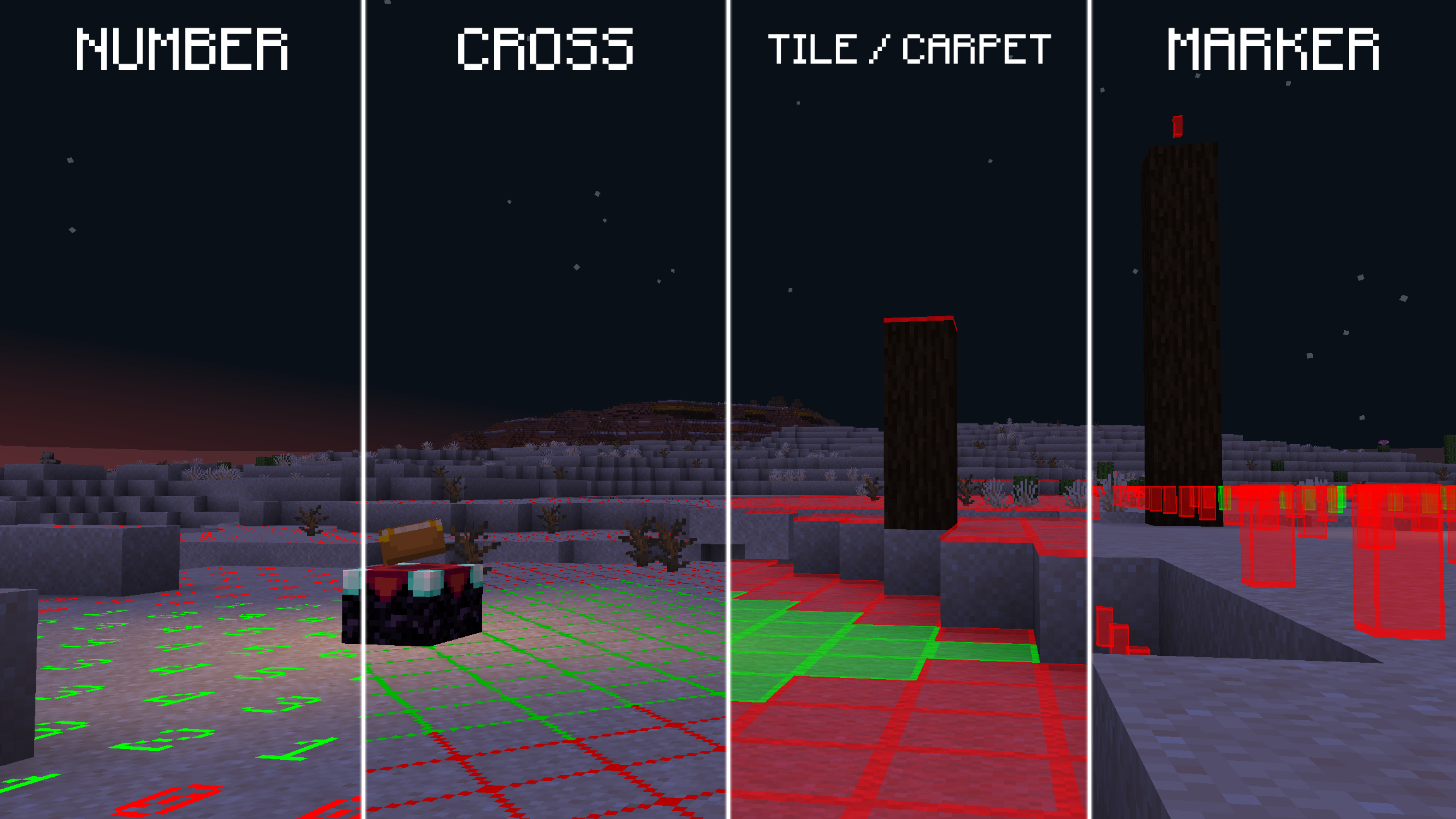
This mod adds a configurable, fully client-side Light Overlay to the game, showing you where mobs can spawn at night. Very useful for spawn-proofing.
Feature Requests & Bug Reports
Feature Requests / Bug Reports are always welcome and they typically get implemented in less than 2 days! To create one, you can simply open an issue and I'll look at it.

Translate Light Overlay to your language!
How to help: Guide
⚠️: Needs Update ✅: 100% translated Language - Translators ♥️
✅ German - Kolpixx, Lugo_Sieben ⚠️ Chinese (Simplified) - edeipici, OoxO0OxoO ⚠️ Spanish - UnPanMuySaS ⚠️ Hungarian - BigM ⚠️ Japanese - sho-green ⚠️ French - florianorineveu ⚠️ Portuguese - renanclaudio0 ✅ Italian - heytittino

Configuration
Use Mod Menu or /lightoverlay config to enter the config.
Usage
Use the keybind (F9 by default) or /lightoverlay to toggle the Light Overlay.
Cách cài đặt Light Overlay
With Millida Launcher
Install Millida Launcher
The launcher is free: download it at millida.net/launcher and sign in with any nickname.
Click “Install” on this page
The launcher opens and installs the mod for Minecraft 26.2–26.3 on Fabric automatically, together with its dependencies: YetAnotherConfigLib (YACL), Dependency, Fabric API.
Launch the game
A profile with it appears in the launcher: click “Play”.
Manually
Install Fabric
The loader must match the game version of the mod file, for example Minecraft 26.3. After installing it, a separate profile appears in your launcher.
Download the file for your version
In the version list above, pick the file light-overlay-2.13.0+26.3.jar (69 KB) for your game version.
Put it in the mods folder
The folder is inside .minecraft (Windows: %appdata%\.minecraft\mods). If it does not exist, create it. Required dependencies go there too: YetAnotherConfigLib (YACL), Dependency, Fabric API.
Launch the loader profile
Open “Mods” in the main menu: Light Overlay should be in the list.
Light Overlay works on the player’s side only: there is no need to install it on a server.
Phiên bản
Kèm phụ thuộc
| Minecraft | Loader | Tệp | Ngày | Hành động |
|---|---|---|---|---|
| 26.3 | Fabric | 26.369.4 KB 3 | ||
| 26.3 | Fabric | 26.365.8 KB | ||
| 26.2 | Fabric | 26.265.5 KB 2 | ||
| 26.2 | Fabric | 26.265.6 KB | ||
| 26.2 | Fabric | 26.265.2 KB | ||
| 26.2 | Fabric | 26.259.6 KB | ||
| 26.2 | Fabric | 26.260.1 KB | ||
| 26.2 | Fabric | 26.260 KB |
Yêu cầu để chạy
- YetAnotherConfigLib (YACL)bắt buộc
- Dependencybắt buộc
- Fabric APIbắt buộc
- Mod Menukhông bắt buộc
Câu hỏi thường gặp
Which Minecraft versions does Light Overlay work on?
There are files for 26.3, 26.2. The newest is 26.3.
Is Light Overlay for Forge or Fabric?
Only for Fabric: 26.2–26.3. There are no files for Forge or NeoForge: a mod for another loader will not start.
What does Light Overlay need to work?
Required: YetAnotherConfigLib (YACL), Dependency, Fabric API. Without them the mod will not start: dependencies go into the same mods folder. Optional: Mod Menu.
Do I need to install Light Overlay on a server?
No. Light Overlay works on the player’s side only: there is no need to install it on a server.
Where can I download Light Overlay safely?
On this page: the file light-overlay-2.13.0+26.3.jar (69 KB) is stored on Millida’s server, with no link shorteners. SHA-1 checksum: d4c232fb32c912bcc508f84c99599ce508a4e5a6.
Đánh giá
Hãy là người đầu tiên đánh giá Light Overlay


