
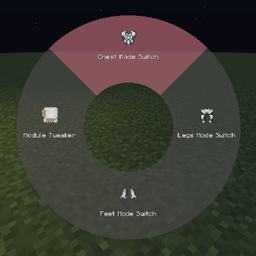
KeyBind Bundles Mod cho Minecraft 1.20.1, 26.1.2
Kamu punya terlalu banyak keybind tapi tombolnya kurang? Dengan mod ini kamu bisa membuat bundel tombol sendiri, menggabungkan sekumpulan tombol menjadi menu radial yang mudah digunakan
 NeoForge
 Forge
ForgeGiới thiệu mod KeyBind Bundles
Bạn có quá nhiều phím tắt nhưng không đủ phím vật lý cho tất cả? Bạn có mệt mỏi vì liên tục đổi những phím ít dùng sang các liên kết khác? Bạn có thấy khó nhớ mỗi phím làm gì? Vậy thì mod này dành cho bạn.
Mod này thêm các gói phím, về cơ bản là nhiều phím tắt trong một phím.
Tạo gói
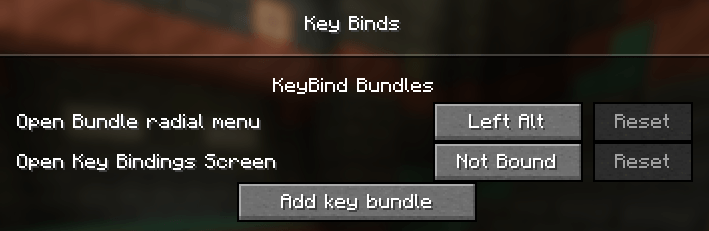
Để tạo một gói mới, hãy mở màn hình phím tắt và trong mục KeyBind Bundles (mục đầu tiên), nhấp vào nút Add key bundle, sau đó nhập tên cho gói của bạn.
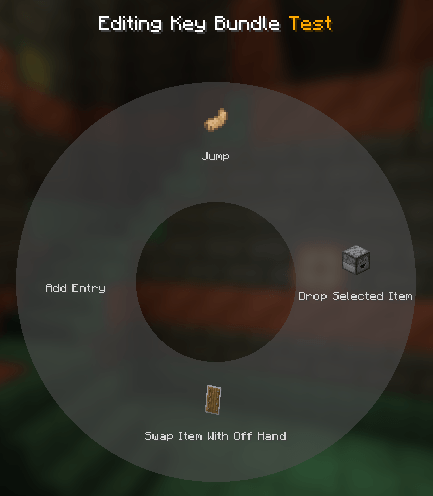
Sau đó, nhấp vào nút Edit trên gói. Trong màn hình mới, di chuột qua menu tròn ở giữa và nhấp vào Add entry. Thao tác này sẽ mở lại màn hình phím tắt nhưng giờ mỗi phím tắt đều có nút chọn. Tại đây bạn có thể chọn các liên kết bạn muốn thêm vào gói.
Sau khi chọn các liên kết, bạn có thể chỉnh sửa từng mục trong menu tròn và đặt tên tùy chỉnh cùng biểu tượng vật phẩm cho nó.
Sử dụng gói
Thoát menu chỉnh sửa bằng cách nhấn escape và gán gói vào một phím. Sau đó, khi đang chơi, bạn có thể nhấn giữ phím đã gán để hiện menu tròn. Di chuột và nhấp chuột trái vào một mục để kích hoạt phím tắt đó. Đơn giản vậy thôi!
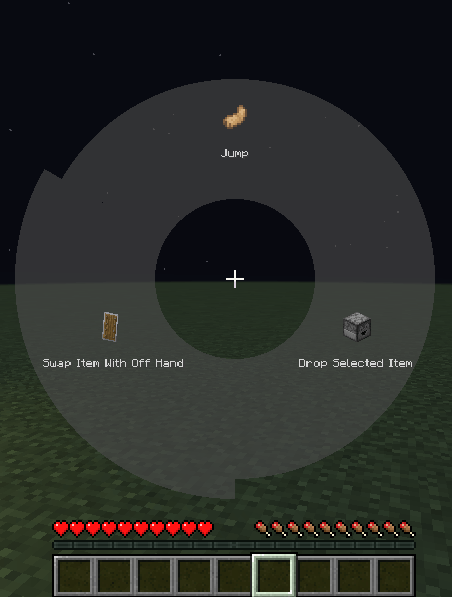
Bạn cũng có thể đánh dấu một phím tắt bằng cách nhấp chuột phải vào nó. Sau khi đánh dấu, nhấn phím đã gán cho gói sẽ kích hoạt ngay phím tắt đó mà không cần mở menu tròn. Khi một phím được đánh dấu, menu tròn có thể được mở lại bằng cách giữ phím Radial menu modifier, mặc định là Left alt. Phím được đánh dấu hiện tại sẽ được tô đỏ trong menu tròn.
Mod này tương thích với Controlling
Cách cài đặt KeyBind Bundles
With Millida Launcher
Install Millida Launcher
The launcher is free: download it at millida.net/launcher and sign in with any nickname.
Click “Install” on this page
The launcher opens and installs the mod for Minecraft 1.20.1–26.1.2 on Forge or NeoForge automatically.
Launch the game
A profile with it appears in the launcher: click “Play”.
Manually
Install Forge or NeoForge
The loader must match the game version of the mod file, for example Minecraft 26.1.2. After installing it, a separate profile appears in your launcher.
Download the file for your version
In the version list above, pick the file keybindbundles-2.0.0.jar (90 KB) for your game version and loader.
Put it in the mods folder
The folder is inside .minecraft (Windows: %appdata%\.minecraft\mods). If it does not exist, create it.
Launch the loader profile
Open “Mods” in the main menu: KeyBind Bundles should be in the list.
Phiên bản
Kèm phụ thuộc
| Minecraft | Loader | Tệp | Ngày | Hành động |
|---|---|---|---|---|
| 26.1.2 | NeoForge | 26.1.2 - keybindbundles-2.0.0.jar90.2 KB 1 | ||
| 1.20.1 | NeoForge, Forge | keybindbundles-1.20.1-1.1.0.jar267 KB 1 |
Câu hỏi thường gặp
Which Minecraft versions does KeyBind Bundles work on?
There are files for 26.1.2, 1.20.1. The newest is 26.1.2.
Is KeyBind Bundles for Forge or Fabric?
There are files for Forge: 1.20.1 and for NeoForge: 1.20.1–26.1.2. There are no files for Fabric: a mod for another loader will not start.
Does KeyBind Bundles need other mods?
The author lists no required dependencies: the Forge or NeoForge loader is enough.
Where can I download KeyBind Bundles safely?
On this page: the file keybindbundles-2.0.0.jar (90 KB) is stored on Millida’s server, with no link shorteners. SHA-1 checksum: 20527d7c26ca72188fab72f860d31d5149f02c90.
Đánh giá
Hãy là người đầu tiên đánh giá KeyBind Bundles


