

Jade 🔍 Mod cho Minecraft 1.20.1, 1.21.1
Hiển thị thông tin về thứ bạn đang nhìn vào. (bản fork Hwyla/Waila cho Minecraft 1.16+)
 NeoForge
 Fabric
 Quilt
Quilt Forge
ForgeJade 🔍
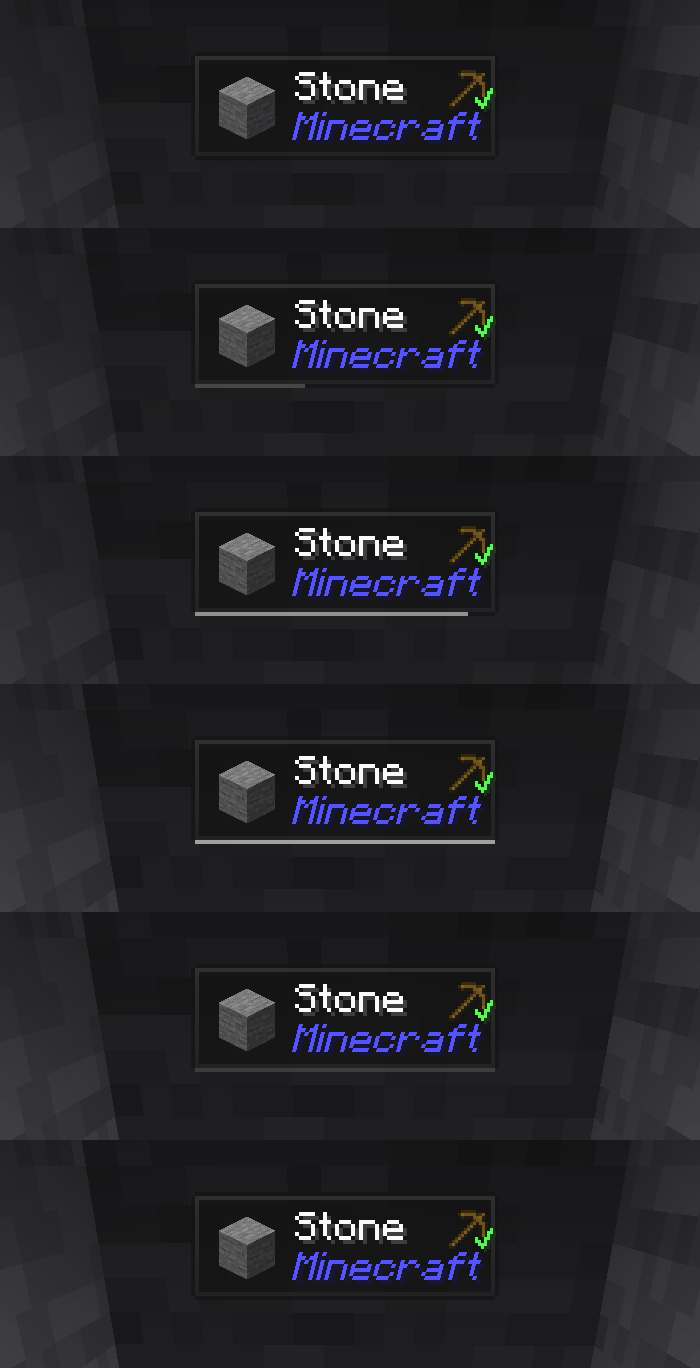
Jade là mod HUD hiển thị thông tin - Hwyla/Waila dành cho các phiên bản Minecraft hiện đại. Được thiết kế để mang lại trải nghiệm người dùng và API tốt hơn.
Jade chỉ có thể được cài đặt ở phía client. Nhưng nhiều tính năng yêu cầu Jade ở phía server. (lưu trữ vật phẩm, lượng nhiên liệu của giá ủ, ong trong tổ ong...)
Để tích hợp mod, hãy thử Jade Addons: NeoForge Fabric

Phím (mặc định):
- Keypad 0: Mở màn hình cấu hình
- Keypad 1: Bật/tắt lớp phủ
- Keypad 2: Bật/tắt hiển thị chất lỏng
- Keypad 3: Hiển thị công thức (Yêu cầu JEI)
- Keypad 4: Hiển thị cách sử dụng (Yêu cầu JEI)
- Keypad 5: Đọc to mục tiêu

Những thay đổi đáng chú ý so với Hwyla:
- Thiết kế lại API
- Nhiều addon vanilla hơn
- Khả năng cấu hình cao hơn
- Khả năng truy cập tốt hơn
Theo yêu cầu của dự án gốc Hwyla, Jade sử dụng giấy phép Creative Commons Attribution-NonCommercial-ShareAlike 4.0 International (CC BY-NC-SA 4.0).
Cách cài đặt Jade 🔍
With Millida Launcher
Install Millida Launcher
The launcher is free: download it at millida.net/launcher and sign in with any nickname.
Click “Install” on this page
The launcher opens and installs the mod for Minecraft 1.16–26.3 on Fabric, Forge, NeoForge or Quilt automatically, together with its dependencies: Fabric API.
Launch the game
A profile with it appears in the launcher: click “Play”.
Manually
Install Fabric, Forge, NeoForge or Quilt
The loader must match the game version of the mod file, for example Minecraft 26.3. After installing it, a separate profile appears in your launcher.
Download the file for your version
In the version list above, pick the file Jade-mc26.3-NeoForge-26.3.5.jar (1.0 MB) for your game version and loader.
Put it in the mods folder
The folder is inside .minecraft (Windows: %appdata%\.minecraft\mods). If it does not exist, create it. Required dependencies go there too: Fabric API.
Launch the loader profile
Open “Mods” in the main menu: Jade 🔍 should be in the list.
On a server
A server on Fabric, Forge, NeoForge or Quilt
The mod only works on a server with the same loader and game version, for example 26.3.
File goes into the server’s mods folder
Stop the server, put the mod file into the mods folder and start the server again.
Use the “To server” button
On Millida Hosting, the button at the top of the page uploads the file to your server and restarts it for you.
Phiên bản
Kèm phụ thuộc
| Minecraft | Loader | Tệp | Ngày | Hành động |
|---|---|---|---|---|
| 26.1.2 | NeoForge | 26.1.21005 KB 7 | ||
| 26.3 | NeoForge | 26.31 MB 18 | ||
| 26.3 | Fabric, Quilt | 26.31 MB 609 | ||
| 26.3 | NeoForge | 26.31 MB 1 | ||
| 26.3 | Fabric, Quilt | 26.31 MB | ||
| 26.3 | Fabric, Quilt | 26.31 MB | ||
| 26.3 | Fabric, Quilt | 26.31 MB | ||
| 26.3 | NeoForge | 26.31007 KB |
Yêu cầu để chạy
- Fabric APIbắt buộc
- Just Enough Items (JEI)không bắt buộc
Nội dung cần nó
Đánh giá
Hãy là người đầu tiên đánh giá Jade 🔍


