
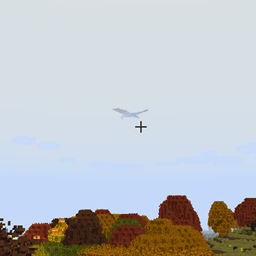
ISeeDragons Mod cho Minecraft 1.12.2
Sửa khoảng cách hiển thị rồng trong RLCraft và các phiên bản cũ hơn của Ice and Fire
- lượt tải
- 1 lượt tải
- lượt xem
- 17 lượt xem
- Đã cập nhật
- Đã cập nhật 18.10.2026
- 1.12.2
 Forge
Forge
Giới thiệu mod ISeeDragons
ISeeDragons Ok... Rồng trong RLCraft thật khó... Nhưng liệu chúng có nhất thiết phải có thiết bị tàng hình cá nhân kích hoạt khi chỉ cách người chơi 64+ khối không?!
Mod này sửa một số lỗi nghiêm trọng trong Ice and Fire 1.7.1 (một phiên bản cũ), dùng với Ice and Fire 1.8.x có thể gây ra hành vi không xác định (lỗi, crash, v.v.)! Nó được thiết kế để dùng trong modpack RLCraft!
Tính năng:
- Sửa khoảng cách hiển thị của rồng Ice and Fire (có thể cấu hình, có thể hoạt động với các thực thể mod khác)
- Sửa lỗi rồng Ice and Fire không thức dậy khi bị đánh
- Sửa lỗi người chơi có thể thoát khỏi hàm rồng bằng shift/xuống ngựa
- Sửa lỗi sửa chữa giáp sea serpent của Ice and Fire
- Sửa Dragonbone Axe
- Giảm hạt từ rồng đập phá khối để tránh lag (có thể cấu hình)
- Thêm lại các mục OreDictionary cho các vật phẩm Ice and Fire (Ice and Fire vẫn spam log, TODO: loại bỏ spam log luôn)
- Có thể đặt vật phẩm sửa chữa tùy chỉnh cho các công cụ chưa có vật phẩm sửa chữa (có thể cấu hình)
- Có thể thêm sát thương tùy chỉnh cho vật phẩm đối với kẻ địch undead (có thể cấu hình)
Mod này nên được cài đặt trên cả client và server, nhưng hầu hết các bản sửa lỗi sẽ hoạt động nếu chỉ cài trên server (cài đặt trên client không phải là yêu cầu bắt buộc).
Modpack RLCraft: https://www.curseforge.com/minecraft/modpacks/rlcraft Mod Ice and Fire: https://www.curseforge.com/minecraft/mc-mods/ice-and-fire-dragons
Để cài đặt mod này, hãy đặt tệp jar vào thư mục mods trong thư mục instance Minecraft của bạn. Vị trí thư mục instance Minecraft sẽ khác nhau tùy thuộc vào trình khởi chạy bạn đang dùng!
Mã nguồn: https://github.com/xcube16/ISeeDragons
Cách cài đặt ISeeDragons
With Millida Launcher
Install Millida Launcher
The launcher is free: download it at millida.net/launcher and sign in with any nickname.
Click “Install” on this page
The launcher opens and installs the mod for Minecraft 1.12.2 on Forge automatically.
Launch the game
A profile with it appears in the launcher: click “Play”.
Manually
Install Forge
The loader must match the game version of the mod file, for example Minecraft 1.12.2. After installing it, a separate profile appears in your launcher.
Download the file for your version
In the version list above, pick the file ISeeDragons-1.2.1.jar (64 KB) for your game version.
Put it in the mods folder
The folder is inside .minecraft (Windows: %appdata%\.minecraft\mods). If it does not exist, create it.
Launch the loader profile
Open “Mods” in the main menu: ISeeDragons should be in the list.
Minecraft 1.12.2 runs on Java 8: with a different Java version the game may close right after launch.
Phiên bản
Kèm phụ thuộc
| Minecraft | Loader | Tệp | Ngày | Hành động |
|---|---|---|---|---|
| 1.12.2 | Forge | ISeeDragons-1.2.163.7 KB 1 | ||
| 1.12.2 | Forge | ISeeDragons-0.1224.4 KB | ||
| 1.12.2 | Forge | ISeeDragons6.7 KB |
Câu hỏi thường gặp
Which Minecraft versions does ISeeDragons work on?
Only Minecraft 1.12.2: there are no files for other versions.
Is ISeeDragons for Forge or Fabric?
Only for Forge: 1.12.2. There are no files for Fabric or NeoForge: a mod for another loader will not start.
Does ISeeDragons need other mods?
The author lists no required dependencies: the Forge loader is enough.
Which Java does ISeeDragons need?
Minecraft 1.12.2 runs on Java 8. If the game closes right after launch, the usual cause is the wrong Java version in the profile settings.
Where can I download ISeeDragons safely?
On this page: the file ISeeDragons-1.2.1.jar (64 KB) is stored on Millida’s server, with no link shorteners. SHA-1 checksum: 0f8c5fee7eb2b76ab4a01adb08b63147f5a2a2fe.
Đánh giá
Hãy là người đầu tiên đánh giá ISeeDragons


