
Gravitational Modulating Additional Unit Mod cho Minecraft 1.20.1, 1.21.1
Cung cấp các tính năng bổ sung
 NeoForge
 Forge
ForgeGravitational Modulating Additional Unit
Cung cấp các tính năng bổ sung.
Cần Mekanism
https://www.curseforge.com/minecraft/mc-mods/mekanism
Tính năng
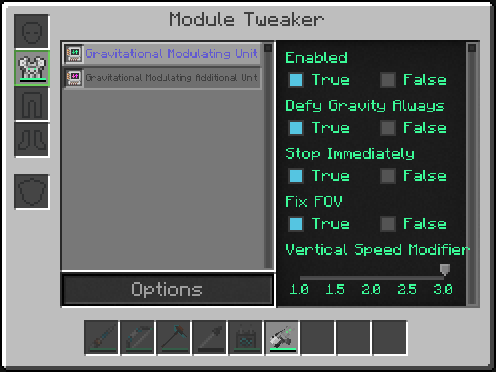
- Luôn Chống Trọng Lực
Vẫn bay được ngay cả khi chạm đất. Trừ khi bạn ngồi trên mặt đất. Tại sao phải nhấn đúp 'space' cho mỗi lần bay?
- Dừng Ngay Lập Tức
Như tên gọi, dừng ngay lập tức khi bạn thả phím di chuyển. (WASD) Có thể đến chính xác vị trí bạn muốn.
- Cố Định FOV
Không thay đổi FOV khi người chơi hành động. Như kéo cung và chạy nước rút.
- Bộ Điều Chỉnh Tốc Độ Dọc
Thay đổi tốc độ lên/xuống khi bay. Có thể chuyển bằng phím (mặc định chưa gán)
- Tắt Âm Thanh Điều Chỉnh
Có từ 1.19.2. Tắt âm thanh bay. Sẽ tốt khi dùng với 'Luôn Chống Trọng Lực'.
Giấy phép
MIT và trong phạm vi 'Mekanism' cho phép.
Modpack
Có thể dùng trong modpack theo giấy phép.
Vấn đề hoặc góp ý?
Vui lòng "New Issue" từ đây.
https://github.com/gisellevonbingen/Minecraft-GravitationalModulatingAdditionalUnit/issues
Cách cài đặt Gravitational Modulating Additional Unit
With Millida Launcher
Install Millida Launcher
The launcher is free: download it at millida.net/launcher and sign in with any nickname.
Click “Install” on this page
The launcher opens and installs the mod for Minecraft 1.20.1–1.21.1 on Forge or NeoForge automatically.
Launch the game
A profile with it appears in the launcher: click “Play”.
Manually
Install Forge or NeoForge
The loader must match the game version of the mod file, for example Minecraft 1.21.1. After installing it, a separate profile appears in your launcher.
Download the file for your version
In the version list above, pick the file GravitationalModulatingAdditionalUnit-1.21.1-6.4.jar (39 KB) for your game version and loader.
Put it in the mods folder
The folder is inside .minecraft (Windows: %appdata%\.minecraft\mods). If it does not exist, create it.
Launch the loader profile
Open “Mods” in the main menu: Gravitational Modulating Additional Unit should be in the list.
Minecraft 1.21.1 runs on Java 21: with a different Java version the game may close right after launch.
Phiên bản
Kèm phụ thuộc
| Minecraft | Loader | Tệp | Ngày | Hành động |
|---|---|---|---|---|
| 1.21.1 | NeoForge | 1.21.1-6.439.2 KB 1 | ||
| 1.20.1 | Forge | 1.20.1-3.539.8 KB |
Đánh giá
Hãy là người đầu tiên đánh giá Gravitational Modulating Additional Unit


