

Flywheel Version Fix Mod cho Minecraft 1.20.1
Sửa lỗi của mod flywheel bắt buộc 1.0+
 Forge
Forge Fabric
 Quilt
QuiltThis mod fixes the issue that requires flywheel 1.0.x. Add the mod to your modloader or install it directly from the curse launcher.
Versions:
- 1.20.1 Forge/Neoforge/fabric
- 1.21.1 Neoforge/fabric
Compatibility:
- All mods if you see the following errors.
Watch out [GOTM] to find out mutiversion .mixins
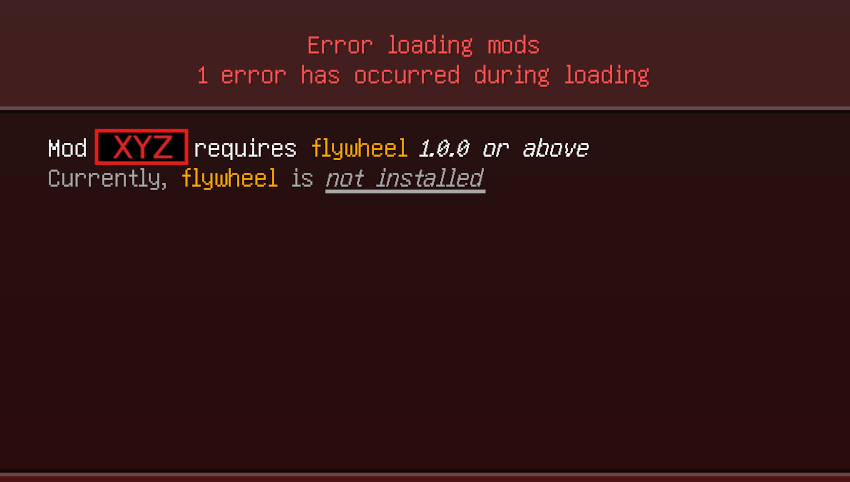
Custom fixes:
If the problem described below occurs, please use version v.0.6.11-12.jar
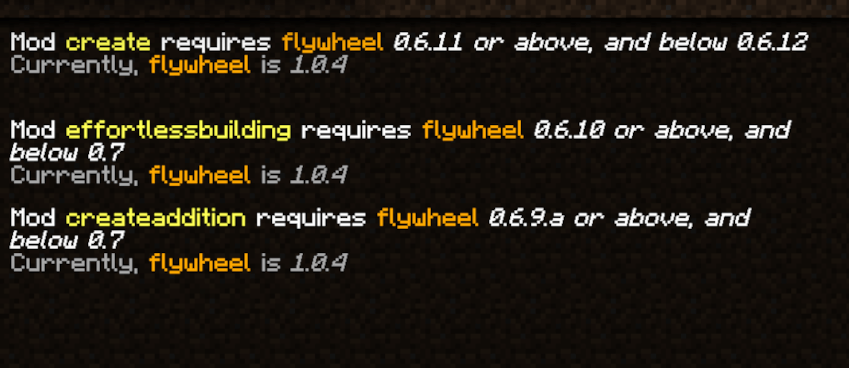
No updates planned yet
Cách cài đặt Flywheel Version Fix
With Millida Launcher
Install Millida Launcher
The launcher is free: download it at millida.net/launcher and sign in with any nickname.
Click “Install” on this page
The launcher opens and installs the mod for Minecraft 1.20.1 on Fabric, Forge or Quilt automatically.
Launch the game
A profile with it appears in the launcher: click “Play”.
Manually
Install Fabric, Forge or Quilt
The loader must match the game version of the mod file, for example Minecraft 1.20.1. After installing it, a separate profile appears in your launcher.
Download the file for your version
In the version list above, pick the file flywheel-forge-1.20.1-0.6.11-12.jar (528 KB) for your game version and loader.
Put it in the mods folder
The folder is inside .minecraft (Windows: %appdata%\.minecraft\mods). If it does not exist, create it.
Launch the loader profile
Open “Mods” in the main menu: Flywheel Version Fix should be in the list.
Minecraft 1.20.1 runs on Java 17: with a different Java version the game may close right after launch.
Phiên bản
Kèm phụ thuộc
| Minecraft | Loader | Tệp | Ngày | Hành động |
|---|---|---|---|---|
| 1.20.1 | Forge | flywheel-forge-1.20.1-0.6.11-12.jar528 KB 67 | ||
| 1.20.1 | Fabric, Quilt | flywheel-fabric-1.20.1-1.0.jar857 KB 5 |
Đánh giá
Hãy là người đầu tiên đánh giá Flywheel Version Fix


