
- lượt tải
- 8 lượt tải
- lượt xem
- 44 lượt xem
- Đã cập nhật
- Đã cập nhật 28.10.2026
- 1.12.2
 Forge
Forge
Giới thiệu mod Entity Culling
Entity Culling - 1.16.5 - 2.1.4 và các phiên bản mới hơn chỉ tương thích với Optifine G8! Entity Culling - 1.16.5 - 2.1.3 và các phiên bản cũ hơn chỉ tương thích với Optifine G7! Entity Culling - 1.12.2 - 2.0.8 và các phiên bản mới hơn chỉ tương thích với Optifine G5! Entity Culling - 1.12.2 - 2.0.7 và các phiên bản cũ hơn chỉ tương thích với Optifine F5!
Mod này yêu cầu MixinBootstrap (curseforge, modrinth) và RenderLib (curseforge, modrinth) để chạy (chỉ MC 1.12.2)! Mixin 0.7-0.8 Compatibility (curseforge, modrinth) có thể hữu ích khi một mod khác sử dụng phiên bản mixin cũ hơn và do đó bạn không thể khởi chạy game (chỉ MC 1.12.2).
Entity Culling là một mod hiệu năng phía client nhằm bỏ qua việc render các (tile-)entity bị ẩn. Trong vanilla, nó chỉ render tất cả (tile-)entity nằm trong trường nhìn của người chơi. Điều này có nghĩa là có thể có hàng trăm (tile-)entity đang ăn fps của bạn trong khi bạn thậm chí không thể nhìn thấy chúng vì chúng bị ẩn sau một bức tường.
Culling các Entity bị ẩn Theo mặc định, mod này sử dụng triển khai OpenGL occlusion culling, mang lại cho bạn culling bounding box chính xác đến từng pixel chỉ với độ trễ một khung hình và chi phí rất nhỏ.
Nếu phần cứng của bạn không hỗ trợ OpenGL 4.3 thì mod này sử dụng triển khai culling bằng raytracing. Culling bằng raytracing tiêu tốn nhiều CPU hơn trong khi culling bằng OpenGL tiêu tốn nhiều GPU hơn, do đó tùy thuộc vào phần cứng của bạn mà bạn có thể muốn ưu tiên cái này hơn cái kia. Điều này có thể dẫn đến cải thiện FPS rất lớn khi có nhiều (tile-)entity trên màn hình nhưng không hiển thị vì chúng bị che khuất.
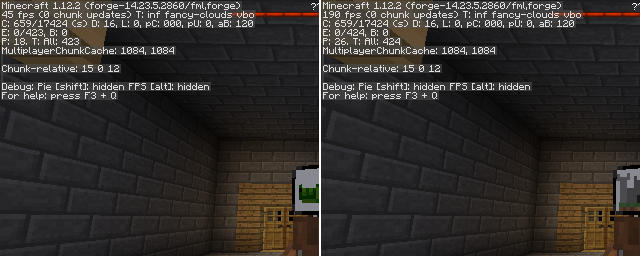
Thử nghiệm với EntityCulling-1.12.2-6.0.2 bên trong một dungeon của Chocolate Quest Repoured với khoảng 200 entity trên màn hình cho thấy cải thiện rất lớn!
Cách cài đặt Entity Culling
With Millida Launcher
Install Millida Launcher
The launcher is free: download it at millida.net/launcher and sign in with any nickname.
Click “Install” on this page
The launcher opens and installs the mod for Minecraft 1.12.2 on Forge automatically.
Launch the game
A profile with it appears in the launcher: click “Play”.
Manually
Install Forge
The loader must match the game version of the mod file, for example Minecraft 1.12.2. After installing it, a separate profile appears in your launcher.
Download the file for your version
In the version list above, pick the file EntityCulling-1.12.2-6.5.0.jar (62 KB) for your game version.
Put it in the mods folder
The folder is inside .minecraft (Windows: %appdata%\.minecraft\mods). If it does not exist, create it.
Launch the loader profile
Open “Mods” in the main menu: Entity Culling should be in the list.
Minecraft 1.12.2 runs on Java 8: with a different Java version the game may close right after launch.
Phiên bản
Kèm phụ thuộc
| Minecraft | Loader | Tệp | Ngày | Hành động |
|---|---|---|---|---|
| 1.12.2 | Forge | EntityCulling-1.12.2-6.5.0.jar62.4 KB 7 | ||
| 1.12.2 | — | EntityCulling-1.12.2-6.3.1.jar64.4 KB 1 | ||
| 1.12.2 | — | EntityCulling-1.12.2-6.0.2.jar54.1 KB |
Câu hỏi thường gặp
Which Minecraft versions does Entity Culling work on?
Only Minecraft 1.12.2: there are no files for other versions.
Is Entity Culling for Forge or Fabric?
Only for Forge: 1.12.2. There are no files for Fabric or NeoForge: a mod for another loader will not start.
Does Entity Culling need other mods?
The author lists no required dependencies: the Forge loader is enough.
Which Java does Entity Culling need?
Minecraft 1.12.2 runs on Java 8. If the game closes right after launch, the usual cause is the wrong Java version in the profile settings.
Where can I download Entity Culling safely?
On this page: the file EntityCulling-1.12.2-6.5.0.jar (62 KB) is stored on Millida’s server, with no link shorteners. SHA-1 checksum: cf4a4a6b11b1721fbda1edeb32bdc3b1ac3a8560.
Đánh giá
Hãy là người đầu tiên đánh giá Entity Culling


