
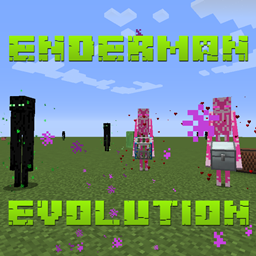
Enderman Evolution Mod cho Minecraft 1.12.2
Một mod tập trung vào Enderman giai đoạn đầu game
- lượt tải
- 1 lượt tải
- lượt xem
- 26 lượt xem
- Đã cập nhật
- Đã cập nhật 26.10.2026
- 1.12.2
 Forge
Giới thiệu mod Enderman Evolution
Patreon: p455w0rd
Mục đích chính của mod này là giúp việc kiếm Ender Pearl ở giai đoạn đầu game trở nên dễ dàng hơn một chút.
Evolved Enderman
Những Enderman này đã tiến hóa đến mức có thể đi trên mặt nước và sinh ra vào ban ngày mà không gặp hậu quả tiêu cực nào.
Frienderman
Frienderman là những Enderman thân thiện có thể làm nhiều việc khác nhau để giúp bạn. Nếu bạn thuần hóa một con bằng Friender Pearl (theo tỉ lệ ngẫu nhiên), bạn sẽ có thể đặt chế độ của nó thành Follow hoặc Idle. Frienderman đã được thuần hóa của bạn sẽ bảo vệ bạn (giống như một con sói đã được thuần hóa) khi bạn bị tấn công. Bạn cũng có thể đưa cho Frienderman đã được thuần hóa của mình một cái rương (hiện hỗ trợ EnderStorage, IronChests và Vanilla) để nó mang theo và nhặt các vật phẩm gần đó khi chúng rơi ra.
Ender Daisy
Ender Daisy sinh ra tự nhiên ở overworld, nether và the end. Để trồng lại chúng, chỉ cần thu hoạch chúng, rồi nhấp chuột phải vào một khối trồng được hỗ trợ (grass, dirt, farmland, netherrack, end stone, end stone brick hoặc end portal frame). Chúng chỉ phát triển ở mức ánh sáng nhỏ hơn 8. Chúng chỉ có thể được bón bằng bột xương trên các biến thể end của những khối trồng được hỗ trợ.
Tham gia Discord cùng tôi
Hãy thể hiện chút tình cảm
@TheRealp455w0rd
Cách cài đặt Enderman Evolution
With Millida Launcher
Install Millida Launcher
The launcher is free: download it at millida.net/launcher and sign in with any nickname.
Click “Install” on this page
The launcher opens and installs the mod for Minecraft 1.12.2 on Forge automatically.
Launch the game
A profile with it appears in the launcher: click “Play”.
Manually
Install Forge
The loader must match the game version of the mod file, for example Minecraft 1.12.2. After installing it, a separate profile appears in your launcher.
Download the file for your version
In the version list above, pick the file EndermanEvolution-1.12.2-1.0.33.jar (269 KB) for your game version.
Put it in the mods folder
The folder is inside .minecraft (Windows: %appdata%\.minecraft\mods). If it does not exist, create it.
Launch the loader profile
Open “Mods” in the main menu: Enderman Evolution should be in the list.
Minecraft 1.12.2 runs on Java 8: with a different Java version the game may close right after launch.
Phiên bản
Kèm phụ thuộc
| Minecraft | Loader | Tệp | Ngày | Hành động |
|---|---|---|---|---|
| 1.12.2 | Forge | EndermanEvolution-1.12.2-1.0.33.jar269 KB 1 | ||
| 1.12.2 | — | EndermanEvolution-1.12.2-1.0.30.jar273 KB | ||
| 1.12.2 | — | EndermanEvolution-1.12.2-1.0.29.jar274 KB |
Câu hỏi thường gặp
Which Minecraft versions does Enderman Evolution work on?
Only Minecraft 1.12.2: there are no files for other versions.
Is Enderman Evolution for Forge or Fabric?
Only for Forge: 1.12.2. There are no files for Fabric or NeoForge: a mod for another loader will not start.
Does Enderman Evolution need other mods?
The author lists no required dependencies: the Forge loader is enough.
Which Java does Enderman Evolution need?
Minecraft 1.12.2 runs on Java 8. If the game closes right after launch, the usual cause is the wrong Java version in the profile settings.
Where can I download Enderman Evolution safely?
On this page: the file EndermanEvolution-1.12.2-1.0.33.jar (269 KB) is stored on Millida’s server, with no link shorteners. SHA-1 checksum: abcc72f5a87a47197216b6b4fb84665892783d62.
Đánh giá
Hãy là người đầu tiên đánh giá Enderman Evolution


