

Dark Paintings Mod cho Minecraft 1.20.1, 1.19.2
Thêm tranh mới vào Minecraft
 NeoForge
 Fabric
 Forge
Forge Quilt
QuiltGiới thiệu mod Dark Paintings
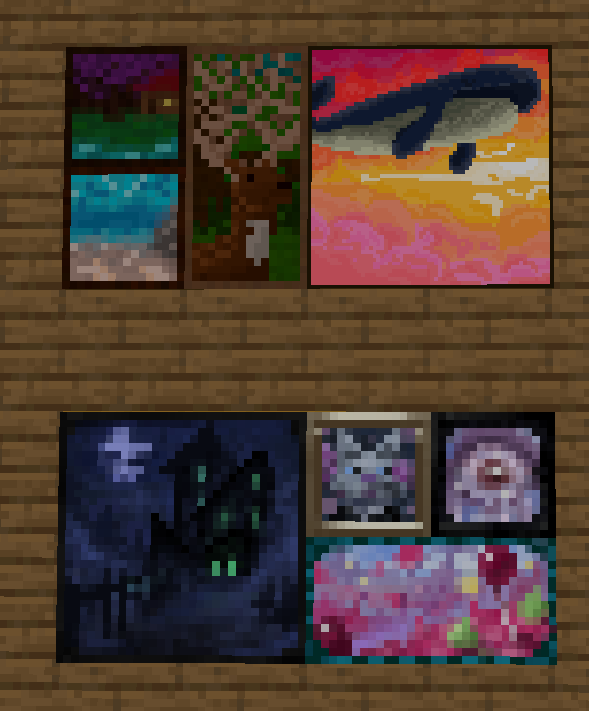
Mod này thêm nhiều bức tranh mới vào trò chơi! Những bức tranh này có nhiều kích cỡ và phong cách nghệ thuật khác nhau. Mỗi bức tranh đều được thiết kế và minh họa bởi một thành viên trong cộng đồng của chúng tôi! Những bức tranh này được tích hợp liền mạch với các bức tranh gốc và có thể đặt vào thế giới bằng vật phẩm tranh thông thường. Ngoài ra còn có các vật phẩm trong tab sáng tạo có thể dùng để đặt một thiết kế cụ thể đúng vào vị trí bạn muốn!
Cảm ơn nhiều nghệ sĩ tài năng đã hợp tác với tôi trong mod này, bao gồm mmg28rtt, FuryDev, Axeonlotl, Wouter, Absolem Jackdaw, Punpudle, Superkat32, và tôi Darkhax lol.
Dự án này được tài trợ bởi Nodecraft. Dùng mã DARKHAX để được giảm 30% cho tháng dịch vụ đầu tiên!
Cách cài đặt Dark Paintings
With Millida Launcher
Install Millida Launcher
The launcher is free: download it at millida.net/launcher and sign in with any nickname.
Click “Install” on this page
The launcher opens and installs the mod for Minecraft 1.15.2–26.3 on Fabric, Forge, NeoForge or Quilt automatically.
Launch the game
A profile with it appears in the launcher: click “Play”.
Manually
Install Fabric, Forge, NeoForge or Quilt
The loader must match the game version of the mod file, for example Minecraft 26.3. After installing it, a separate profile appears in your launcher.
Download the file for your version
In the version list above, pick the file DarkPaintings-neoforge-MC26.3-26.3.0.1.jar (55 KB) for your game version and loader.
Put it in the mods folder
The folder is inside .minecraft (Windows: %appdata%\.minecraft\mods). If it does not exist, create it.
Launch the loader profile
Open “Mods” in the main menu: Dark Paintings should be in the list.
Phiên bản
Kèm phụ thuộc
| Minecraft | Loader | Tệp | Ngày | Hành động |
|---|---|---|---|---|
| 26.3 | NeoForge | DarkPaintings-neoforge-MC26.3-26.3.0.1.jar55.3 KB 1 | ||
| 26.3 | Fabric | DarkPaintings-fabric-MC26.3-26.3.0.1.jar57.8 KB 24 | ||
| 1.20.1 | Forge, NeoForge | DarkPaintings-Forge-1.20.1-17.0.6.jar51.4 KB 6 | ||
| 1.19.2 | Forge | DarkPaintings-Forge-1.19.2-13.1.4.jar38.6 KB | ||
| 1.19.2 | Fabric, Quilt | DarkPaintings-Fabric-1.19.2-13.1.4.jar33.8 KB | ||
| 1.17 | Fabric | DarkPaintings-fabric-1.17-rc2-3.0.5.jar12.7 KB | ||
| 1.15.2 | — | DarkPaintings-1.15.2-1.0.2.jar7.1 KB | ||
| 1.15.2 | — | DarkPaintings-1.15.2-1.0.1.jar28.8 KB |
Câu hỏi thường gặp
Which Minecraft versions does Dark Paintings work on?
There are files for 26.3, 1.20.1, 1.19.2, 1.17, 1.15.2. The newest is 26.3.
Is Dark Paintings for Forge or Fabric?
There are files for Fabric: 1.17–26.3, for Forge: 1.19.2–1.20.1, for NeoForge: 1.20.1–26.3 and for Quilt: 1.19.2.
Does Dark Paintings need other mods?
The author lists no required dependencies: the Fabric, Forge, NeoForge or Quilt loader is enough.
Where can I download Dark Paintings safely?
On this page: the file DarkPaintings-neoforge-MC26.3-26.3.0.1.jar (55 KB) is stored on Millida’s server, with no link shorteners. SHA-1 checksum: 15c9f13e2fa48507f646c9f0b133940516f6350c.
Đánh giá
Hãy là người đầu tiên đánh giá Dark Paintings


