
Create: Ultimate Factory Mod cho Minecraft 1.20.1, 1.21.1
Một addon cho mod Create được phát triển để tăng khả năng tự động hóa, thêm 30 công thức (tương đối) cân bằng vào game.
 Fabric
 NeoForge
 Forge
Forge Quilt
QuiltGiới thiệu mod Create: Ultimate Factory
Đối với 1.18.2 và các phiên bản cũ hơn, hãy tham khảo phiên bản datapack
Giới thiệu
Create: Ultimate Factory là một addon đơn giản cho Create, mang đến những khả năng tự động hóa mới. Thông qua 30 công thức mới (tương đối) cân bằng, mod này về cơ bản giúp hàng chục tài nguyên trong Minecraft trở nên tái tạo được.
Ví dụ, Tuff giờ đây có thể tái tạo, mang đến cho người chơi nguồn Quặng đáng tin cậy. Lapis Lazuli, Amethyst, Redstone... Gần như mọi tài nguyên đều có thể được tự động hóa. Điều này cũng bao gồm các vật phẩm và chiến lợi phẩm quý hiếm, với tỷ lệ thấp hơn nhiều.
Bạn từng mơ về việc tự động hóa Diamond hay Netherite? Giờ đây điều đó đã có thể!
Phương tiện
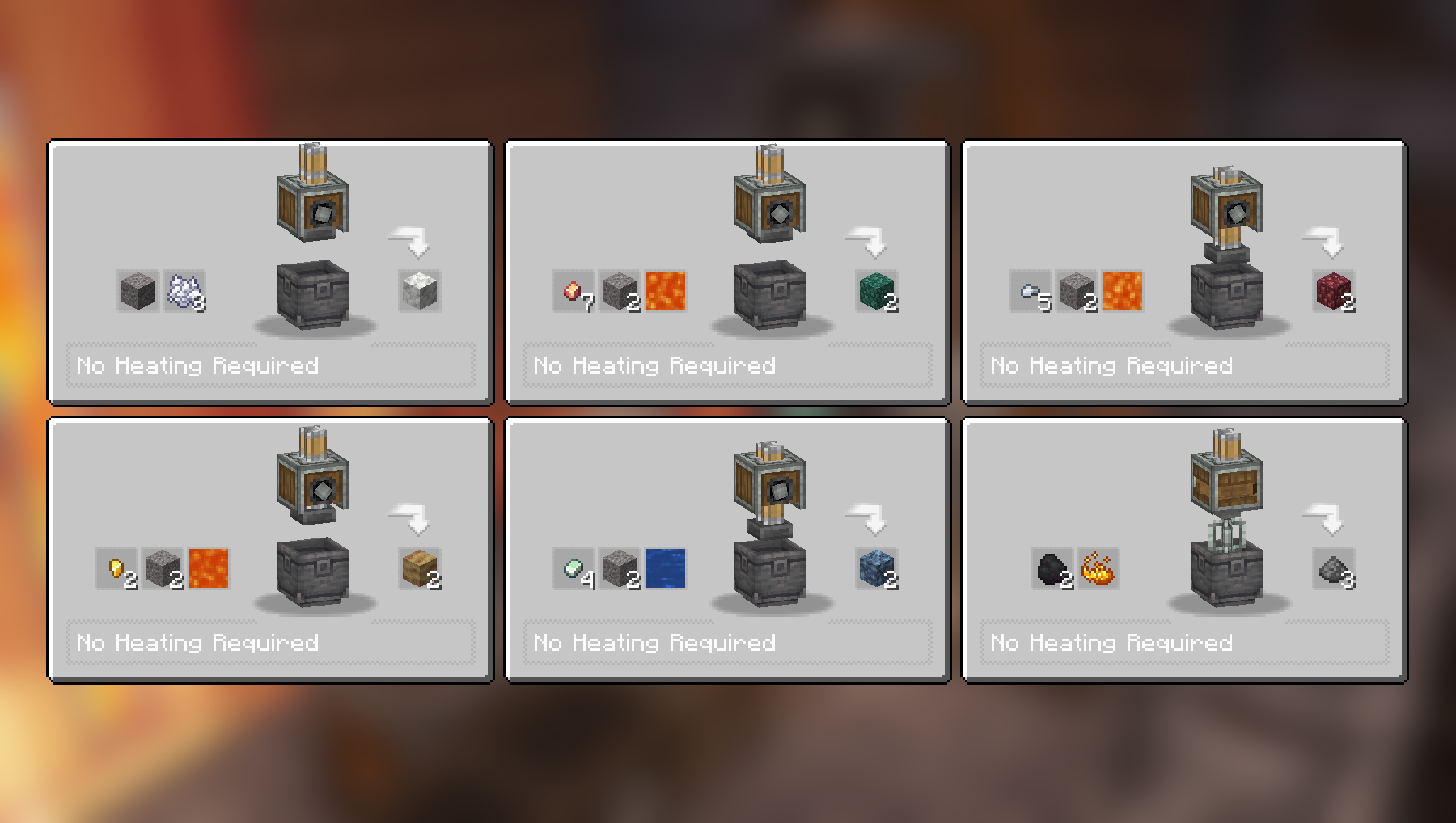
Công thức Compacting và Mixing:
Thêm công thức Compacting và Mixing:
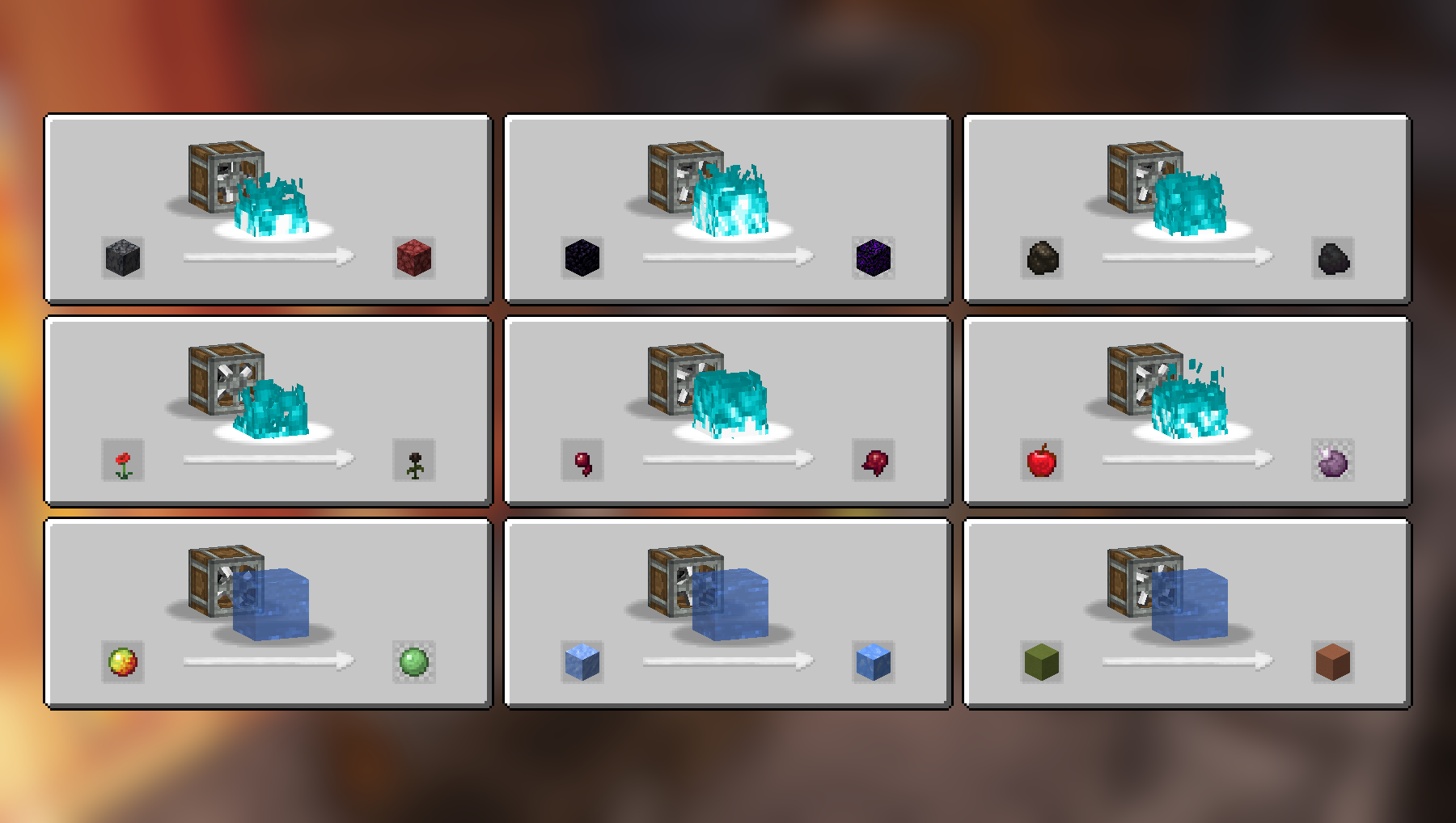
Công thức Haunting và Splashing:
Công thức Crushing:
Thêm công thức Crushing:
Danh sách công thức đầy đủ (2.2.4)
Compacting
- Cobblestone và Lava thành Tuff
- Stone và Lava thành Deepslate
- Coal Blocks và Lava thành Diamond (phải được nung nóng bởi Blaze Burner đang hoạt động)
- Gravel và Bone Meal thành Calcite
- Zinc Nuggets, Gravel và Water thành Asurine
- Iron Nuggets, Gravel và Lava thành Crimsite
- Gold Nuggets, Gravel và Lava thành Ochrum
- Copper Nuggets, Gravel và Lava thành Veridium
- Blaze Powder thành Blaze Rod
Mixing
- Netherrack, Flint và Lava thành Redstone
- Calcite và Water thành Dripstone
- Coal và Blaze Powder thành Gunpowder
Haunting
- Basalt thành Netherrack
- Obsidian thành Crying Obsidian
- Charcoal thành Coal
- Poppy thành Wither Rose
- Spider Eye thành Fermented Spider Eye
- Apple thành Chorus Fruit
Splashing
- Packed Ice thành Blue Ice
- Magma Cream thành Slime Ball
- Colored Terracotta thành Terracotta
Crushing
- Blackstone thành Wither Skull (hiếm), đôi khi trả lại Blackstone
- Scoria thành Blaze Powder
- Nether Bricks thành Nether Brick và Netherite Scraps (cực kỳ hiếm)
- Soul Sand thành Glowstone Dust
- Limestone thành Quartz và Lapis Lazuli
- Red Sandstone thành Red Sand và Nautilus Shell (cực kỳ hiếm)
- Crying Obsidian thành Powdered Obsidian và Amethyst Shard
- Corals thành Heart of the Sea (cực kỳ hiếm)
- Dead Corals thành Bone Meal
- Red Mushroom Blocks thành Red Mushrooms
- Brown Mushroom Blocks thành Brown Mushrooms
- Endstone thành Ender Pearl (hiếm), đôi khi trả lại Endstone
Video
Phụ thuộc
Chỉ cần mod Create gốc để các công thức trên hoạt động.
Nên dùng JEI nhưng không bắt buộc.
Cài đặt
Thêm tệp mod .jar vào thư mục mods của bạn.
Ngoài ra, bạn có thể tìm mod trên trình khởi chạy CurseForge (nếu không thấy, hãy thử gõ tên tác giả). Sau khi tìm thấy, nhấp vào "Install" để thêm nó vào modpack của bạn.
Quyền
Bạn được tự do đưa mod này vào bất kỳ modpack nào, công khai hoặc riêng tư.
Ủng hộ công việc của tôi
Tải các dự án của tôi trên CurseForge
Tải các dự án của tôi trên Modrinth
Quyên góp trên Paypal
Cách cài đặt Create: Ultimate Factory
With Millida Launcher
Install Millida Launcher
The launcher is free: download it at millida.net/launcher and sign in with any nickname.
Click “Install” on this page
The launcher opens and installs the mod for Minecraft 1.20–26.2 on Fabric, Forge, NeoForge or Quilt automatically.
Launch the game
A profile with it appears in the launcher: click “Play”.
Manually
Install Fabric, Forge, NeoForge or Quilt
The loader must match the game version of the mod file, for example Minecraft 26.2. After installing it, a separate profile appears in your launcher.
Download the file for your version
In the version list above, pick the file create_ultimate_factory-2.2.4-fabric-26.2.jar (259 KB) for your game version and loader.
Put it in the mods folder
The folder is inside .minecraft (Windows: %appdata%\.minecraft\mods). If it does not exist, create it.
Launch the loader profile
Open “Mods” in the main menu: Create: Ultimate Factory should be in the list.
Phiên bản
Kèm phụ thuộc
| Minecraft | Loader | Tệp | Ngày | Hành động |
|---|---|---|---|---|
| 26.2 | Fabric | create_ultimate_factory-2.2.4-fabric-26.2.jar259 KB 50 | ||
| 1.21 | NeoForge | create_ultimate_factory-2.2.4-neoforge-1.21.1.jar230 KB 335 | ||
| 1.20.1 | Forge, NeoForge | create_ultimate_factory-2.2.4-forge-1.20.1.jar229 KB 118 | ||
| 1.21 | NeoForge | create_ultimate_factory-2.2.3-neoforge-1.21.1.jar229 KB | ||
| 1.20.1 | Forge, NeoForge | create_ultimate_factory-2.2.3-forge-1.20.1.jar228 KB | ||
| 1.20.1 | Fabric, Quilt | create_ultimate_factory-2.0.0-fabric-1.20.1.jar222 KB 44 |
Câu hỏi thường gặp
Which Minecraft versions does Create: Ultimate Factory work on?
There are files for 26.2, 1.21.1, 1.21, 1.20.1, 1.20. The newest is 26.2.
Is Create: Ultimate Factory for Forge or Fabric?
There are files for Fabric: 1.20–26.2, for Forge: 1.20–1.20.1, for NeoForge: 1.20–1.21.1 and for Quilt: 1.20–1.20.1.
Does Create: Ultimate Factory need other mods?
The author lists no required dependencies: the Fabric, Forge, NeoForge or Quilt loader is enough.
Where can I download Create: Ultimate Factory safely?
On this page: the file create_ultimate_factory-2.2.4-fabric-26.2.jar (259 KB) is stored on Millida’s server, with no link shorteners. SHA-1 checksum: dad0d63849a485082727b80af6fe758db530792c.
Đánh giá
Hãy là người đầu tiên đánh giá Create: Ultimate Factory


