

Create Simulated Additions Mod cho Minecraft 1.21.1
Một vài bổ sung và tinh chỉnh cho mod Create Simulated/Aeronautics
- lượt tải
- 15 lượt tải
- lượt xem
- 61 lượt xem
- Đã cập nhật
- Đã cập nhật 05.10.2026
- 1.21.1
 NeoForge
- Máy khách và máy chủ

Description
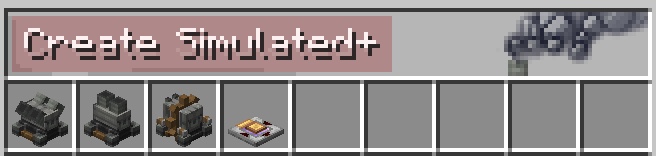
Adds 3 new engine types with different uses
- V4 Engine: Provides twice the SU of the Portable Engine, but consumes twice the fuel
- I2 Engine: Provides half the SU of the Portable Engine, but consumes half the fuel
- Mid-Drive Engine: Provides the same SU of the Portable Engine, and consumes the same amount of fuel, but gives power via a cog instead of a shaft

All engines can be turned vertically (unlike the Portable Engine) and have "clockwise", "counterclockwise", and "neutral" modes. Neutral mode stops the rotation and fuel consumption without having to remove fuel.
Adds 1 new redstone component
- Redstone Computator: Allows for addition, subtraction, multiplication, and division of redstone signals.
Spoiler
Future Plans:
- More Redstone Components (Logic Gates)
- Recipe Remake (for all engine types, including Portable Engine)
- and more
Questions? Join the Discord

Cách cài đặt Create Simulated Additions
With Millida Launcher
Install Millida Launcher
The launcher is free: download it at millida.net/launcher and sign in with any nickname.
Click “Install” on this page
The launcher opens and installs the mod for Minecraft 1.21.1 on NeoForge automatically, together with its dependencies: Create, Create Aeronautics.
Launch the game
A profile with it appears in the launcher: click “Play”.
Manually
Install NeoForge
The loader must match the game version of the mod file, for example Minecraft 1.21.1. After installing it, a separate profile appears in your launcher.
Download the file for your version
In the version list above, pick the file create_simulated_additions-0.2.3-neoforge-1.21.1.jar (680 KB) for your game version.
Put it in the mods folder
The folder is inside .minecraft (Windows: %appdata%\.minecraft\mods). If it does not exist, create it. Required dependencies go there too: Create, Create Aeronautics.
Launch the loader profile
Open “Mods” in the main menu: Create Simulated Additions should be in the list.
On a server
A server on NeoForge
The mod only works on a server with the same loader and game version, for example 1.21.1.
File goes into the server’s mods folder
Stop the server, put the mod file into the mods folder and start the server again.
Use the “To server” button
On Millida Hosting, the button at the top of the page uploads the file to your server and restarts it for you.
Minecraft 1.21.1 runs on Java 21: with a different Java version the game may close right after launch.
Phiên bản
Kèm phụ thuộc
| Minecraft | Loader | Tệp | Ngày | Hành động |
|---|---|---|---|---|
| 1.21.1 | NeoForge | 1.21.1680 KB 15 | ||
| 1.21.1 | NeoForge | 1.21.1678 KB | ||
| 1.21.1 | NeoForge | 1.21.1678 KB | ||
| 1.21.1 | NeoForge | 1.21.1678 KB | ||
| 1.21.1 | NeoForge | 1.21.1630 KB | ||
| 1.21.1 | NeoForge | 1.21.1630 KB |
Yêu cầu để chạy
- Createbắt buộc
- Create Aeronauticsbắt buộc
Câu hỏi thường gặp
Which Minecraft versions does Create Simulated Additions work on?
Only Minecraft 1.21.1: there are no files for other versions.
Is Create Simulated Additions for Forge or Fabric?
Only for NeoForge: 1.21.1. There are no files for Forge or Fabric: a mod for another loader will not start.
What does Create Simulated Additions need to work?
Required: Create, Create Aeronautics. Without them the mod will not start: dependencies go into the same mods folder.
Does Create Simulated Additions work on a server?
Yes. Create Simulated Additions works both in singleplayer and on a server.
Which Java does Create Simulated Additions need?
Minecraft 1.21.1 runs on Java 21. If the game closes right after launch, the usual cause is the wrong Java version in the profile settings.
Where can I download Create Simulated Additions safely?
On this page: the file create_simulated_additions-0.2.3-neoforge-1.21.1.jar (680 KB) is stored on Millida’s server, with no link shorteners. SHA-1 checksum: 6f622a8fb81fdcfc0c6e9f692c089eb534f868d4.
Đánh giá
Hãy là người đầu tiên đánh giá Create Simulated Additions


