
Create: Radars Mod cho Minecraft 1.20.1, 1.21.1
Thêm công nghệ giám sát tiên tiến vào Create!
 NeoForge
 Forge
ForgeGiới thiệu mod Create: Radars
Yêu cầu Create
NEOFORGE ĐÃ RA MẮT
Nhiều tính năng sẽ sớm có. Chúng tôi đang làm việc!
Tham gia cộng đồng để nhận tin tức độc quyền và hỗ trợ:
https://discord.gg/create-arsenal-1044367456417882202
https://ko-fi.com/arsenalistsofcreate
Giới thiệu
Chào mừng đến với Create Radars, một mod cung cấp nhiều công cụ và khối để Giám sát, Phát hiện và Điều khiển Vũ khí.
Các yếu tố công nghệ được thêm vào được thiết kế để dành càng nhiều lựa chọn thiết kế cho người chơi càng tốt. Với Create Radars, trò chơi không diễn ra bên trong một đống giao diện, mà thách thức bạn thiết lập những cỗ máy gồm các thành phần chuyển động hoạt động cùng nhau theo nhiều cách sắp xếp khả thi, cùng vô số kỹ thuật và tính năng đảm bảo chiều sâu chiến thuật và sự đắm chìm.
Các cơ chế được lấy cảm hứng từ công nghệ phát hiện ngoài đời thực, nhưng được đơn giản hóa đến mức bất kỳ người chơi nào cũng có thể sử dụng chúng... và nhờ đó việc phát triển sẽ nhanh hơn.
Các tính năng hiện có:
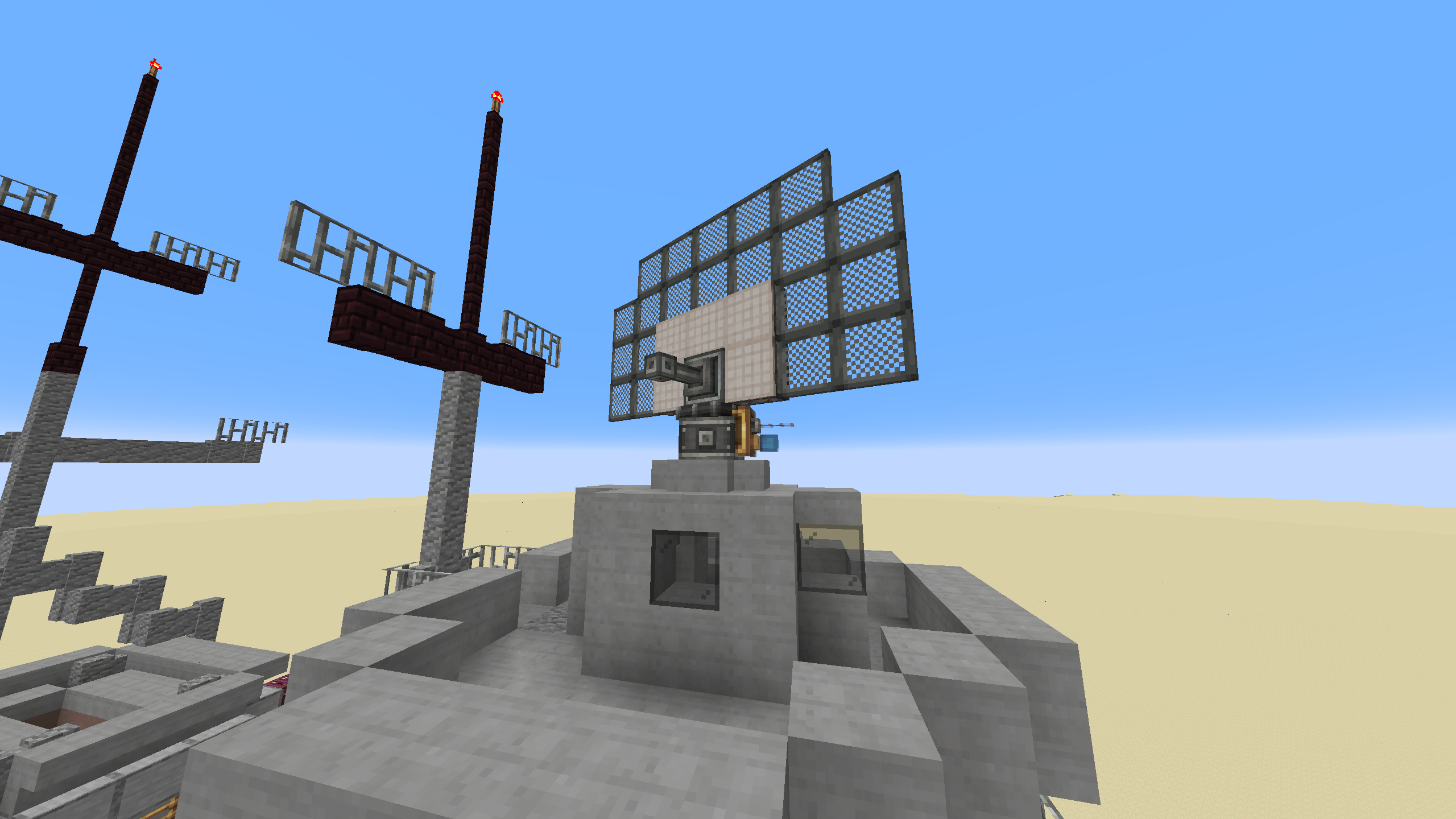
- Radar bearing multiblock: Tạo hình radar của bạn theo bất kỳ cách nào bạn muốn, với mỗi đặc điểm ảnh hưởng đến khả năng của nó.
- Scalable monitor multiblock: Trực quan hóa radar của bạn, để có cái nhìn tổng quan về chiến trường và dễ dàng phát hiện bất kỳ kẻ xâm nhập nào.
- Cannon controller: Hướng autocannon của bạn vào kẻ xâm nhập, với sự hỗ trợ của radar.
Cách cài đặt Create: Radars
With Millida Launcher
Install Millida Launcher
The launcher is free: download it at millida.net/launcher and sign in with any nickname.
Click “Install” on this page
The launcher opens and installs the mod for Minecraft 1.20.1–1.21.1 on Forge or NeoForge automatically.
Launch the game
A profile with it appears in the launcher: click “Play”.
Manually
Install Forge or NeoForge
The loader must match the game version of the mod file, for example Minecraft 1.21.1. After installing it, a separate profile appears in your launcher.
Download the file for your version
In the version list above, pick the file create_radar-0.4.9.4-1.21.1.jar (2.9 MB) for your game version and loader.
Put it in the mods folder
The folder is inside .minecraft (Windows: %appdata%\.minecraft\mods). If it does not exist, create it.
Launch the loader profile
Open “Mods” in the main menu: Create: Radars should be in the list.
Minecraft 1.21.1 runs on Java 21: with a different Java version the game may close right after launch.
Phiên bản
Kèm phụ thuộc
| Minecraft | Loader | Tệp | Ngày | Hành động |
|---|---|---|---|---|
| 1.21.1 | NeoForge | create_radar-0.4.9.4-1.21.1.jar2.9 MB 384 | ||
| 1.20.1 | Forge | create_radar-0.4.6+mc1.20.1.jar2.8 MB 61 | ||
| 1.21.1 | NeoForge | create_radar-0.4.6-1.21.1.jar15.7 MB | ||
| 1.20.1 | Forge | create_radar-0.4.3+Create-5+mc1.20.1.jar2.8 MB | ||
| 1.20.1 | Forge | Radars 3.5.2-Create 6.0.8.jar2.5 MB 2 |
Câu hỏi thường gặp
Which Minecraft versions does Create: Radars work on?
There are files for 1.21.1, 1.20.1. The newest is 1.21.1.
Is Create: Radars for Forge or Fabric?
There are files for Forge: 1.20.1 and for NeoForge: 1.21.1. There are no files for Fabric: a mod for another loader will not start.
Does Create: Radars need other mods?
The author lists no required dependencies: the Forge or NeoForge loader is enough.
Which Java does Create: Radars need?
Minecraft 1.21.1 runs on Java 21. If the game closes right after launch, the usual cause is the wrong Java version in the profile settings.
Where can I download Create: Radars safely?
On this page: the file create_radar-0.4.9.4-1.21.1.jar (2.9 MB) is stored on Millida’s server, with no link shorteners. SHA-1 checksum: 9726fced4bf86c9e2c0ea09b35bc39ed3ac007b6.
Đánh giá
Hãy là người đầu tiên đánh giá Create: Radars


