
Create: Netherless ((Neo)Forge) Mod cho Minecraft 1.20.1, 1.21.1
🚫Thu thập và tự động hóa tài nguyên Nether mà không bao giờ cần đến Nether
 NeoForge
 Forge
Giới thiệu mod Create: Netherless ((Neo)Forge)
Nếu bạn muốn bản fabric, hãy bấm vào đây
Create: Netherless là một Addon cho Create Mod;
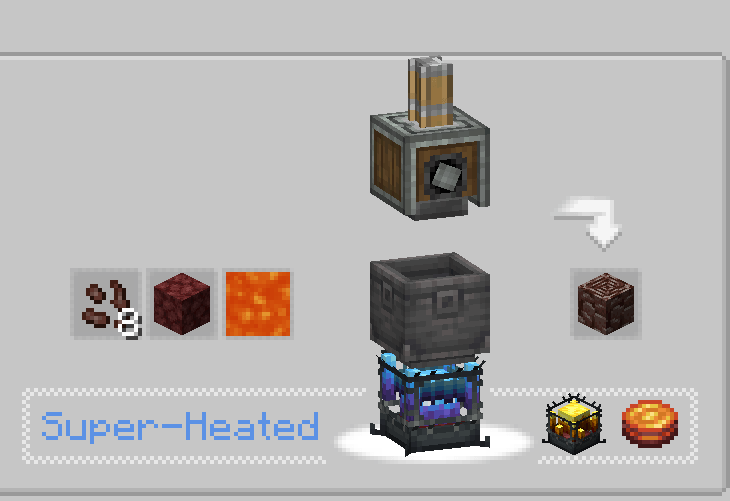
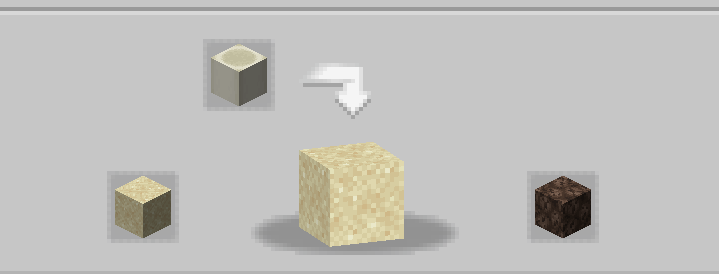
Mục tiêu của mod này là mang đến cho người chơi khả năng chế tạo và tự động hóa hầu hết tài nguyên Nether ngay cả khi không có quyền truy cập vào Nether! Điều này bao gồm Blaze, Netherite, Netherrack, hoặc bất cứ thứ gì khác mà bạn có thể nghĩ đến bị khóa sau Nether. Nếu bạn thấy một số công thức không cân bằng/không hoạt động/bị thiếu, hãy cho tôi biết trong phần bình luận💬!
Các câu hỏi thường gặp (FAQ):
▶H: Làm sao để tôi xem các công thức? Đ: Bạn có thể dùng các mod xem công thức như JEI hoặc EMI.
▶H: việc xóa/thêm addon này vào một thế giới hiện có có gây ra vấn đề gì không? Đ: Bạn có thể xóa/thêm mod này khỏi bất kỳ thế giới nào một cách an toàn mà không gặp vấn đề gì.
▶H: mod này có bao giờ ra bản fabric không? Đ: Có chứ! chỉ cần bấm vào đây!
▶H: Add-on này có khả dụng cho 6.0.x không? Đ: Có!
▶H: Tiếp theo cho mod là gì? Đ: Add-on hiện đang tạm dừng vì chúng tôi đang làm các dự án khác. Nội dung mới và cân bằng lại đang được lên kế hoạch, ví dụ như giới thiệu ectoplasm, nhưng hiện tại, bạn sẽ phải chờ đợi!
▶Có câu hỏi nào khác không? Bạn có thể tham gia Discord Server của Honeycomb Studio và hỏi họ ở đó!
Xin lỗi nếu tôi mắc lỗi, tôi là người Pháp.. nếu bạn thấy lỗi chính tả, hãy cho tôi biết!
Mod này KHÔNG vô hiệu hóa nether!
Cách cài đặt Create: Netherless ((Neo)Forge)
With Millida Launcher
Install Millida Launcher
The launcher is free: download it at millida.net/launcher and sign in with any nickname.
Click “Install” on this page
The launcher opens and installs the mod for Minecraft 1.19.2–1.21.1 on Forge or NeoForge automatically.
Launch the game
A profile with it appears in the launcher: click “Play”.
Manually
Install Forge or NeoForge
The loader must match the game version of the mod file, for example Minecraft 1.21.1. After installing it, a separate profile appears in your launcher.
Download the file for your version
In the version list above, pick the file create_netherless-2.0.0-1.21.1.jar (30 KB) for your game version and loader.
Put it in the mods folder
The folder is inside .minecraft (Windows: %appdata%\.minecraft\mods). If it does not exist, create it.
Launch the loader profile
Open “Mods” in the main menu: Create: Netherless ((Neo)Forge) should be in the list.
Minecraft 1.21.1 runs on Java 21: with a different Java version the game may close right after launch.
Phiên bản
Kèm phụ thuộc
| Minecraft | Loader | Tệp | Ngày | Hành động |
|---|---|---|---|---|
| 1.21.1 | NeoForge | create_netherless-2.0.0-1.21.1.jar30.2 KB 65 | ||
| 1.20.1 | Forge | create_netherless-2.0.0-1.20.1.jar30.1 KB 19 | ||
| 1.19.2 | Forge | Create: Netherless 1.19.2-1.137.6 KB 1 |
Câu hỏi thường gặp
Which Minecraft versions does Create: Netherless ((Neo)Forge) work on?
There are files for 1.21.1, 1.20.1, 1.19.2. The newest is 1.21.1.
Does Create: Netherless ((Neo)Forge) need other mods?
The author lists no required dependencies: the Forge or NeoForge loader is enough.
Which Java does Create: Netherless ((Neo)Forge) need?
Minecraft 1.21.1 runs on Java 21. If the game closes right after launch, the usual cause is the wrong Java version in the profile settings.
Where can I download Create: Netherless ((Neo)Forge) safely?
On this page: the file create_netherless-2.0.0-1.21.1.jar (30 KB) is stored on Millida’s server, with no link shorteners. SHA-1 checksum: 2d3499b77c8bcbe8c7a301750271c3d2a0b35cbe.
Đánh giá
Hãy là người đầu tiên đánh giá Create: Netherless ((Neo)Forge)


