
Carpentry & Chisels Mod cho Minecraft 1.20.1, 1.21.1
Thêm các khối xây dựng bằng gỗ mới và một công cụ mới gọi là Chisel mà bạn có thể dùng để chạm khắc và đục khối!
 NeoForge
 Fabric
 Quilt
Quilt Forge
ForgeGiới thiệu mod Carpentry & Chisels
Carpentry & Chisels is a Minecraft mod for both Fabric and Forge that adds new wooden building blocks and a new tool called the Chisel which you can use to carve and chisel blocks!

Features
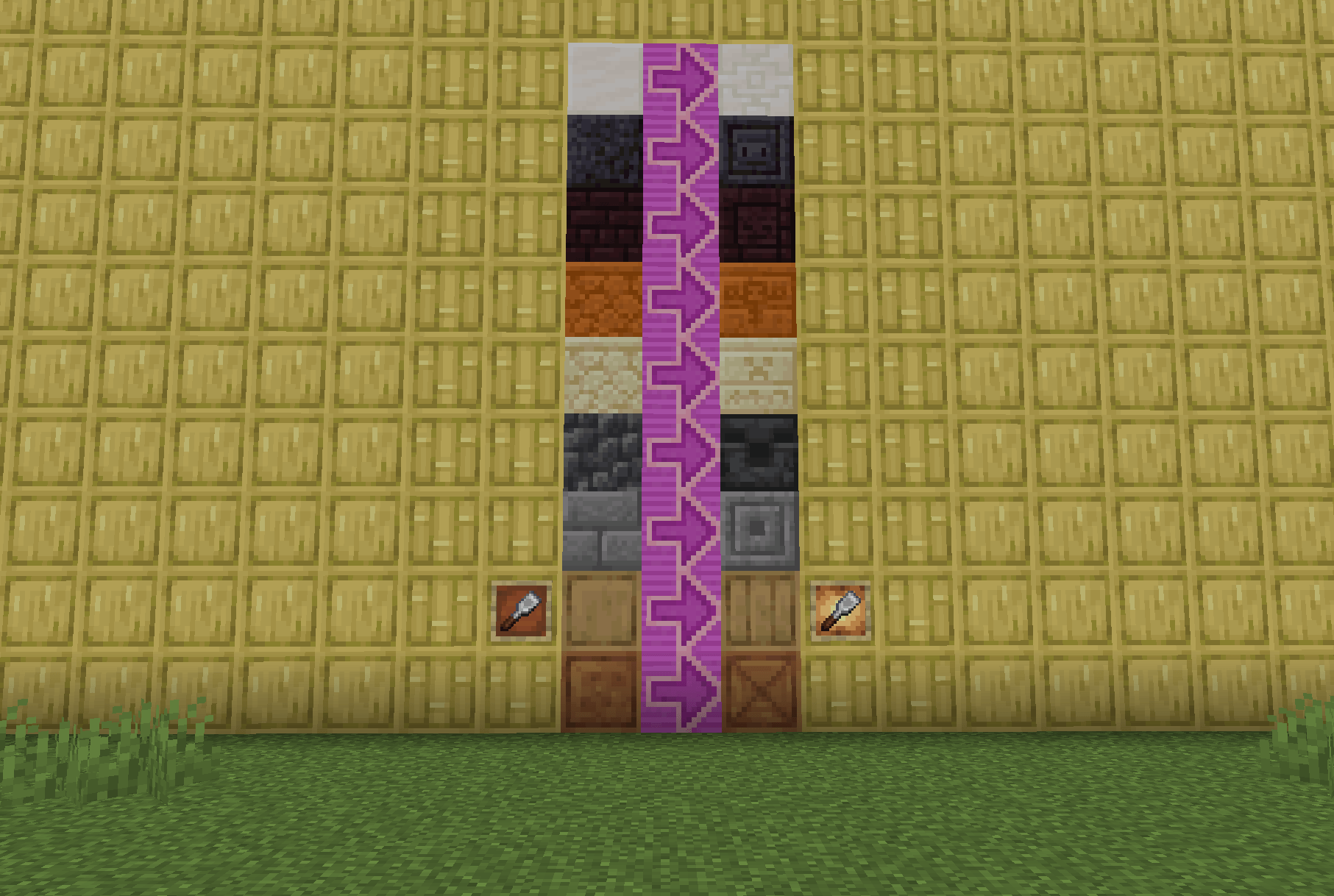
Carved Wood - These blocks can be crafted with 2 wood slabs, once crafted you will be given the base version of the carved wood block, then you can craft a Chisel to carve up to 7 patterns into the block!
Chisel - The Chisel has an attack damage of 3 and 250 durability and can carve blocks by interacting with them, they can also save patterns to carve later. The Chisel can also chisel other blocks!
Wooden Poles - These blocks can be crafted with 2 logs, once crafted the player can use these Poles as they see fit! These Poles can also be stripped with an axe.
Log Slabs - These slabs can be crafted and placed like normal vanilla slabs. These slabs can also be stripped!
Has Built In Compatibility With Wood Good - By downloading Wood Good also known as Every Compat, you can have compatibility with this mod and any mod that adds wood sets!

How to add integration
You can add integration with the Chisel using Data-packs. Here is a link to a guide explaining how to do that!
https://kekecreations.boomla.net/mods/minecraft-java-edition/carpentry-and-chisels/chisel-compat

Cách cài đặt Carpentry & Chisels
With Millida Launcher
Install Millida Launcher
The launcher is free: download it at millida.net/launcher and sign in with any nickname.
Click “Install” on this page
The launcher opens and installs the mod for Minecraft 1.20.1–1.21.1 on Fabric, Forge, NeoForge or Quilt automatically.
Launch the game
A profile with it appears in the launcher: click “Play”.
Manually
Install Fabric, Forge, NeoForge or Quilt
The loader must match the game version of the mod file, for example Minecraft 1.21.1. After installing it, a separate profile appears in your launcher.
Download the file for your version
In the version list above, pick the file carpentry_and_chisels-neoforge-1.21.1-1.0.2.jar (1.2 MB) for your game version and loader.
Put it in the mods folder
The folder is inside .minecraft (Windows: %appdata%\.minecraft\mods). If it does not exist, create it.
Launch the loader profile
Open “Mods” in the main menu: Carpentry & Chisels should be in the list.
Minecraft 1.21.1 runs on Java 21: with a different Java version the game may close right after launch.
Phiên bản
Kèm phụ thuộc
| Minecraft | Loader | Tệp | Ngày | Hành động |
|---|---|---|---|---|
| 1.21.1 | NeoForge | carpentry_and_chisels-neoforge-1.21.1-1.0.2.jar1.2 MB | ||
| 1.21.1 | Fabric, Quilt | carpentry_and_chisels-fabric-1.21.1-1.0.2.jar1.2 MB | ||
| 1.20.1 | NeoForge, Forge | carpentry_and_chisels-forge-1.20.1-1.0.2.jar1.2 MB |
Câu hỏi thường gặp
Which Minecraft versions does Carpentry & Chisels work on?
There are files for 1.21.1, 1.20.1. The newest is 1.21.1.
Is Carpentry & Chisels for Forge or Fabric?
There are files for Fabric: 1.21.1, for Forge: 1.20.1, for NeoForge: 1.20.1–1.21.1 and for Quilt: 1.21.1.
Does Carpentry & Chisels need other mods?
The author lists no required dependencies: the Fabric, Forge, NeoForge or Quilt loader is enough.
Which Java does Carpentry & Chisels need?
Minecraft 1.21.1 runs on Java 21. If the game closes right after launch, the usual cause is the wrong Java version in the profile settings.
Where can I download Carpentry & Chisels safely?
On this page: the file carpentry_and_chisels-neoforge-1.21.1-1.0.2.jar (1.2 MB) is stored on Millida’s server, with no link shorteners. SHA-1 checksum: 88f9c5c0be2a764d29d3f30e4c6123cef2b11f77.
Đánh giá
Hãy là người đầu tiên đánh giá Carpentry & Chisels


